Digital Banks · October 2026
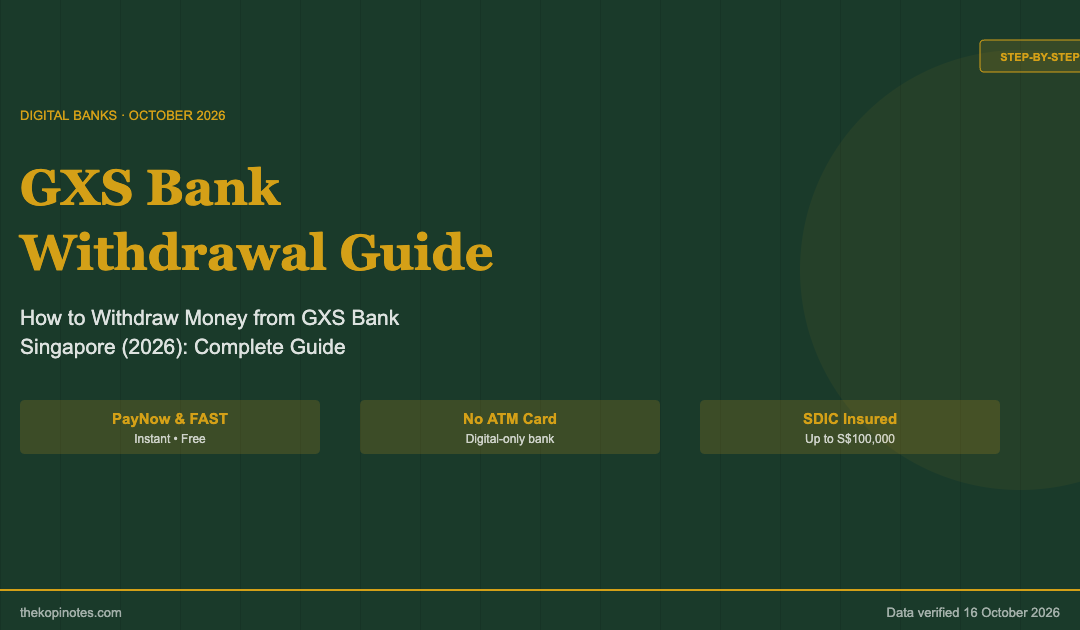
GXS Bank Withdrawal Guide (2026): How to Withdraw Money from GXS Bank Singapore
Step-by-step PayNow & FAST guide, Boost Pocket early exit rules, transfer limits & processing times — all verified from official GXS sources.
To withdraw money from GXS Bank in Singapore, open the GXS Bank app, tap “Transfer”, choose “To Another Bank Account” or “PayNow”, enter the recipient’s details and amount, and confirm with your PIN or biometrics. GXS Bank does not have an ATM card or debit card — PayNow and FAST bank transfer are your only withdrawal routes. Funds reach other Singapore banks almost instantly via PayNow, or within minutes via FAST.
Not financial advice. All figures are for educational reference only. Data verified as at 16 October 2026 unless otherwise noted.
In This Guide
- What you need to know before withdrawing from GXS Bank
- Step-by-step: How to withdraw via PayNow & FAST
- Withdrawing from Boost Pockets: what happens to your interest?
- GXS Bank transfer limits & processing time
- GXS vs MariBank vs Trust Bank: withdrawal experience compared
- Common withdrawal problems & how to fix them
- Frequently asked questions
What You Need to Know Before Withdrawing from GXS Bank
GXS Bank is a digital-only bank — there are no physical branches, no ATMs, and no debit card you can use to withdraw cash from an ATM. This catches some users off guard when they first try to access their funds.
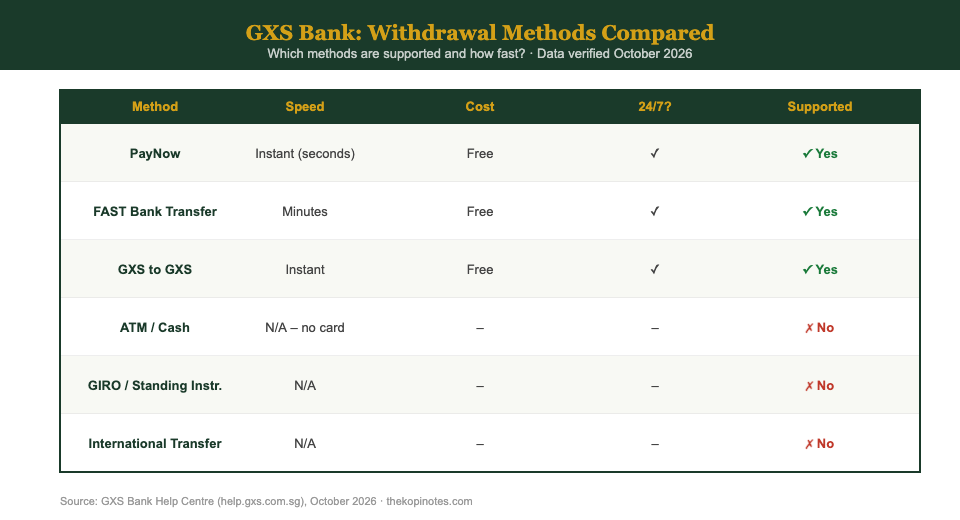
Here’s what GXS Bank currently supports and does not support for moving money out:
| Transfer Method | Supported? | Notes |
|---|---|---|
| PayNow | ✓ Yes | Transfer to any Singapore bank via mobile number or NRIC/FIN |
| FAST (bank transfer) | ✓ Yes | Transfer to another bank using account number and bank code |
| GXS to GXS | ✓ Yes | Instant transfer between GXS Bank accounts |
| ATM withdrawal | ✗ No | GXS Bank has no debit card or ATM access |
| GIRO | ✗ No | Cannot set up standing instructions from GXS Bank |
| Cheque | ✗ No | No cheque facility |
| Overseas remittance | ✗ No | GXS does not support international transfers |
Source: GXS Bank Help Centre (help.gxs.com.sg/Payments), October 2026
Bottom line: to get money out of GXS Bank, you must transfer it to another Singapore bank account using PayNow or FAST, and then withdraw cash there if needed. For most Singaporeans with a DBS, OCBC, UOB, or Citibank account, this is seamless — PayNow transfers are instant and free.
Is Your Money Safe in GXS Bank?
Yes. GXS Bank is licensed by the Monetary Authority of Singapore (MAS) as a Digital Full Bank and is a member of the Singapore Deposit Insurance Corporation (SDIC). Your deposits are insured up to S$100,000 per depositor, the same protection as DBS, OCBC, and UOB. For a full breakdown of GXS Bank’s features and our rating, see our GXS Bank review Singapore 2026.
Step-by-Step: How to Withdraw Money from GXS Bank
Method 1: PayNow Transfer (Recommended)
PayNow is the fastest and most convenient way to move money out of GXS Bank. Transfers are instant and free, and you only need the recipient’s mobile number or NRIC/FIN linked to their PayNow.
- Open the GXS Bank app on your phone.
- Tap “Transfer” on the home screen.
- Select “PayNow”.
- Enter the recipient’s mobile number (linked to their PayNow) or NRIC/FIN.
- Enter the amount you wish to transfer.
- Add a reference or description (optional).
- Review the transfer details, then confirm with your 6-digit PIN or biometrics.
- You’ll receive a transfer confirmation on screen. Funds are credited to the recipient instantly.
Tip: To withdraw to your own DBS/OCBC/UOB account, enter your own mobile number linked to your PayNow in step 4. The funds will appear in your other bank account within seconds.
Method 2: FAST Bank Transfer
If you need to transfer to a bank account that isn’t registered for PayNow, use FAST (Fast And Secure Transfers). You’ll need the recipient’s bank account number and bank code.
- Open the GXS Bank app.
- Tap “Transfer” then select “To Another Bank Account”.
- Search for or select the recipient’s bank from the list.
- Enter the account number and account holder name.
- Enter the transfer amount.
- Add a reference (optional).
- Review the details, then confirm with your PIN or biometrics.
- Transfer is typically processed within minutes on business days.
Note: Double-check the account number before confirming a FAST transfer. Unlike PayNow, FAST transfers go to a specific account number — an error may be difficult to reverse.
For a deeper look at how GXS Bank’s savings products work, read our full GXS Bank Singapore review. If you’re comparing GXS Bank against competitors, see our GXS vs Trust Bank vs MariBank comparison.
Withdrawing from Boost Pockets: What Happens to Your Interest?
This is where things get a little more complicated. GXS Bank’s Boost Pockets are fixed-tenure savings products — you commit to holding your money for a set period (1, 3, 4, 8, or 12 months) to earn the bonus interest rate at maturity.
Can You Withdraw from a Boost Pocket Early?
Yes — you can withdraw from a Boost Pocket before it matures. However, the bonus interest is forfeited. Here’s exactly what happens:
- Your principal (the amount you deposited) is returned to your GXS Main Account.
- You receive the 0.88% p.a. base rate (credited daily) for the days you held the funds — this is not forfeited.
- The bonus interest (the extra % earned for holding to maturity) is fully forfeited, even if you withdraw one day before maturity.
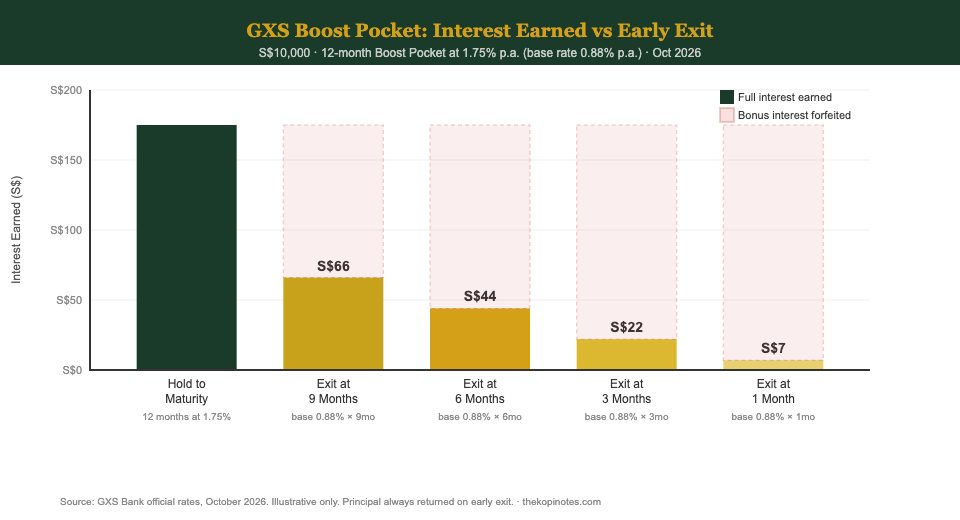
Consider this example: You deposit S$10,000 into a 12-month Boost Pocket at 1.75% p.a., but withdraw after 6 months.
| Scenario | Interest Earned on S$10,000 |
|---|---|
| Hold to maturity (12 months) at 1.75% p.a. | ~S$175 |
| Early exit after 6 months (base 0.88% p.a. only) | ~S$44 |
| Early exit after 3 months (base 0.88% p.a. only) | ~S$22 |
| Opportunity cost of early exit (6 months) | ~S$131 forfeited |
Figures are illustrative estimates based on GXS Bank rates effective October 2026 (official GXS Bank website). Actual amounts may vary by credit frequency.
Should You Exit Your Boost Pocket Early?
Only in genuine emergencies. The penalty for early exit is steep — particularly for longer-tenure Boost Pockets. If you need flexible access to your funds, GXS Bank’s Saving Pockets (currently 1.20% p.a., no lock-in) are a better choice for your liquidity reserve. Keep only the portion of your savings you won’t need before maturity in a Boost Pocket.
For alternatives to Boost Pockets for parking short-term cash, see our guide to Singapore T-bills 2026 and Singapore Savings Bonds 2026.
GXS Bank Transfer Limits & Processing Time
Daily Transfer Limits
GXS Bank applies daily transfer limits to outgoing PayNow and FAST transactions. These limits may vary based on your account age, verification status, and how you confirmed the transaction. Check your current daily transfer limit in the GXS Bank app under Settings → Transaction Limits.
As a general note, GXS Bank’s help centre has indicated that some users may encounter a daily transfer cap — if you need to transfer a large amount, plan to spread it over multiple days or contact GXS Bank support via the in-app live chat to request a temporary limit increase.
Processing Time
| Transfer Type | Processing Time | Hours Available |
|---|---|---|
| PayNow | Near-instant (seconds) | 24/7 |
| FAST | Within minutes | 24/7 |
| GXS to GXS | Instant | 24/7 |
Source: GXS Bank Help Centre (help.gxs.com.sg), October 2026. Processing times are typical; delays may occur during high-volume periods.
Unlike traditional banks that process FAST transfers only during business hours, GXS Bank’s digital infrastructure allows 24/7 transfers. This is useful for emergencies outside business hours.
Deposit Insurance Cap
GXS Bank deposits are insured up to S$100,000 per depositor under SDIC. If your GXS balance exceeds S$100,000, consider spreading funds across multiple insured institutions for full coverage. For context, the S$95,000 combined cap on Saving and Boost Pockets means your total in those products alone would be within the insured limit.
GXS Bank vs MariBank vs Trust Bank: Withdrawal Experience Compared
All three Singapore digital banks rely on PayNow/FAST for withdrawals — none offer ATM access. But there are meaningful differences in flexibility and what you lose when you exit early.
| Feature | GXS Bank | MariBank | Trust Bank |
|---|---|---|---|
| ATM access | None | None | None |
| Debit card | Not currently | Not currently | Not currently |
| PayNow out | ✓ Yes | ✓ Yes | ✓ Yes |
| FAST out | ✓ Yes | ✓ Yes | ✓ Yes |
| GIRO support | ✗ No | ✗ No | ✓ Yes |
| Flexible savings (no lock-in) | Saving Pockets (1.20%) | Mari Savings (0.88% base) | Flex Plan (up to 2.40%) |
| Early exit penalty | Boost Pocket bonus forfeited | None (no lock-in products) | None (no lock-in products) |
Sources: GXS Bank Help Centre; MariBank official website; Trust Bank app terms. Rates as at October 2026. Trust Bank GIRO support is available for salary crediting to qualify for bonus interest.
The key takeaway: GXS Bank’s Boost Pockets require commitment. If you value maximum flexibility — the ability to move funds anytime without penalty — MariBank’s no-lock-in savings or Trust Bank’s Flex Plan might suit you better. For a detailed comparison of all three, see our GXS vs Trust Bank vs MariBank guide.
If you’re looking for alternatives for your surplus cash beyond digital banks, consider reading about passive income strategies for Singapore investors.
Common GXS Bank Withdrawal Problems & How to Fix Them
Problem 1: Transfer Is Stuck on “Processing”
PayNow transfers are near-instant; FAST transfers typically process within minutes. If your transfer shows “Processing” for more than 30 minutes, check whether the recipient bank has any ongoing maintenance. You can also contact GXS Bank support via the in-app live chat — available 24/7 through the app.
Problem 2: Wrong Account Number or Mobile Number
If you entered the wrong PayNow number and the transfer went through, contact GXS Bank immediately via in-app chat. For FAST transfers to wrong account numbers, you’ll need to make a police report and GXS Bank will initiate a recall request on your behalf. Recovery is not guaranteed — always double-check recipient details before confirming.
Problem 3: Transfer Declined or Limit Reached
GXS Bank applies daily transfer limits. If your transfer is declined, you may have reached your daily limit. Check Settings → Transaction Limits in the GXS app. For larger one-off transfers, contact GXS support to request a temporary increase.
Problem 4: Boost Pocket Funds Not Appearing After Early Withdrawal
When you break a Boost Pocket early, the principal is returned to your GXS Main Account — not your Saving Pocket. Check your Main Account balance in the app. The bonus interest will not appear (it is forfeited on early withdrawal).
Problem 5: Can’t Find the Transfer Button
The GXS Bank app layout has been updated several times. Look for a money transfer icon on the home screen, or tap “More” in the navigation bar. GXS Bank’s in-app help section also has a step-by-step walkthrough.
Frequently Asked Questions About GXS Bank Withdrawals
Does GXS Bank have an ATM card or debit card?
How long does a GXS Bank transfer take?
What is GXS Bank's daily transfer limit?
What happens if I break a Boost Pocket before maturity?
Can I set up GIRO from GXS Bank?
Is there a fee to transfer money out of GXS Bank?
Can I withdraw from GXS Bank to an overseas bank account?
Ready to Get the Most from GXS Bank?
GXS Bank is one of Singapore’s most accessible digital banks — no minimum balance, no fees, and daily interest on your savings. If you’re not yet on GXS Bank, use referral code YONG477 when signing up to earn your referral bonus.
For more on GXS Bank’s full product suite and how its savings rates compare, read our GXS Bank Singapore 2026 review or explore how the full trio compares in our MariBank Singapore review.
If you’re weighing where to park your cash for the best returns, also check out our guide to fixed deposit interest rates in Singapore and our Singapore Savings Bonds 2026 guide.
This article was researched with the help of AI. While we strive to keep all information accurate and up to date, there may be errors. If you notice any discrepancies, please contact us.