YouTrip Card for Philippines Travel: PHP Exchange Rate, ATM Fees & Tips (2026)
Table of Contents
Quick Navigation
- Does YouTrip Work in the Philippines?
- Key Facts at a Glance
- How YouTrip’s PHP Exchange Rate Works
- Withdrawing Cash: Best Philippines ATMs for YouTrip
- Philippines ATM Fees Compared
- YouTrip vs Other Multi-Currency Cards for Philippines
- Why Cash Still Matters in the Philippines
- Who Should Use YouTrip in the Philippines?
- Frequently Asked Questions
YouTrip works in the Philippines at 0% FX fees. Philippine Peso (PHP) isn’t one of YouTrip’s 12 held-wallet currencies, so every peso payment or ATM withdrawal converts automatically from your SGD balance at Mastercard’s wholesale rate with no markup. You get S$400 in free overseas ATM withdrawals every calendar month, then 2% applies. Always choose PHP on the ATM screen — never SGD — to dodge the dynamic currency conversion (DCC) trap that’s common in tourist areas.
Not financial advice. All figures are for educational reference only, verified against YouTrip’s official Philippines ATM guide and public sources. Data verified as at 23 August 2026 unless otherwise stated.
- YouTrip charges 0% FX on PHP at Mastercard’s wholesale rate — no hidden spread
- S$400 free overseas ATM withdrawals per month; after that, 2% fee plus any local Philippine bank fee (~250 PHP at BDO/Security Bank)
- HSBC ATMs charge no local fee and allow up to 40,000 PHP per transaction — but very limited locations; stick to SM and Ayala mall ATMs for safety
- Always select PHP at the ATM screen — choosing SGD triggers DCC and a worse rate
Does YouTrip Work in the Philippines?
Yes — and it works at 0% FX fees, even though Philippine Peso (PHP) isn’t one of YouTrip’s 12 held-wallet currencies. Those 12 are: SGD, USD, EUR, GBP, JPY, HKD, AUD, NZD, CHF, SEK, MYR and THB. PHP isn’t in that list.
That doesn’t mean PHP is unsupported. YouTrip covers 150+ currencies worldwide — including PHP — through Mastercard’s wholesale exchange rate at 0% FX fees. When you tap your YouTrip card at an Ayala Mall restaurant in Makati, or withdraw pesos from a BDO ATM in Cebu, the conversion happens automatically at the live wholesale rate. No pre-exchange needed, no app top-up for pesos in advance.
Visa and Mastercard are accepted at most ATMs and merchants across Metro Manila, Cebu City, and major resort areas. Outside those hubs — in provincial towns, smaller islands, and local markets — cash becomes essential. More on that in the section below.
Key Facts at a Glance
| Metric | Detail |
|---|---|
| Card network | Mastercard — accepted at all BancNet-connected ATMs and most merchants in tourist areas |
| PHP wallet in-app? | No — PHP is a pass-through currency, converted automatically at Mastercard’s wholesale rate |
| FX fee on PHP | 0% |
| Free overseas ATM withdrawal | Up to S$400 per calendar month (subject to local ATM fees) |
| ATM fee after free limit | 2% on the withdrawal amount |
| Best local bank for zero local fee | HSBC (no local fee, up to 40,000 PHP per withdrawal) — limited locations in Manila & Cebu |
| Most common local ATM fee | 250 PHP (~S$5.14) at BDO and Security Bank |
| Indicative rate | 1 SGD ≈ 48.6 PHP (21 August 2026, XE) |
Source: YouTrip SG — Philippines ATM Withdrawal Guide (20 April 2026); xe.com, verified 21 August 2026.
How YouTrip’s PHP Exchange Rate Works
YouTrip converts PHP using Mastercard’s real-time wholesale exchange rate — the same benchmark you see on Google or XE, with no markup added on top. There’s no PHP-specific FX fee and no spread inflated for tourist rates.
As at 21 August 2026, 1 SGD buys roughly 48.6 PHP. Rates move throughout the day, so check the YouTrip app before large purchases. On a SGD 500 trip budget, you’d get approximately:
Compare that with a standard Singapore bank card. Most add a 2.5–3.5% foreign transaction fee on top of a marked-up exchange rate. On a SGD 500 spend, a 3% total markup costs you about SGD 15 — money that stays in your pocket with YouTrip.
Because PHP isn’t one of YouTrip’s 12 wallet currencies, conversion happens at the moment of authorisation — not when you “pre-buy” PHP in advance. In practice, this makes little difference. You can’t lock a PHP rate in the app days ahead the way you might pre-buy THB or JPY, but the rate you get is still Mastercard’s wholesale rate at the time of the transaction — not a tourist markup.
Withdrawing Cash: Best Philippines ATMs for YouTrip
The Philippines runs on the BancNet interbank network — your YouTrip Mastercard will work at any ATM displaying the Mastercard or Visa logo. The five main bank ATM networks are BDO, BPI, Metrobank, Security Bank, and UnionBank. HSBC also has a small but fee-free network in Manila and Cebu.
Here’s how to withdraw PHP with your YouTrip card:
- Find an ATM with the Mastercard or Visa logo and insert your YouTrip card
- Select Savings account when asked for account type
- Enter your 4-digit YouTrip card PIN
- When prompted, always select PHP — never SGD (see DCC section in mistakes below)
- Withdraw your desired amount
Which ATM should you use? For the lowest overall cost:
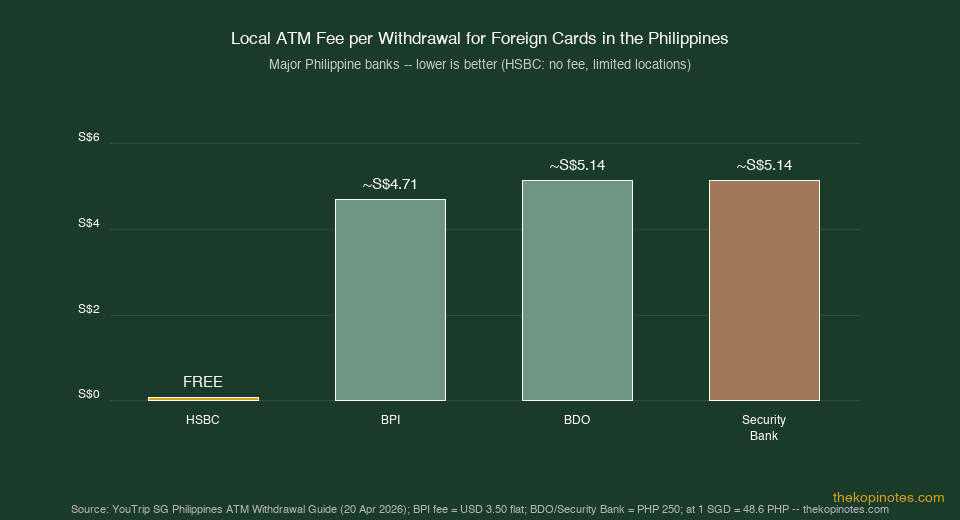
- HSBC — no local fee, allows up to 40,000 PHP per transaction. The standout option if you can find one near your itinerary. Locations are limited mainly to Makati, BGC, and Cebu Business Park.
- BDO and Security Bank — most widespread, but charge 250 PHP (~S$5.14) per withdrawal. Withdraw the maximum each time (10,000–20,000 PHP depending on the machine) to minimise how often you pay this fee.
- BPI — broadly available, charges USD 3.50 per withdrawal (~S$4.71) or 1.75%, whichever the ATM applies.
Safety tip: Always use ATMs inside SM, Ayala, or Robinsons malls and in bank branches. Standalone ATMs in tourist strips carry a higher risk of card skimming. Cover your PIN every time.
Philippines ATM Fees Compared
Unlike some destinations (Vietnam’s VPBank, or Japan’s 7-Eleven ATMs), there are no genuinely fee-free ATM networks for foreign cards in the Philippines — except HSBC, which has very limited locations. Expect to pay a local fee at most machines.
| Bank | Local ATM Fee (Foreign Cards) | Per-Transaction Limit |
|---|---|---|
| HSBC | None (free) | Up to 40,000 PHP (~S$823) |
| BPI | USD 3.50 (~S$4.71) or 1.75% | Typically 10,000–20,000 PHP |
| BDO | 250 PHP (~S$5.14) | Up to 20,000 PHP (~S$411) |
| Security Bank | 250 PHP (~S$5.14) | Typically 10,000–20,000 PHP |
| Metrobank / UnionBank | Varies; typically 200–300 PHP | Typically 10,000–20,000 PHP |
Source: YouTrip SG — Philippines ATM Withdrawal Guide (20 April 2026). Fees are set by local banks and subject to change — always check the ATM screen before confirming.
Strategy tip: The 250 PHP fee is flat, so larger single withdrawals cost less per peso than multiple smaller ones. Withdraw your day’s cash needs in one transaction rather than returning to the ATM several times.
Note that PHP 10,000 per transaction is the most common limit at standalone ATMs — significantly lower than most countries. In Palawan, Siargao, or Boracay, some ATMs run out of cash at peak tourist periods. Withdraw what you need in Manila or Cebu before heading to smaller islands.
YouTrip vs Other Multi-Currency Cards for the Philippines
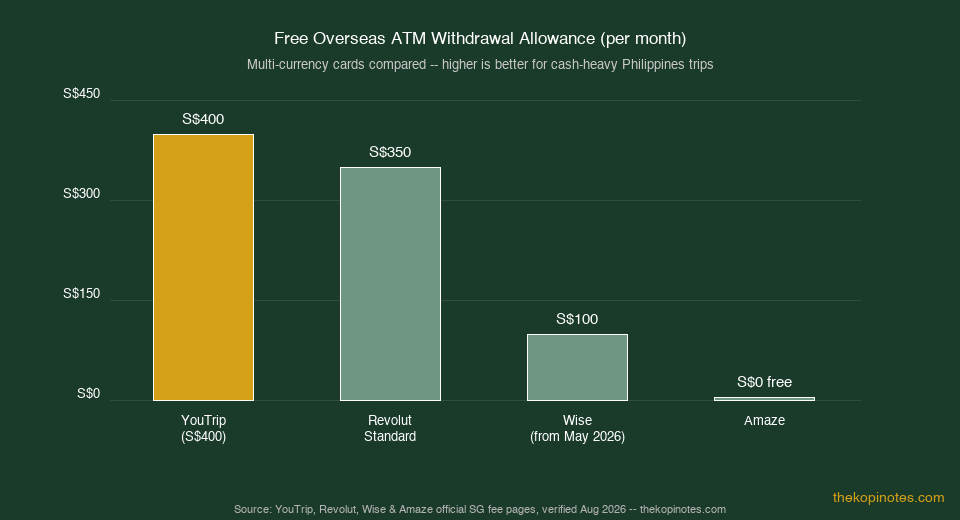
YouTrip isn’t the only fee-free option for Singaporeans visiting the Philippines. Here’s how its monthly ATM allowance compares with Revolut, Wise, and Amaze.
| Card | FX Fee | Free ATM/Month | Fee After Free Limit |
|---|---|---|---|
| YouTrip | 0% | S$400 | 2% |
| Revolut (Standard) | 0% weekdays within limit; 1% weekends | S$350 or 5 withdrawals | 2% |
| Wise | From 0.26%, varies by currency | S$100 (from 1 May 2026) | 1.75% |
| Amaze | 0% on FX; 1% on domestic SGD | — | 2% on all withdrawals |
Source: YouTrip, Revolut, Wise, and Amaze official Singapore fee pages, verified August 2026. Always confirm current terms with each provider.
For the Philippines specifically, the S$400 YouTrip free allowance matters more than usual. Cash is essential across the islands, so you’re more likely to withdraw larger amounts than in card-friendly cities. Wise’s reduced S$100 free limit from May 2026 makes it less efficient for a 7–10 day Philippines trip where you might need S$200+ in cash withdrawals alone.
Why Cash Still Matters More in the Philippines
The Philippines is more cash-reliant than most Southeast Asian destinations. Metro Manila, Cebu, and resort cores are increasingly card-friendly — but step outside, and cash is non-negotiable.
You’ll need cash PHP for:
- Local transport — jeepneys, tricycles, habal-habal (motorbike taxis), and UV Express minivans are cash-only; tap-to-pay doesn’t reach them
- Street food and local markets — palengkes (wet markets), night markets, and roadside eateries rarely accept cards
- Island-hopping and boat operators — most collect cash on the day, especially on smaller islands like El Nido, Coron, and Siargao
- Tips — guides, drivers, resort staff, and boat crew expect cash; allocate 200–500 PHP per guide per day
- Rural and provincial areas — card acceptance drops sharply outside major cities; many businesses have no POS terminal
A useful rule of thumb: budget a 60/40 card-to-cash split for Metro Manila-only trips, and closer to 40/60 cash if your itinerary includes islands or provincial areas. Withdraw enough in Manila or Cebu before you head out — smaller islands sometimes have only one or two ATMs, and they run out of cash during peak season.
Who Should Use YouTrip in the Philippines?
YouTrip is a strong fit if you:
- Want 0% FX on all PHP spending without needing to pre-exchange in Singapore
- Are on a trip where S$400 in free monthly ATM withdrawals covers your cash needs (most 7–10 day trips will fall within this)
- Already use YouTrip across the region — it’s seamless to pack one card for Thailand, Vietnam, and the Philippines with the same 0% rate
- Want a card you can freeze instantly in-app if it’s lost or stolen — important given card skimming risks in the Philippines
Consider pairing it with cash or another card if you:
- Are on a long trip (14+ days) and expect to withdraw well over S$400 in cash — the 2% YouTrip fee on excess withdrawals, stacked with local bank fees, may justify a Metal-tier card with a higher free allowance
- Are heading deep into rural provinces where ATM access is limited — carry more cash from your last city stop than you think you’ll need
- Want rewards points or miles on overseas spending — YouTrip doesn’t earn rewards; pairing it with a miles card for large hotel or tour purchases could make sense
Frequently Asked Questions — YouTrip in the Philippines
Does YouTrip support Philippine Peso (PHP)?
Which Philippine ATM charges the lowest fee for YouTrip users?
What is YouTrip's ATM withdrawal fee in the Philippines?
What is the ATM withdrawal limit in the Philippines?
How do I avoid dynamic currency conversion (DCC) in the Philippines?
Is GCash useful for tourists in the Philippines?
Is the Philippines safe to use ATMs?
More YouTrip Country Guides
Heading to other destinations too? YouTrip’s 0% FX rate applies across the region. See our other guides:
- YouTrip Card for Thailand & Bali: THB & IDR Guide (2026)
- YouTrip Card for Japan Travel: JPY Rates, ATM Fees & Tips (2026)
- YouTrip Card for Vietnam Travel: VND Exchange Rate & ATM Guide (2026)
- Best Multi-Currency Card in Singapore (2026)
- YouTrip Exchange Rate Today: How to Check & Save More
For more on building smarter travel and investment habits, see our Singapore retirement calculator and our guide to passive income in Singapore — small savings on FX and fees add up to real money over time.
Not financial advice. Exchange rates, bank fees, and card terms are set by third parties and change without notice — always verify current rates in the YouTrip app and on the ATM screen before relying on any figure here.
Ready to Save on Your Philippines Trip?
Sign up for a YouTrip card before you fly — spend PHP at 0% FX, no annual fee, no minimum balance required.
This article was researched with the help of AI. While we strive to keep all information accurate and up to date, there may be errors. If you notice any discrepancies, please contact us.