YouTrip Exchange Rate Today Singapore (2026): How to Check & Is It the Best?
A Singapore traveller’s guide — how YouTrip sets its rate, how to check it live, and how it stacks up against banks, Wise, and Revolut.
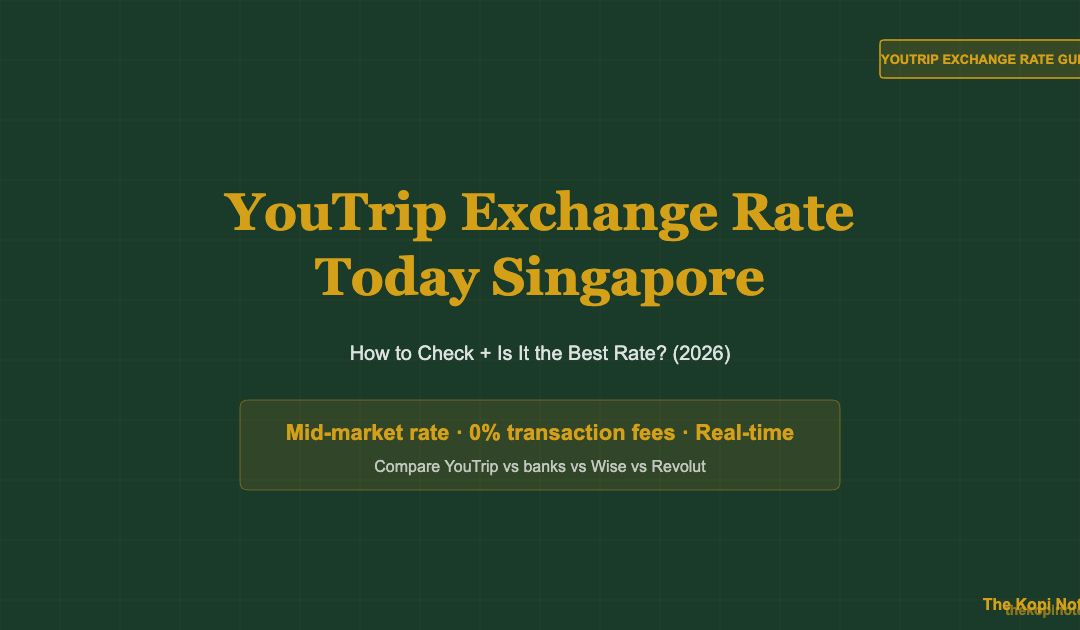
YouTrip’s exchange rate today is the real-time Mastercard wholesale (mid-market) rate — with zero additional markup or transaction fee. You can check it instantly inside the YouTrip app by tapping “Convert” and entering any currency. For most currencies, YouTrip consistently beats Singapore bank debit and credit cards by 2–3%, making it one of the best-value travel cards for Singaporeans.
Not financial advice. All figures are for educational reference only. Data as at July 2026 unless noted.
- YouTrip uses the mid-market rate — the same rate you see on Google — with 0% markup for over 150 currencies.
- Open the app → tap “Convert” → enter the currency to see today’s exact YouTrip rate.
- YouTrip typically saves you 2–2.5% vs Singapore bank debit cards on every overseas transaction.
Table of Contents
What Is YouTrip’s Exchange Rate?
YouTrip uses the Mastercard wholesale exchange rate — commonly known as the mid-market or interbank rate. This is the rate that banks use when trading currencies among themselves. It sits right between the buy and sell price you’d see on a currency exchange board.
This is the same rate you see when you type “USD to SGD” in Google. Most banks and money changers add a markup on top of this rate when selling you foreign currency. YouTrip does not.
YouTrip supports over 150 currencies. For major currencies like USD, EUR, GBP, JPY, AUD, HKD, and THB, you get the mid-market rate at all times during market hours. For more exotic currencies, a small spread may apply — always check in-app before converting.
There is no monthly fee, no account fee, and no conversion fee. YouTrip earns revenue through merchant fees (paid by merchants, not you) and optional add-ons like YouTrip Business and YouTrip+ insurance.
How to Check YouTrip Exchange Rate Today
Checking the YouTrip exchange rate today takes under 30 seconds. Here’s how:
- Open the YouTrip app on your phone (iOS or Android).
- Tap “Convert” from the home screen — it’s the currency icon at the bottom.
- Select your base currency (usually SGD) and the foreign currency you want to check (e.g. JPY, USD, EUR).
- Enter an amount — YouTrip shows you the exact converted amount using its live rate.
- Compare — for reference, open Google and type “1 USD to SGD”. YouTrip’s rate should match closely or be identical.
If you want to lock in a rate, tap “Convert Now” to transfer funds from your SGD wallet to the foreign currency wallet. This is useful for popular currencies like JPY or EUR where rates fluctuate daily.
You do not need to convert before travelling. YouTrip also converts in real-time at the point of payment — so even if you pay in JPY with only SGD in your wallet, it applies today’s rate automatically.
How YouTrip Sets Its Rate
YouTrip does not set its own exchange rate. Instead, it passes the Mastercard wholesale rate directly to you. Here’s how the chain works:
- Mastercard sets the interbank rate in real-time, based on global forex markets.
- When you spend with your YouTrip card, Mastercard converts the transaction at that rate.
- YouTrip charges you exactly that rate — no spread, no conversion fee, no hidden markup.
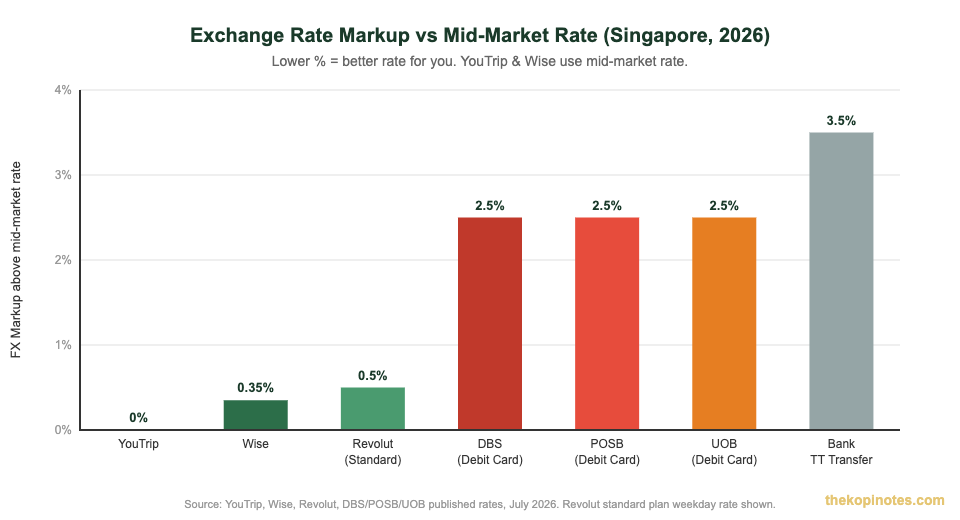
This is different from how your Singapore bank works. Most banks (DBS, OCBC, UOB, Standard Chartered) charge a 1.0% DCC fee plus an additional 1.5–2.25% administrative fee on top of the base exchange rate. Total markup: 2.5–3.25% per transaction.
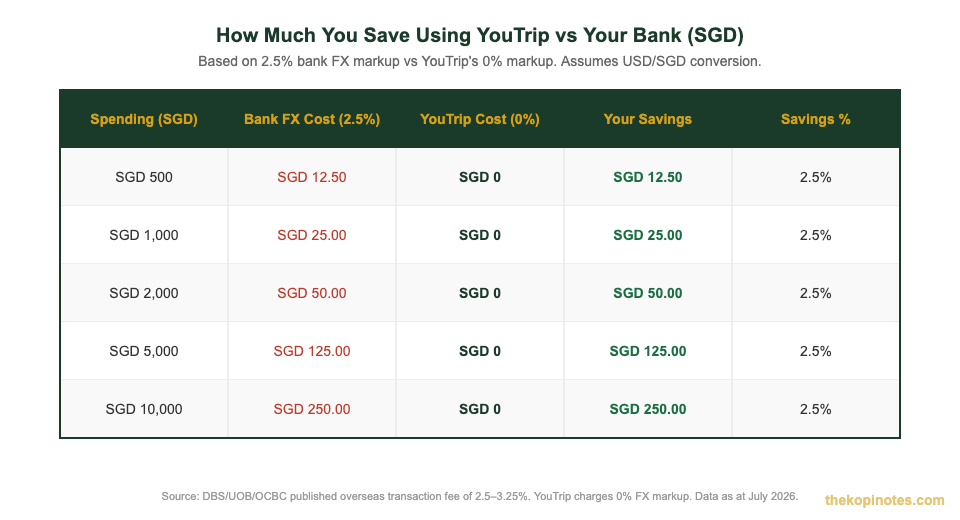
For a family spending SGD 5,000 on a Japan holiday, that’s SGD 125–162.50 going straight to the bank — just in FX fees. With YouTrip, that figure is SGD 0.
The rate updates in real-time during weekday trading hours. During weekends and after forex markets close, YouTrip may apply a small buffer rate to cover market risk — this is industry-standard practice and also applies to Wise and Revolut.
YouTrip vs Bank Exchange Rate — Real Cost Comparison
Let’s make this concrete. Suppose you’re spending SGD 2,000 on a trip to Japan. Here’s what each card actually costs you:
| Card / Method | FX Markup | Fee on SGD 2,000 | You Pay Extra |
|---|---|---|---|
| YouTrip | 0% | SGD 0 | Nothing |
| Wise (variable) | ~0.35% | SGD 7 | SGD 7 |
| Revolut (Standard, weekday) | ~0.5% | SGD 10 | SGD 10 |
| DBS/POSB Debit Card | 2.5% | SGD 50 | SGD 50 |
| UOB Debit Card | 2.5–3.25% | SGD 50–65 | SGD 50–65 |
| Airport Money Changer | 2–4% | SGD 40–80 | SGD 40–80 |
Source: DBS, OCBC, UOB, Standard Chartered published overseas transaction fees; YouTrip, Wise, Revolut published rates; July 2026.
The numbers are clear. If you read our complete YouTrip Singapore review, you’ll see this saving adds up to hundreds of dollars over a year of regular travel.
For occasional trips, YouTrip’s 0% markup is the simplest win. For frequent international travellers who also make overseas transfers, you may want to consider our YouTrip vs Wise comparison — Wise has slightly more features but charges small variable fees.
YouTrip vs Wise vs Revolut: Which Has the Best Rate?
All three cards are significantly better than your bank. The differences between them come down to small fees, currency limits, and features beyond just the exchange rate.
| Feature | YouTrip | Wise | Revolut (Standard) |
|---|---|---|---|
| FX Rate Used | Mastercard mid-market | Mid-market | Interbank (weekdays) |
| FX Markup | 0% | ~0.35–1.0% | 0% (weekday) / 1% (weekend) |
| Currencies Supported | 150+ | 40+ | 30+ |
| Monthly Fee | Free | Free (basic) | Free (basic) |
| Overseas ATM Withdrawals | SGD 400/month free, 1.5% after | SGD 350/month free | SGD 350/month free |
| Overseas Money Transfer | No | Yes | Yes (limited) |
| Travel Insurance | Optional (YouTrip+) | No | Basic (Standard plan) |
| Best For | Travel spending (cards) | Overseas transfers + spending | Multi-purpose, budgeting |
Source: YouTrip, Wise, Revolut published product pages, July 2026. Revolut standard (free) plan shown.
For pure travel card use — tapping your card to pay at restaurants, hotels, and shops abroad — YouTrip wins on exchange rate. It covers the widest range of currencies and has no fees to worry about.
If you also need to send money to overseas bank accounts (e.g. remittance to family), Wise is the better fit for that use case. See our full Revolut vs YouTrip breakdown if you’re deciding between those two.
If you want a single recommendation for the best travel card in Singapore, YouTrip is the most beginner-friendly choice for most travellers.
When to Top Up and Convert Currency in YouTrip
Since YouTrip uses the real-time mid-market rate, timing your top-up can make a small difference. Here are the practical rules to know:
| Situation | What to Do |
|---|---|
| Travelling next week | Top up SGD now; convert to target currency when the rate looks favourable. Or just let YouTrip auto-convert at point of payment. |
| Weekend travel | Convert on Friday before markets close. YouTrip may apply a small weekend buffer on some currencies. |
| JPY/THB/VND trip | Consider converting early — these currencies can move 1–2% in a week. Lock in your rate in-app. |
| USD/EUR transactions | Less volatile. Fine to let YouTrip auto-convert at the point of payment — minimal timing risk. |
| Unused foreign currency | Convert back to SGD in-app after your trip. YouTrip applies the same 0% markup for reverse conversions. |
Source: YouTrip published terms, Mastercard rate schedule, July 2026.
The bottom line: you don’t need to obsessively time the market. YouTrip’s 0% markup already saves you 2–2.5% vs your bank card. For most Singapore travellers, the rate difference between today and next week is likely under 1% — not worth stressing over.
Sign up using a YouTrip referral code to get a sign-up bonus when you first top up. You can also learn more about how to use your YouTrip card overseas for step-by-step tips on getting the most from it.
Not financial advice. Always compare current rates in-app before making large currency conversions. Rates fluctuate based on global forex market conditions.
Frequently Asked Questions
What exchange rate does YouTrip use today?
YouTrip uses the Mastercard wholesale (mid-market) exchange rate — the same rate you see on Google or XE.com. There is no additional markup or foreign transaction fee for over 150 currencies. The rate updates in real-time during forex market hours (Monday to Friday). On weekends, a small buffer may apply for some currencies.
How do I check the YouTrip exchange rate before spending?
Open the YouTrip app → tap “Convert” → select your currencies and enter an amount. The app shows you the exact converted amount using the live rate. You can also check Mastercard’s currency converter tool online for a reference rate. YouTrip’s in-app rate should match this closely.
Is the YouTrip exchange rate better than the bank?
Yes, for almost every currency and every transaction. Singapore banks (DBS, OCBC, UOB, Standard Chartered) charge a 2.5–3.25% foreign transaction fee on top of the exchange rate. YouTrip charges 0%. On a SGD 1,000 trip, that saves you SGD 25–32.50 compared to using a bank debit card. The saving is consistent — it applies every single time you use the card abroad.
Does YouTrip charge fees when converting currency in the app?
No. In-app currency conversion is free for all supported currencies. You simply tap “Convert”, select the currencies, enter the amount, and confirm. The full amount is converted at the mid-market rate with no service charge. There is also no fee to top up YouTrip via PayNow or linked Singapore bank cards (minimum top-up: SGD 20).
Is YouTrip's exchange rate the same as Wise?
Both YouTrip and Wise use the mid-market rate as their base, but there is a key difference: Wise charges a small variable conversion fee (typically 0.35–0.65% for major currencies) while YouTrip charges 0% for card spending. For overseas card transactions, YouTrip is slightly cheaper. However, Wise has the edge if you need to send money to an overseas bank account, which YouTrip does not support.
Can I lock in the YouTrip exchange rate before my trip?
Yes. In the YouTrip app, tap “Convert” and convert your SGD balance into the foreign currency wallet (e.g. JPY, EUR, USD). This locks in today’s rate immediately. When you spend abroad, the pre-converted balance is used directly without any further conversion. This is useful when you expect the rate to worsen before your trip, or simply want budget certainty.
What is the YouTrip exchange rate for Japanese Yen (JPY) today?
YouTrip’s JPY rate is updated in real-time and mirrors the Mastercard wholesale rate. To see today’s exact JPY rate, open the YouTrip app → tap “Convert” → select SGD to JPY → enter your amount. The app shows the live conversion instantly. JPY is one of YouTrip’s most popular currencies for Singapore travellers heading to Japan, and the 0% markup means you get more yen for your dollar vs exchanging at Changi Airport.
Get YouTrip — Zero FX Fees on 150+ Currencies
Sign up with our referral code and get a bonus on your first top-up. No annual fee, no monthly fee — just the best exchange rate.
This article was researched with the help of AI. While we strive to keep all information accurate and up to date, there may be errors. If you notice any discrepancies, please contact us.