YouTrip Card for Japan Travel: JPY Rates, ATM Fees & How to Use It (2026)
A Singapore traveller’s practical guide to spending and withdrawing yen with YouTrip.
YouTrip lets Singapore travellers spend and withdraw Japanese yen with zero FX fees, using Mastercard’s wholesale rate. It works at most card terminals in Japan’s cities, though smaller shops and rural areas still run on cash. For ATM cash, YouTrip gives S$400 free withdrawals every calendar month before a 2% fee applies — useful, since Japan remains one of Asia’s most cash-heavy countries.
Not financial advice. All figures are for educational reference only. Data verified as at 16 August 2026 unless otherwise noted.
- YouTrip charges 0% FX fees on JPY and nine other major currencies — lock in your rate in the app before you fly
- ATM cash is still worth carrying: many small eateries, temples and rural shops in Japan are cash-only
- Free ATM withdrawals up to S$400 a month, then a 2% fee — one bigger withdrawal beats several small ones
Table of Contents
Contents — Click to expand
Does YouTrip Work in Japan?
Yes. YouTrip is a multi-currency wallet and Mastercard for Singapore residents. You top up SGD in the app, convert it into any of ten wallet currencies — including Japanese yen (JPY) — and spend with zero foreign transaction fees at Mastercard-accepting terminals.
Japan is one of the more card-friendly countries in Asia for tourists these days. Convenience stores, department stores, hotels, train ticket machines and most restaurants in Tokyo, Osaka and Kyoto now take contactless Mastercard. That said, Japan is still culturally a cash-first society. Small family-run ramen shops, izakayas, shrine donation boxes, and rural guesthouses may only take cash — or a local app like PayPay that foreign cards can’t always link to.
The practical answer for most Singapore travellers: use YouTrip for the bulk of your spending, and carry some JPY cash — either topped up before you fly or withdrawn from an ATM once you land — as backup. We cover exactly how much cash to carry further down this guide.
Key Facts at a Glance
| Metric | Detail |
|---|---|
| Currencies with 0% FX fee | SGD, USD, EUR, GBP, JPY, AUD, HKD, MYR, THB, CHF |
| Card network | Mastercard — accepted in 150+ countries |
| Free ATM withdrawal | Up to S$400 per calendar month |
| ATM fee after free limit | 2% of the withdrawal amount |
| Daily ATM withdrawal limit | S$5,000 |
| Best ATMs in Japan | Seven Bank ATMs at 7-Eleven, Japan Post Bank ATMs |
| App top-up methods | PayNow, linked bank transfer, linked debit/credit card |
Source: YouTrip Support Centre and YouTrip app fee schedule, verified 16 August 2026.
Where YouTrip Is Accepted in Japan
You can tap or insert your YouTrip Mastercard at most 7-Eleven, Lawson and FamilyMart convenience stores, all major department stores (Isetan, Takashimaya, Don Quijote), hotel front desks, JR ticket vending machines, and most mid-range to upscale restaurants in Tokyo, Osaka, Kyoto, Fukuoka and Sapporo.
Two things to know before you rely on card-only spending. First, IC transit cards like Suica and Pasmo — the tap cards you use on trains and buses — usually need to be topped up with cash at a station machine, though newer iPhone models can add a Suica linked to certain international cards. Check this works with your phone before your trip. Second, PayPay — Japan’s dominant QR payment app — is what many small local eateries actually prefer, and it doesn’t always link to foreign-issued cards. This is where cash becomes your fallback.
If you’re still deciding between travel cards, our YouTrip card review covers the app experience, sign-up process and where it falls short. And if this is your first time using a multi-currency card overseas, our guide on how to use YouTrip overseas walks through activation, top-ups and spending limits in more detail.
ATM Withdrawals: Fees & Best Machines
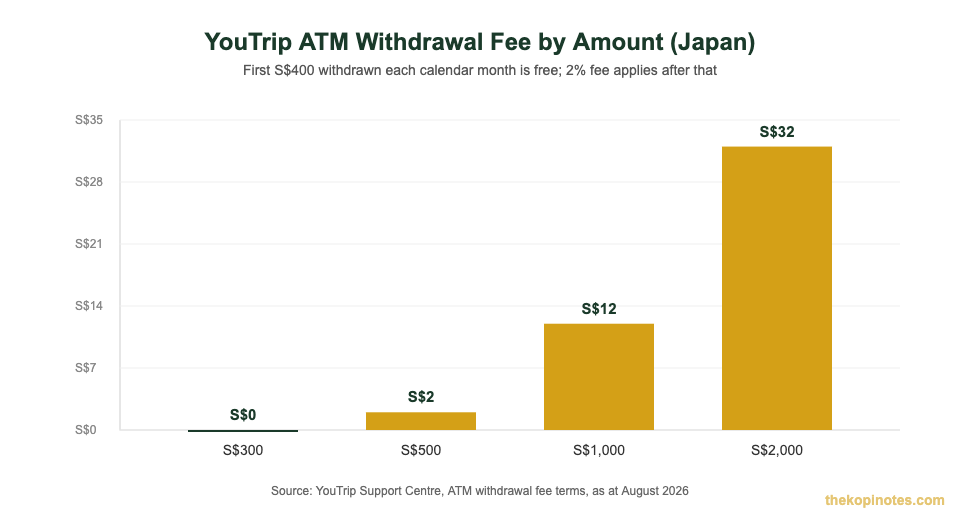
Japan still runs on cash for a lot of everyday spending, so at some point you’ll likely withdraw yen from an ATM. YouTrip gives you S$400 of free ATM withdrawals every calendar month. After that, a 2% fee applies to the withdrawn amount — a fee YouTrip charges on top of anything Seven Bank or the ATM operator charges separately.
For example: withdraw S$300 in a month and you pay S$0 in YouTrip fees. Withdraw S$1,000 and you’ve used your S$400 free quota, leaving S$600 charged at 2% — S$12 in fees. Withdraw S$2,000 in one month and the fee rises to S$32. The lesson: try to plan one or two larger withdrawals rather than several small ones, since each ATM operator visit may also add its own machine fee regardless of the amount.
Which ATMs actually work in Japan?
Seven Bank ATMs — installed in over 28,000 7-Eleven stores across Japan, plus major airports like Narita, Haneda, Kansai and Chubu Centrair — are the most reliable option for foreign Mastercards. They offer an English-language menu and accept Mastercard, Maestro and Cirrus. Japan Post Bank ATMs are a solid second option, especially outside big cities. Regular bank-branded ATMs (MUFG, Mizuho, SMBC) are far less reliable for foreign cards and often only operate during banking hours.
Seven Bank and other ATM operators may also charge their own small transaction fee, separate from YouTrip’s — this is set by the bank operating the machine, not YouTrip, so check the on-screen fee disclosure before confirming your withdrawal. For the full breakdown of how YouTrip calculates fees across all its features, see YouTrip’s own ATM withdrawal fee explainer, or our own YouTrip fees and top-up limits guide.
How to Use YouTrip in Japan (Step-by-Step)
- Top up SGD before you fly. Open the YouTrip app, top up via PayNow or linked bank transfer, and convert a portion into JPY. Locking in your rate before departure means you’re spending at that day’s 0% FX rate, not whatever the rate happens to be mid-trip.
- Activate your physical card and add it to Apple Pay or Google Pay. Tap-to-pay is widely accepted in Japanese convenience stores and train stations, and it’s faster than inserting a chip card at a busy konbini counter.
- Withdraw cash at a Seven Bank ATM if needed. Select “Withdrawal,” choose English if the machine offers it, and select “Credit” as the account type — this is the option that works most reliably for foreign-issued cards, even though YouTrip is a prepaid wallet, not a credit card.
- Top up on the go via WiFi or roaming data. If your JPY balance runs low mid-trip, you can convert more SGD to JPY directly from the app without needing to find an ATM or money changer.
- Track your spending in the app. YouTrip shows a running balance per currency, which makes it easy to see how much JPY you have left without doing mental exchange-rate math at the register.
Card vs Cash: What You Actually Need
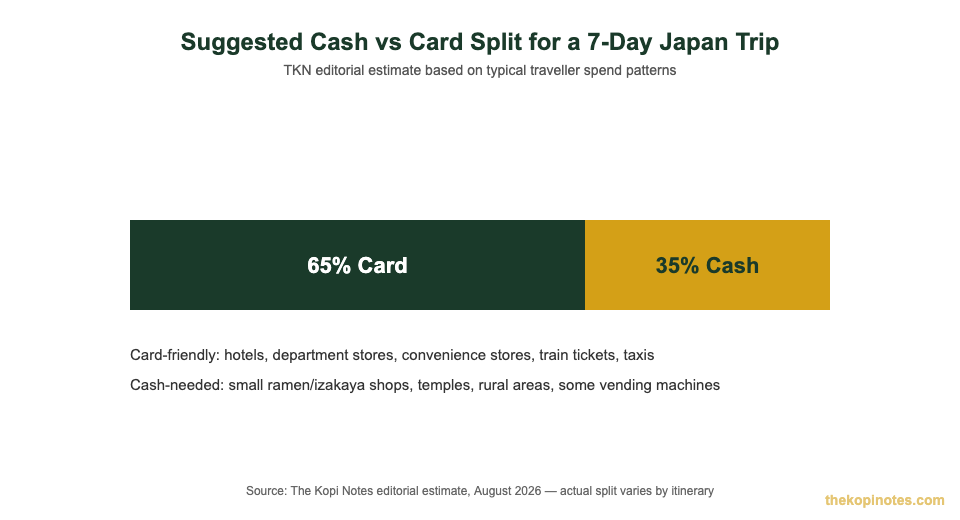
For a Singapore traveller spending, say, SGD 2,000 over a 7-day Japan trip, a rough working split is 65% card and 35% cash. Hotels, department stores, convenience stores, most restaurants, and train tickets can go on the card. Cash covers small ramen and izakaya counters, temple and shrine donations, some rural transport, and vending machines that don’t take contactless yet.
A practical routine: withdraw a lump sum of JPY cash in your first day or two — enough to cover about a third of your budget — then top up your YouTrip JPY balance in the app as needed for everything else. This keeps you within, or close to, the S$400 free ATM withdrawal quota for the month, while still having cash on hand for the moments card isn’t an option.
YouTrip vs Wise vs Revolut for Japan Trips
YouTrip isn’t the only multi-currency card Singapore travellers use for Japan. Wise and Revolut both support JPY too, but the fee structures differ enough to matter on a longer trip.
| Feature | YouTrip | Wise | Revolut |
|---|---|---|---|
| JPY spending fee | 0% | Small conversion fee applies per Wise’s published rates | 0% within monthly fair-usage allowance, then a markup |
| Card network | Mastercard | Mastercard | Visa |
| Free ATM withdrawal | S$400/month | Varies by plan and balance | Varies by plan tier |
| Best for | Simple, dedicated travel spending money | Travellers who also want a borderless multi-currency bank account | Travellers already using Revolut for everyday banking |
Source: YouTrip, Wise and Revolut published fee schedules, verified 16 August 2026. Fee terms change — always check the provider’s current terms before travel.
If you want the full head-to-head, we’ve broken it down in Wise Card vs YouTrip. For most short leisure trips to Japan, YouTrip’s simplicity and 0% FX fee on JPY make it the easier default — you’re unlikely to need Wise’s banking features or Revolut’s subscription tiers just to cover a week of holiday spending.
Money-Saving Tips for Your Japan Trip
A few habits make a real difference to how much of your travel budget goes to fees instead of your actual trip.
- Top up JPY before you fly, not after landing. This locks in the rate at YouTrip’s 0% FX and skips the airport money changer queue entirely.
- Withdraw once, not five times. Each ATM visit may carry its own machine-operator fee on top of YouTrip’s. One S$500–S$800 withdrawal beats five S$100 ones.
- Check your monthly free ATM quota resets on the 1st. If your trip spans two calendar months, you effectively get two separate S$400 free withdrawal quotas.
- Compare against a money changer before you commit. On a SGD 1,000 conversion, a typical airport money changer charging a 2–3% margin costs you roughly S$20–S$30 more than YouTrip’s 0% FX rate — see our deep dive on whether YouTrip really gives you the mid-market rate.
- Sign up with a referral code for a small welcome bonus. New users get S$5 on their first top-up using the YouTrip referral code. If you’re a freelancer or run a small business and travel for work, YouTrip’s business card (YouBiz) offers a separate S$50 bonus with promo code YOUygWAHwmo on your first S$5 card purchase.
Disclaimer: exchange rates, fees and promotional terms change frequently. Figures in this article reflect YouTrip’s published terms as verified on 16 August 2026 — always confirm current rates and fees in the YouTrip app before you travel.
Frequently Asked Questions
Can I use YouTrip card in Japan?
Yes. YouTrip is a Mastercard-based multi-currency wallet, and Mastercard is widely accepted across Japan’s convenience stores, department stores, hotels and most restaurants in major cities. You can also hold and spend Japanese yen directly in the app with 0% foreign exchange fees.
Does YouTrip charge fees when I use it in Japan?
Spending in JPY carries 0% foreign transaction fees, since JPY is one of YouTrip’s ten 0%-FX wallet currencies. ATM withdrawals are free up to S$400 per calendar month, after which a 2% fee applies. The ATM operator (such as Seven Bank) may also charge its own separate machine fee.
What is the best ATM to withdraw cash with YouTrip in Japan?
Seven Bank ATMs, found in over 28,000 7-Eleven stores across Japan plus major airports like Narita and Haneda, are the most reliable option for foreign Mastercards. They offer an English-language menu and accept Mastercard, Maestro and Cirrus cards.
How much cash should I bring to Japan if I use YouTrip?
A rough guide is to keep about a third of your trip budget in cash, since small local eateries, temples and rural areas often don’t accept card. The rest can comfortably stay on your YouTrip card for hotels, transport, convenience stores and larger retailers.
Is YouTrip better than Wise for a Japan trip?
For most short leisure trips, YouTrip’s 0% FX fee on JPY and simple app make it the easier choice. Wise is worth considering if you also want a borderless multi-currency bank account with an IBAN, beyond just travel spending money.
Can I top up YouTrip with JPY while I am already in Japan?
Yes, as long as you have WiFi or mobile data. You can convert SGD to JPY directly in the YouTrip app at any point during your trip, at that moment’s 0% FX rate — you don’t need to find a physical top-up point or ATM.
Ready for Your Japan Trip?
Sign up for YouTrip and get a S$5 welcome bonus on your first top-up.
This article was researched with the help of AI. While we strive to keep all information accurate and up to date, there may be errors. If you notice any discrepancies, please contact us.