YouTrip Card for Thailand & Bali Trips: THB & IDR Guide (2026)
Bangkok street stalls and Bali’s beach ATMs both still run on cash — here’s how to set up your YouTrip card for both legs of the trip.
YouTrip works well for both Thailand and Bali, but the two destinations behave differently. Thai Baht (THB) is one of YouTrip’s 12 wallet currencies, so you top up and lock in a rate before you fly. Indonesian Rupiah (IDR) isn’t a wallet currency — YouTrip auto-converts at the wholesale Mastercard rate with 0% fees at the point of sale instead.
Not financial advice. All figures are for educational reference only. Data verified as at 18 August 2026 against YouTrip’s official support pages and pricing guides unless noted.
- Top up THB in your YouTrip wallet before you fly to Thailand; skip this step for Bali — IDR converts automatically with no fees either way
- AEON Bank ATMs in Thailand and BCA or BNI ATMs in Indonesia charge the lowest local fees; avoid standalone airport and hotel-lobby machines
- Always select THB or IDR on the ATM screen, never SGD — choosing your home currency triggers Dynamic Currency Conversion (DCC), a poor exchange rate in disguise
Table of Contents
Contents — Click to expand
Does YouTrip Actually Work in Thailand and Bali?
Yes — but the two destinations aren’t identical under the hood. YouTrip supports 12 “wallet currencies” that you can exchange for and hold inside the app at the wholesale exchange rate. Thai Baht is one of them, alongside SGD, USD, EUR, GBP, JPY, HKD, AUD, NZD, CHF, SEK and MYR.
Indonesian Rupiah isn’t on that list. But that doesn’t mean it costs you more. YouTrip supports payments in over 150 currencies worldwide, including IDR, at the Mastercard wholesale rate with no added fees. The only real difference is timing: with THB, you exchange in the app first and see the locked-in rate before you spend. With IDR, the conversion from your SGD balance happens automatically at checkout, using whatever the live wholesale rate is at that moment.
For a Bangkok-to-Bali itinerary, this means you’ll top up a THB wallet before your Thailand leg, then simply spend straight from SGD once you land in Bali — no extra step needed.
Key Facts at a Glance
| Feature | Thailand (THB) | Bali / Indonesia (IDR) |
|---|---|---|
| YouTrip wallet currency? | Yes — pre-exchange in-app | No — auto-converts at checkout |
| Card spending FX fee | 0% | 0% |
| Typical local ATM fee | 220–350 THB (~S$8.52–S$13.55) | 20,000–75,000 IDR (~S$1.55–S$5.83) |
| Cheapest ATM network | AEON Bank — 150 THB (~S$5.81) | BCA or BNI |
| Per-withdrawal limit | 20,000–30,000 THB (~S$809–S$1,214) | 3,000,000 IDR (~S$226) per transaction |
Source: YouTrip Support Centre and YouTrip Thailand/Indonesia ATM withdrawal guides, correct as at 18 August 2026. Local ATM operator fees are set by individual banks and subject to change without notice.
Setting Up Your Wallet Before You Fly
Getting ready takes five minutes. Here’s exactly what to do for each leg of the trip.
For Thailand: Open the YouTrip app, tap the THB wallet, and exchange enough SGD to cover a few days of spending. You’ll see the exact wholesale rate before you confirm — no surprises later. Top up again mid-trip if you run low; there’s no limit on how many times you can exchange.
For Bali or elsewhere in Indonesia: There’s nothing to set up. Just make sure your SGD wallet has enough balance, and YouTrip converts to IDR automatically the moment you tap or swipe. You don’t need to hold a separate IDR balance.
Before you leave Singapore: Check that both your virtual and physical YouTrip cards are active, and that overseas usage is switched on in the app under card settings. Also note your 4-digit ATM PIN, which is different from your 6-digit app login passcode — you’ll need it at any ATM.
ATM Withdrawals in Thailand
Cash still matters in Thailand. Street food stalls, tuk-tuks, and small shops in Chiang Mai or off the main Phuket strip often don’t take cards at all. So, plan to withdraw some Baht soon after you land.
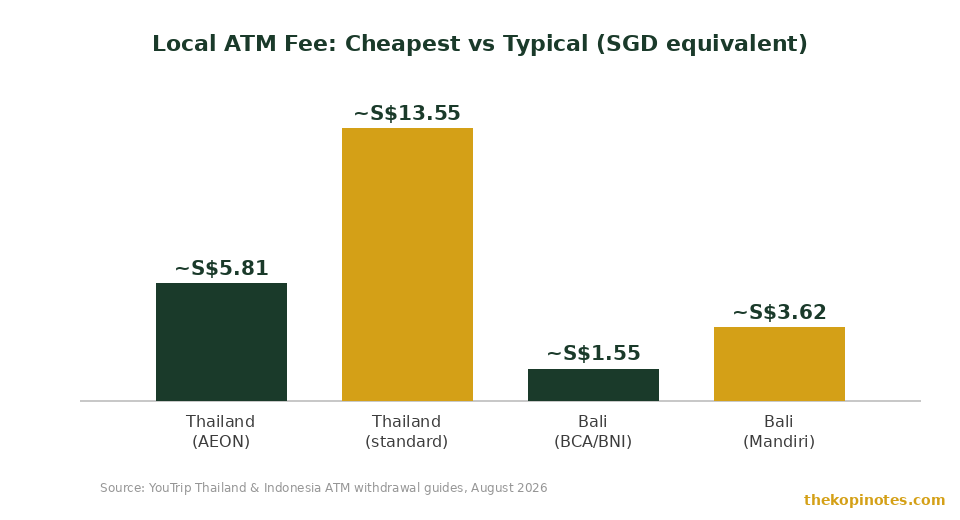
Here’s the catch: Thai ATMs charge their own local fee on top of whatever your card provider charges. Most machines charge a standard 220 THB (roughly S$8.52) per withdrawal for foreign cards, and this can climb to 350 THB (about S$13.55) at some banks.
AEON Bank is the cheapest option. Its ATMs charge just 150 THB (around S$5.81) per withdrawal — one of the lowest fees in the country. You’ll find AEON machines inside Big C, Tesco Lotus, and Makro stores, which are common across Bangkok, Chiang Mai, and most tourist areas.
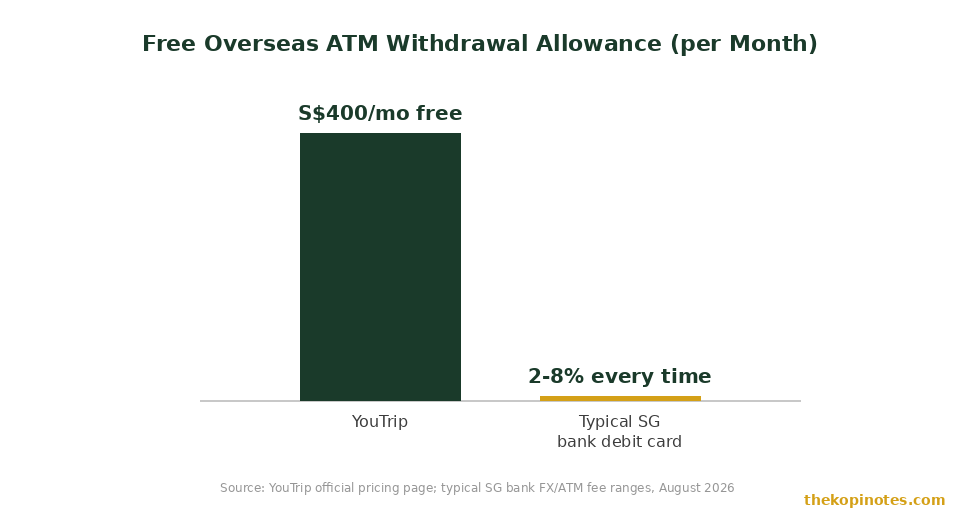
On top of the local fee, YouTrip gives you S$400 in free overseas ATM withdrawals every calendar month, with a 2% fee on anything beyond that. So, if you withdraw S$200 worth of Baht mid-trip, YouTrip itself charges nothing — you’re only paying the ATM operator’s local fee.
Thai ATMs typically cap withdrawals at 20,000 to 30,000 THB (roughly S$809 to S$1,214) per transaction, though your YouTrip daily limit across all ATMs is S$5,000. If you need more cash than one machine allows, simply withdraw again.
ATM Withdrawals in Bali & Indonesia
Bali runs on cash more than you’d expect. Warungs, beach clubs, scooter rentals, and local markets in Canggu, Ubud, or Seminyak often prefer Rupiah over card payments, especially outside the main tourist strips.
Local ATM fees in Indonesia vary more widely than in Thailand — typically between 20,000 and 75,000 IDR (about S$1.55 to S$5.83) per withdrawal for a foreign card. Bank Mandiri machines have charged a flat 50,000 IDR (around S$3.62) for foreign cards since February 2026.
Stick to BCA or BNI ATMs where you can. These two networks are the most widely available in Bali and tend to be more reliable, with fewer reports of skimming compared to standalone machines outside convenience stores. Bank branches, shopping malls, and airport arrival halls are the safest places to withdraw.
Indonesian ATMs dispense either 50,000 or 100,000 IDR notes — a sticker on the machine tells you which. Most machines cap withdrawals at 3,000,000 IDR (about S$226) per transaction and 6,000,000 IDR (about S$453) per day, so budget a few separate withdrawals if you need more cash for a longer stay.
As with Thailand, YouTrip’s S$400 monthly free ATM allowance and 2% fee thereafter apply the same way in Indonesia — it’s one shared allowance across every country you withdraw in each month.
Common Mistakes That Cost You Money
Most of the extra cost Singaporeans pay on this trip comes down to a handful of avoidable slip-ups. Here’s what to watch for.
Choosing SGD instead of THB or IDR at the ATM screen. Almost every foreign ATM asks if you’d like to withdraw in your home currency or the local one. Always pick the local currency — THB in Thailand, IDR in Indonesia. Selecting SGD triggers Dynamic Currency Conversion (DCC), where the ATM operator sets its own exchange rate, usually 3% to 8% worse than the real rate.
So what happens if you accidentally hit “yes” on the SGD prompt? You lock in a bad rate the moment you confirm — there’s no way to undo it once cash comes out.
Forgetting to top up THB before you fly. If your THB wallet runs empty mid-trip and you don’t top up in time, YouTrip can still process the transaction — but it draws from another wallet’s balance and converts at that moment’s rate rather than one you pre-locked in. It’s not a big loss, but topping up in advance gives you rate certainty.
Using standalone ATMs in tourist hotspots. Machines outside convenience stores near Bali’s beach clubs or Bangkok’s nightlife strips tend to charge the highest local fees, and have a higher risk of card skimming. A bank branch or shopping mall ATM is almost always cheaper and safer.
Withdrawing too many small amounts. Since local ATM fees are charged per transaction, not per dollar, one S$300 withdrawal costs the same fixed fee as one S$50 withdrawal. Withdraw larger amounts less often to cut down on total fees paid.
YouTrip vs a Regular Bank Card for This Trip
If you used your regular Singapore bank debit card instead of YouTrip for this trip, here’s roughly what you’d be up against. Most bank debit cards charge an admin fee of around 3% to 3.25% on every foreign currency transaction, on top of the exchange rate itself. On ATM withdrawals, banks typically add a further 2% to 8% withdrawal fee, layered on top of whatever the local ATM operator charges.
Put another way: withdraw S$500 worth of Baht on a typical bank debit card, and you could be paying S$25 to S$40 in combined bank fees before the local ATM fee is even added. On YouTrip, the same withdrawal costs S$2 in YouTrip fees (2% on the S$100 over your S$400 free allowance) plus the local ATM operator’s fixed fee.
The trade-off is that YouTrip funds sit in an e-money wallet regulated by MAS as a Major Payment Institution, not in a bank deposit account, so they aren’t covered by SDIC deposit insurance. For a trip-sized balance, this is a minor consideration — it matters more if you’re parking a large sum for a long period.
If you’re comparing options for other destinations too, our YouTrip card guide for Japan travel and YouTrip card guide for Europe trips cover the same setup for JPY, EUR and GBP. For a wider comparison across cards, see our multi-currency debit card Singapore guide, and our breakdown of exactly what YouTrip’s exchange rate saves you versus Wise, Revolut and the banks. If you’d rather change physical cash before you fly, our best money changer in Singapore guide compares physical changers against YouTrip too.
Not signed up yet? Use our YouTrip referral code and sign-up bonus page to get your card with a welcome credit.
Disclaimer: This article is for educational purposes only and does not constitute financial advice. Fees, limits and exchange rates change — always check the YouTrip app or official website before you travel. The Kopi Notes may earn a referral fee from some of the links on this page, at no extra cost to you.
Frequently Asked Questions
Can I use YouTrip in Thailand and Bali?
Yes. YouTrip works for card payments and ATM withdrawals in both destinations with 0% FX fees. Thai Baht is one of YouTrip’s 12 wallet currencies, so you can pre-exchange it in the app. Indonesian Rupiah isn’t a wallet currency, but it’s still supported — YouTrip converts automatically at the wholesale Mastercard rate when you spend.
Do I need to exchange Rupiah in the YouTrip app before flying to Bali?
No. IDR isn’t one of YouTrip’s 12 wallet currencies, so there’s nothing to pre-exchange. As long as you have SGD balance in your wallet, YouTrip converts to IDR automatically at checkout, with no added fees.
Which ATMs have the lowest fees in Thailand?
AEON Bank ATMs charge around 150 THB (about S$5.81) per withdrawal, the lowest of the major networks. You’ll find them inside Big C, Tesco Lotus and Makro stores. Most other Thai banks charge between 220 and 350 THB (roughly S$8.52 to S$13.55) for foreign cards.
Which ATMs should I use in Bali?
Stick to BCA or BNI ATMs where possible — they’re widely available across Bali and generally more reliable than standalone machines. Local fees typically range from 20,000 to 75,000 IDR (about S$1.55 to S$5.83) per withdrawal, and Bank Mandiri has charged a flat 50,000 IDR fee for foreign cards since February 2026.
How much can I withdraw for free with YouTrip in Thailand or Bali?
YouTrip gives you S$400 in free overseas ATM withdrawals every calendar month, shared across every country. A 2% fee applies to any amount withdrawn beyond that. This is separate from whatever local fee the Thai or Indonesian ATM operator charges.
Should I select SGD or the local currency when withdrawing cash?
Always choose the local currency — THB in Thailand, IDR in Indonesia. Selecting SGD triggers Dynamic Currency Conversion (DCC), which applies a poor exchange rate set by the ATM operator, typically far worse than YouTrip’s own rate.
Heading to Southeast Asia Next?
Get your YouTrip card sorted before you fly, and compare it against the rest of the pack.
This article was researched with the help of AI. While we strive to keep all information accurate and up to date, there may be errors. If you notice any discrepancies, please contact us.