How to Use YouTrip Card Overseas: Step-by-Step Guide (2026)
The complete practical guide for Singapore travellers — topping up, pre-converting, paying and withdrawing cash abroad.
Table of Contents
- Step 1: Download the App & Apply for Your Card
- Step 2: Top Up Your YouTrip Wallet
- Step 3: Pre-Convert to Your Travel Currency
- Step 4: Pay at Merchants Overseas
- Step 5: Withdraw Cash from ATMs Overseas
- YouTrip Overseas Fees & Limits at a Glance
- Country-Specific Tips for Singapore Travellers
- Common Mistakes to Avoid
- Frequently Asked Questions
YouTrip is a multi-currency prepaid Mastercard for Singapore residents that charges 0% foreign exchange fees across 150+ currencies. To use it overseas, you top up SGD via PayNow or bank transfer, optionally pre-convert to your travel currency at the mid-market rate, then tap or swipe like any Mastercard. Your first S$400 in overseas ATM withdrawals each calendar month is free — after that, a 2% fee applies. Data verified as at 18 September 2026.
Not financial advice. All figures are for educational reference only. Data as at September 2026 unless noted.
- Download the YouTrip app, verify your identity, and your physical Mastercard arrives in 5–7 working days.
- Top up via PayNow instantly, then pre-convert SGD to your travel currency to lock in the rate before you fly.
- Overseas ATM withdrawals are free up to S$400/month — after that, a flat 2% fee applies. Always choose to pay in local currency, never SGD.
Step 1: Download the App & Apply for Your Card
The YouTrip card is free to apply for and carries no annual fee. Here’s how to get started:
- Download the YouTrip app — available on iOS and Android.
- Sign up with your Singapore mobile number and NRIC/FIN.
- Complete identity verification — upload a photo of your NRIC and take a selfie. This usually takes under 10 minutes.
- Your virtual card is activated immediately — you can use it for online purchases right away.
- Your physical Mastercard arrives in 5–7 working days by mail.
If you sign up with a YouTrip referral code, both you and your friend may receive a bonus — check the current promotion in-app as offers change. There is no annual fee, no minimum spend, and no credit check required.
Step 2: Top Up Your YouTrip Wallet
Before you can spend overseas, you need SGD in your YouTrip wallet. You have three main top-up options:
| Top-Up Method | Fee | Speed | Notes |
|---|---|---|---|
| PayNow | Free | Instant | Recommended — fastest and free |
| Bank Transfer (IBG) | Free | 1 business day | Use if PayNow unavailable |
| Debit/Credit Card | Up to 2% | Instant | Avoid — card issuer may charge cash advance fee |
Source: YouTrip app, September 2026. Fees may vary by bank.
The top-up minimum is S$20 and the maximum wallet balance is S$5,000. Top up before you travel so you’re not scrambling at the airport.
Step 3: Pre-Convert to Your Travel Currency (Optional but Smart)
One of YouTrip’s best features is the ability to pre-convert SGD to a foreign currency before you leave. You lock in the current mid-market rate, which protects you against adverse rate moves while you’re away.
YouTrip supports pre-conversion for 12 currencies: EUR, USD, GBP, JPY, THB, HKD, AUD, CHF, IDR, MYR, NZD, and KRW. For all other currencies, YouTrip automatically converts at the live mid-market rate when you spend.
Here’s how to pre-convert in the app:
- Open the YouTrip app and tap Exchange.
- Select the currency you want (e.g. JPY for Japan).
- Enter the amount in SGD and confirm the rate shown.
- The converted amount sits in a separate currency pocket, ready to spend.
Check out our YouTrip SGD to MYR guide for a worked example of how pre-conversion saves money on JB and Malaysia trips.
Step 4: Pay at Merchants Overseas
Once you have funds in your YouTrip wallet, paying overseas is straightforward:
- Tap or insert your physical YouTrip card at any Mastercard-accepting terminal — which is virtually everywhere outside China.
- Always choose to pay in the local currency when the terminal asks. Choosing SGD activates Dynamic Currency Conversion (DCC), which means the merchant’s bank applies its own rate — usually 3–5% worse than YouTrip’s rate.
- Your YouTrip app sends you a real-time push notification confirming the amount spent and the exchange rate applied.
For contactless payments, Apple Pay and Google Pay both work with YouTrip — add your card to your digital wallet before you travel.
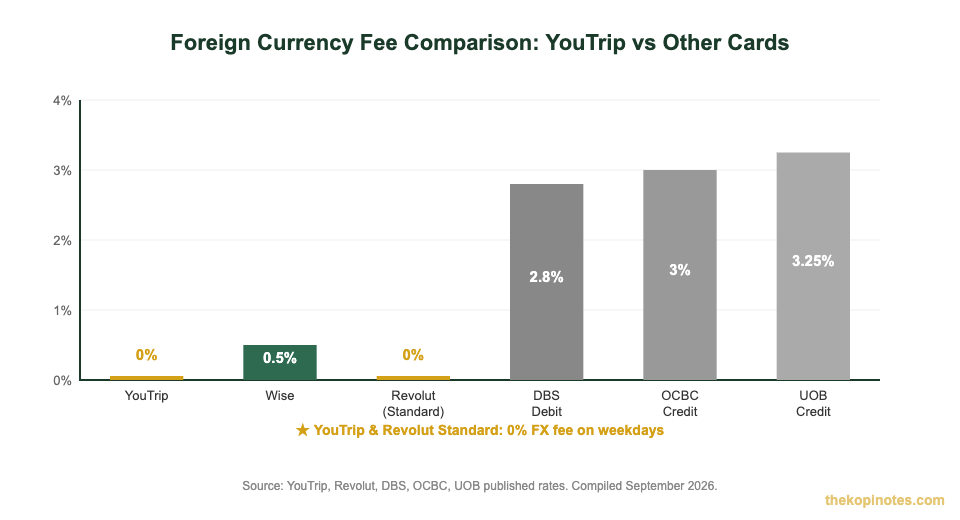
Source: YouTrip, Revolut, DBS, OCBC, UOB published rates. Compiled September 2026. Revolut Standard plan on weekdays.
Step 5: Withdraw Cash from ATMs Overseas
Sometimes you need cash — hawkers in Thailand, tuk-tuk drivers in Bali, or night markets that don’t accept cards. YouTrip makes overseas ATM withdrawals straightforward:
- Free up to S$400 per calendar month — the limit resets on the 1st of each month.
- After S$400, a 2% fee applies on the excess amount. So if you withdraw S$600 in one month, the fee is 2% × S$200 = S$4.00.
- Daily withdrawal limit: S$5,000 (reduced to S$2,500 for withdrawals in Malaysia).
- Use any ATM displaying the Mastercard, Maestro, or Cirrus logo — found at all major banks globally.
- Some ATM operators charge their own surcharge — the ATM will display this before you confirm. Bank ATMs typically have lower or no local surcharges for foreign cards.
For Malaysia specifically, Maybank and CIMB ATMs generally do not add local surcharges for foreign Mastercard withdrawals. For a full guide on JB trips, see our YouTrip JB & Malaysia guide.
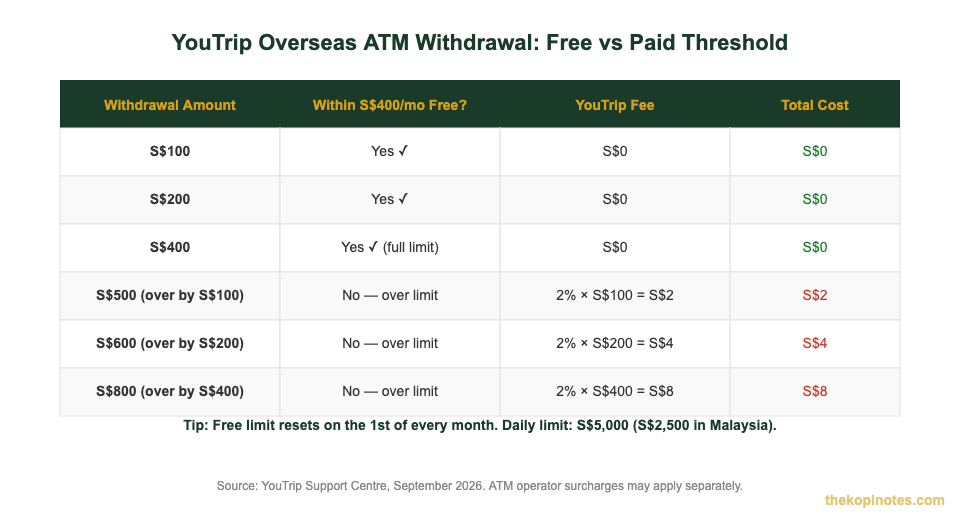
Source: YouTrip Support Centre, September 2026. ATM operator surcharges may apply in addition.
YouTrip Overseas Fees & Limits at a Glance
| Feature | Details |
|---|---|
| Annual fee | S$0 — free forever |
| Foreign exchange fee | 0% — mid-market rate, no markup |
| Countries accepted | 150+ countries (except mainland China, Cuba, Iran, North Korea) |
| Pre-convertible currencies | 12: EUR, USD, GBP, JPY, THB, HKD, AUD, CHF, IDR, MYR, NZD, KRW |
| Free ATM withdrawal limit | S$400 per calendar month (resets 1st of each month) |
| ATM fee after S$400 | 2% on excess amount |
| Daily ATM limit | S$5,000 (S$2,500 in Malaysia) |
| Wallet max balance | S$5,000 |
| Card network | Mastercard (contactless + chip & PIN) |
Source: YouTrip official website and support centre, September 2026. Rates and limits subject to change.
Country-Specific Tips for Singapore Travellers
Malaysia (JB & KL)
YouTrip works well in Malaysia. Pre-convert to MYR before you cross the Causeway to lock in your rate. Use Maybank or CIMB ATMs — they typically don’t charge local surcharges. Note the lower daily ATM limit of S$2,500 in Malaysia. For a detailed breakdown, read our YouTrip SGD to MYR exchange rate guide.
Japan (JPY)
Japan is still heavily cash-based, especially at small restaurants and shrines. Pre-convert to JPY in the app before you fly, and withdraw cash at 7-Eleven or Japan Post ATMs — both reliably accept foreign Mastercard. Avoid airport exchange counters with their poor rates.
Thailand (THB)
Most Thai ATMs charge a local surcharge of around 220 THB (approximately S$8–9) on foreign card withdrawals — this is separate from YouTrip’s fee and is charged by the Thai bank. To minimise the cost, make one larger withdrawal rather than several small ones. YouTrip’s 0% FX fee means the THB conversion itself is free.
Europe (EUR)
Card payments are widely accepted across Europe. Pre-convert to EUR for the best rate before your trip. Be alert to DCC prompts — always decline to pay in SGD. Most modern European terminals offer contactless, so tap-to-pay works seamlessly.
China (mainland)
YouTrip does not work in mainland China. China’s payment infrastructure is built around WeChat Pay and Alipay, which require a Chinese bank account. For China travel, exchange cash CNY in Singapore before you depart, or check with your bank about linking a Singapore card to Alipay (available with some banks as at 2026).
Common Mistakes to Avoid
- Accepting DCC — always choose local currency at the terminal. Saying yes to “pay in SGD” costs you 3–5% extra.
- Not topping up before travel — load enough before you fly. PayNow works instantly in Singapore but connectivity overseas can be unreliable.
- Making many small ATM withdrawals — if the ATM charges a local surcharge, withdraw a larger amount once instead of multiple smaller amounts.
- Exceeding the S$400 free ATM limit — track withdrawals in the app and plan your cash needs to stay within the free monthly allowance.
- Using YouTrip in China — it won’t work at most merchants. Plan your payment strategy in advance.
- Forgetting the referral bonus — if you haven’t applied yet, use a YouTrip referral code for a potential signup bonus.
Comparing your options? Our Wise Card vs YouTrip comparison and Revolut vs YouTrip guide cover the key differences. For a broader view, see our best multi-currency card Singapore comparison.
Frequently Asked Questions
Can I use YouTrip card overseas everywhere?
How much does it cost to use YouTrip overseas?
Do I need to pre-convert currency before travelling?
What is the YouTrip ATM withdrawal limit overseas?
Can I use YouTrip in Malaysia for JB trips?
Does YouTrip work in China?
Is it better to pay by card or withdraw cash with YouTrip overseas?
This article is for informational purposes only and does not constitute financial advice. Exchange rates, fees, and limits are subject to change. Data verified as at 18 September 2026. Always check the YouTrip app and official website for the most current information.
This article was researched with the help of AI. While we strive to keep all information accurate and up to date, there may be errors. If you notice any discrepancies, please contact us.