YouTrip Korean Won: Singapore Guide 2026
Exchange rates, ATM fees, and everything you need to know before using YouTrip in South Korea.
YouTrip supports Korean Won (KRW) and gives Singapore travellers one of the best exchange rates available — no foreign transaction fee, no markup on the Mastercard wholesale rate. To use YouTrip in South Korea, simply load SGD into your YouTrip app, tap your YouTrip card at any Mastercard-accepting terminal, and the conversion happens automatically. For ATM withdrawals, YouTrip charges 2% after the first SGD 400 free withdrawal per month. It consistently beats bank debit cards and airport money changers for KRW spending.
Not financial advice. All figures are for educational reference only. Exchange rates change daily. Data as at June 2026 unless noted.
Table of Contents
- Yes — YouTrip fully supports Korean Won (KRW) in 150+ countries including South Korea.
- You get the Mastercard wholesale rate with 0% foreign transaction fee — better than most Singapore bank cards.
- ATM withdrawals are free up to SGD 400/month, then 2%. Card spending is free with no cap.
Does YouTrip Support Korean Won?
Yes — YouTrip fully supports Korean Won (KRW). South Korea is one of YouTrip’s most popular destinations for Singapore travellers, and KRW is included in YouTrip’s 150+ currency coverage. You don’t need to pre-load KRW into your YouTrip wallet. Instead, you keep SGD in your wallet and YouTrip converts at the point of spending.
This is different from traditional multi-currency wallets that require you to buy and lock in KRW in advance. With YouTrip, you get the live Mastercard wholesale exchange rate at the exact moment of each transaction — which typically means you get a better rate when Korean Won is strengthening, without the risk of buying KRW early and having rates move against you.
YouTrip is issued by EZ-Link Pte Ltd, regulated by the Monetary Authority of Singapore (MAS). It works on the Mastercard network, which means it’s accepted at virtually all card terminals in South Korea — from Lotte Mart and Olive Young to street food stalls and cafes that accept cards.
YouTrip KRW Exchange Rate Explained
YouTrip uses the Mastercard wholesale exchange rate — also called the interbank rate or mid-market rate. This is the rate banks use to trade currencies between themselves, and it’s typically 1.5–3% better than what Singapore banks offer retail customers on debit or credit card spending.
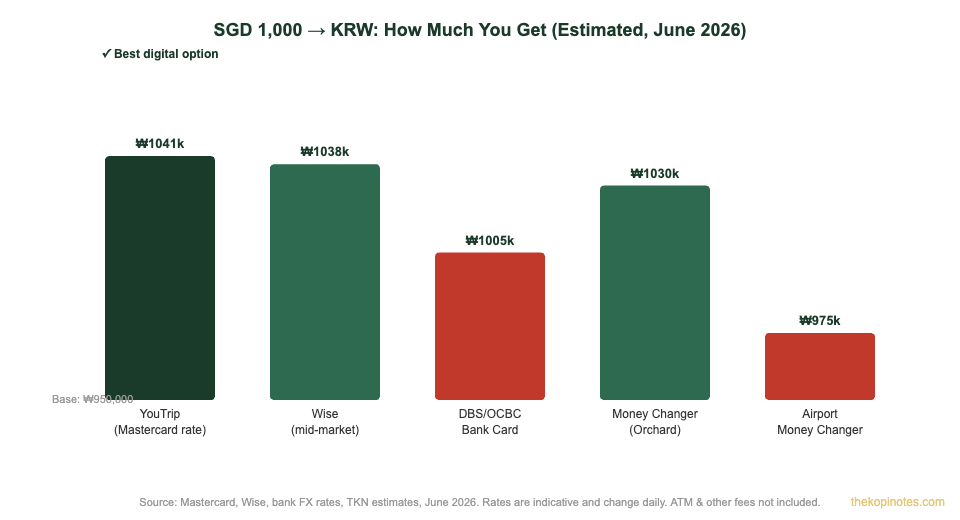
Here’s what that means in practice: if you’re spending SGD 1,000 in South Korea, the difference between YouTrip and a standard Singapore bank card can easily be ₩15,000–₩30,000 more Korean Won in your pocket — enough for a decent meal in Seoul.
| Method | Rate Type | FX Markup | For SGD 1,000 |
|---|---|---|---|
| YouTrip | Mastercard wholesale | 0% | ~₩1,041,000 |
| Wise Card | Mid-market rate | ~0.35% | ~₩1,037,000 |
| DBS/OCBC Bank Card | Retail FX rate | 2.5–3.5% | ~₩1,005,000 |
| Money Changer (Orchard) | Market cash rate | ~1–2% | ~₩1,030,000 |
| Airport Money Changer | Airport markup rate | 3–6% | ~₩975,000 |
Source: Mastercard rate engine, Wise, TKN estimates, June 2026. Rates are indicative and change daily. Figures assume SGD/KRW mid-market rate of approximately 1,041 KRW per SGD.
One nuance to know: YouTrip’s rate may differ slightly from the Mastercard published rate because the conversion happens at the time of settlement (typically 1–2 business days after spending), not at the time of the transaction. In practice, for KRW, the difference is very small — usually within 0.1–0.2%.
How to Use YouTrip in South Korea
Using YouTrip in Korea is straightforward. Here’s exactly what to do before and during your trip:
Before you travel:
Download the YouTrip app (iOS or Android) if you haven’t already. You’ll need to complete a one-time eKYC verification with your Singapore NRIC or passport — this takes about 10 minutes. Once verified, your YouTrip Mastercard card is mailed to your Singapore address (3–7 business days for a new card). Top up SGD from your Singapore bank account via PayNow or bank transfer. There is no minimum top-up, and funds are available instantly. You don’t need to convert to KRW — just hold SGD and YouTrip handles the conversion automatically.
In South Korea:
Tap or insert your YouTrip card at any Mastercard-accepting terminal. South Korea is highly card-friendly — convenience stores (GS25, CU, 7-Eleven), department stores, restaurants, cafes, transportation, and most tourist sites accept Mastercard. The Mastercard acceptance rate in South Korea is above 95% at modern terminals. Always choose to pay in Korean Won (KRW) when prompted — never choose “Pay in SGD” (this triggers Dynamic Currency Conversion with a 3–5% markup by the Korean merchant’s bank).
For transportation:
The Seoul T-money card (used for subway and buses) is a separate prepaid card you load with cash or credit at convenience stores. YouTrip cannot be used directly on public transport as a transit card — you’ll need to buy a T-money card at Incheon Airport or any convenience store. For taxis, most Seoul taxis accept Mastercard directly — tap your YouTrip card and you’re done.
ATM Withdrawals in Korea with YouTrip
YouTrip allows ATM cash withdrawals in South Korea. The key fee structure is: free for the first SGD 400 per calendar month, then 2% on withdrawals above that. There is no per-withdrawal fixed fee from YouTrip’s side, but the Korean ATM operator may charge a separate foreign card fee of ~₩2,000–₩5,000 per transaction.
| ATM Fee Component | YouTrip | Typical Bank Card |
|---|---|---|
| YouTrip/Card Issuer Fee | Free up to SGD 400/month, then 2% | SGD 5–15 flat per withdrawal |
| Korean ATM Operator Fee | ~₩2,000–₩5,000 (varies by ATM network) | ~₩2,000–₩5,000 |
| FX Markup | 0% (Mastercard wholesale rate) | 2.5–3.5% |
Source: YouTrip fee schedule, TKN research, June 2026. Korean ATM fees vary by network. Check Global ATM Alliance or Mastercard ATM Locator for fee-free ATMs.
The best ATMs for foreign cards in South Korea are those at Global ATM Alliance networks and major bank branches. Woori Bank and Shinhan Bank ATMs at airports typically accept foreign Mastercard cards. Many convenience store ATMs (GS25, 7-Eleven) also work. Avoid airport kiosk ATMs run by independent operators — they often charge higher fees and may prompt DCC.
For a 7-day Korea trip, most Singapore travellers spend SGD 500–800 on card transactions (food, transport, shopping). If you stay under SGD 400 in ATM withdrawals, your YouTrip ATM usage is completely free.
YouTrip Korea Fees: Full Breakdown
One of YouTrip’s biggest selling points is its simple, transparent fee structure. Here’s everything you need to know before travelling to South Korea:
| Fee Type | Amount | Notes |
|---|---|---|
| Card spending (KRW) | Free | 0% FX fee, no spending limit |
| ATM withdrawal (KRW) | Free (first SGD 400/month), then 2% | Plus Korean ATM operator fee |
| Top-up fee | Free | Via PayNow or bank transfer |
| Card issuance | Free | Delivered to Singapore address |
| Replacement card | SGD 10 | If lost or stolen |
| Inactivity fee | None | No monthly or annual fee |
| Balance withdrawal to bank | SGD 3 per transfer | To withdraw remaining SGD balance |
Source: YouTrip fee schedule, June 2026. Fees subject to change — verify at youtrip.com before travelling.
If you use a YouTrip referral code when signing up, you typically get SGD 5–10 in your wallet as a sign-up bonus — reducing your first trip’s effective cost even further.
YouTrip vs Alternatives for KRW
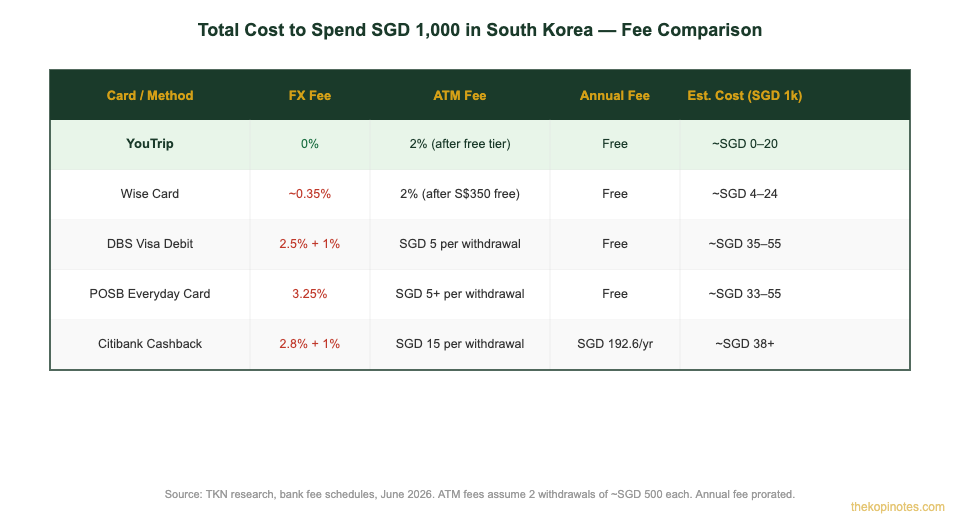
YouTrip isn’t the only option for spending KRW as a Singapore traveller. Here’s how it compares to the main alternatives:
YouTrip vs Wise Card: Both offer near-mid-market rates with low fees. Wise is slightly better for large transfers and offers more features (hold multiple currencies, international bank transfers). YouTrip is simpler to set up and use, with no account needed beyond the app. For pure card spending in Korea, both are excellent — the difference is marginal (under 0.5% in most cases). Our detailed Wise vs YouTrip Singapore comparison covers this in depth.
YouTrip vs Revolut: Revolut also offers low FX fees but has weekend FX markups (1.5–2%) on KRW. South Korean Won is not a major G10 currency, so Revolut often applies a markup on KRW conversion on weekends — unlike YouTrip, which maintains the same rate 24/7. For Korea trips that span a weekend, YouTrip has a clear advantage.
YouTrip vs Singapore bank cards: Standard Singapore bank debit and credit cards charge 2.5–3.5% FX markup plus DBS/OCBC admin fees on foreign transactions. On a SGD 800 Korea trip, that’s SGD 20–28 in unnecessary fees. YouTrip eliminates this entirely for card spending.
YouTrip vs money changers: Good Singapore money changers (like those in Lucky Plaza or Mustafa) can offer rates close to YouTrip for cash — but only if you exchange before you travel. Once you’re in Korea, airport money changers are significantly worse. YouTrip beats cash for card transactions and is competitive with or better than money changers for ATM withdrawals when staying within the free tier.
Tips for Using YouTrip in South Korea
Here are the practical tips that will save you money and hassle on your Korea trip:
1. Always pay in KRW, never SGD. When a Korean terminal asks “Pay in SGD or KRW?”, always choose KRW. Dynamic Currency Conversion (DCC) — where the Korean merchant converts the amount to SGD for you — typically adds a 3–5% surcharge. YouTrip’s conversion is always better.
2. Bring a backup card. YouTrip is accepted everywhere Mastercard is accepted, but some traditional Korean establishments (especially older restaurants, markets, and local guesthouses) remain cash-only. Keep a small amount of KRW cash — around ₩50,000–₩100,000 — for these situations.
3. Use YouTrip for your ATM withdrawals within the free tier. Plan to withdraw no more than SGD 400 equivalent in KRW across your whole trip. For a week in Seoul, SGD 300–400 in cash is usually enough as a backup. This keeps your ATM usage within YouTrip’s free tier.
4. Top up before you fly, not at the airport. Top-up via PayNow or bank transfer is instant and free. Avoid topping up via credit card — some banks charge a cash advance fee when using a credit card to top up a prepaid card. Debit card top-up is fine.
5. Pre-load extra if you’re a heavy shopper. YouTrip has a maximum wallet balance of SGD 5,000. If you’re planning serious shopping in Myeongdong, Gangnam or Dongdaemun, consider topping up your full budget before you leave Singapore — it’s easier than topping up from overseas.
6. Set up a YouTrip Business card if travelling for work. YouTrip Business (YouTrip Biz) offers the same great FX rates with corporate billing. Use referral code YOUygWAHwmo to get a sign-up bonus when opening a YouTrip Business account.
7. Monitor your YouTrip balance in the app. The app shows your balance in SGD and gives real-time transaction notifications. This is useful for budgeting on the go — you see exactly how much KRW each transaction cost in SGD equivalent.
For more on maximising your travel card savings, our complete YouTrip Singapore guide covers the full card setup, referral codes, and spending tips for all destinations. If you’re also considering the best credit cards for overseas spending, check our best travel credit card Singapore comparison.
Not financial advice. All figures are for educational reference only. Exchange rates and fees change frequently — always verify the latest rates at youtrip.com and the Mastercard rate engine before travelling. Data as at June 2026.
Frequently Asked Questions
Does YouTrip work in South Korea?
Yes — YouTrip works in South Korea at any Mastercard-accepting terminal. South Korea has excellent card acceptance, especially in Seoul, Busan, and other major cities. YouTrip supports Korean Won (KRW) as one of 150+ currencies. You don’t need to pre-load KRW — just keep SGD in your wallet and YouTrip converts automatically at the Mastercard wholesale rate with 0% markup.
What exchange rate does YouTrip use for Korean Won?
YouTrip uses the Mastercard wholesale exchange rate (also called the interbank rate) for all currency conversions including Korean Won. This is the same rate that banks use to trade currencies with each other — significantly better than retail FX rates. There is no additional markup or foreign transaction fee charged by YouTrip on top of this rate. The conversion happens at settlement (1–2 business days after spending), not at the moment of the transaction.
Can I use YouTrip at ATMs in South Korea?
Yes — YouTrip can be used at Mastercard-accepting ATMs in South Korea. YouTrip provides free ATM withdrawals up to SGD 400 per calendar month; withdrawals above this incur a 2% fee from YouTrip. Additionally, the Korean ATM operator may charge a separate fee of approximately ₩2,000–₩5,000 per withdrawal. Woori Bank, Shinhan Bank, and major bank ATMs in South Korea typically accept foreign Mastercard cards. Look for the Mastercard logo on the ATM.
Should I use YouTrip or cash KRW in South Korea?
For most spending, YouTrip is the better option — you get a near-interbank FX rate with no fees and the convenience of not carrying large amounts of cash. However, South Korea still has some cash-only establishments, particularly smaller restaurants, traditional markets, and local guesthouses. A good strategy: use YouTrip for all card-accepting merchants and bring a small amount of KRW cash (₩50,000–₩100,000) for cash-only situations. You can get the cash from a YouTrip ATM withdrawal within your free tier, or exchange a small amount at a Singapore money changer before departure.
Is YouTrip better than Wise for spending KRW in Korea?
Both YouTrip and Wise Card offer excellent rates for KRW — significantly better than standard Singapore bank cards. YouTrip uses the Mastercard wholesale rate with 0% fee. Wise uses the mid-market rate with approximately 0.35% conversion fee. The difference on a typical SGD 800 Korea trip is roughly SGD 3–5. YouTrip is simpler to set up and use if you don’t already have a Wise account. Wise is better if you also need to send money internationally or hold multiple currency balances. For KRW card spending alone, either card is an excellent choice.
Does Revolut work for Korean Won? How does it compare to YouTrip?
Revolut also supports Korean Won but applies a weekend FX markup of approximately 1.5–2% on KRW conversions (because KRW is not a major currency and Revolut hedges its exposure). If your Korea trip includes a weekend, YouTrip has a meaningful rate advantage over Revolut’s free tier for KRW. YouTrip’s 0% rate applies 24/7 with no weekend surcharges. Revolut’s paid plans (Premium/Metal) reduce or eliminate the weekend markup, but still typically cost SGD 5–15/month. For most Singapore travellers, YouTrip is the simpler and cheaper option for a Korea trip.
What should I do if my YouTrip card is declined in South Korea?
First, check your YouTrip app to ensure you have sufficient SGD balance. Second, verify the terminal accepts Mastercard (not Visa-only or local Korean payment networks). Third, try a different terminal — some older terminals in Korea may not support international Mastercard contactless payments. If you still have issues, ensure your card is not blocked (check in-app security settings) and contact YouTrip customer support via the app. Always carry a backup payment method — a Visa credit or debit card, or KRW cash — for situations where YouTrip is not accepted.
Ready for Your Korea Trip?
Get YouTrip before you fly — sign up with a referral code for a welcome bonus and zero FX fees in South Korea.
This article was researched with the help of AI. While we strive to keep all information accurate and up to date, there may be errors. If you notice any discrepancies, please contact us.