YouTrip Card Declined? 8 Reasons Why and How to Fix It (2026)
A step-by-step troubleshooting guide for Singapore YouTrip users — online limits, locked cards, ATM caps, and exactly how to fix each one.
Your YouTrip card gets declined most often because of an exceeded S$1,000 default online transaction limit, a locked or unactivated card, or insufficient wallet balance. You can fix most declines in the app within minutes — by checking card status, raising your online limit, or topping up — without calling customer support. Data verified as at July 2026.
Not financial advice. All figures are for educational reference only. Data as at July 2026 unless noted.
- Most declines come from 3 causes: hitting the S$1,000 default online limit, a locked/unactivated card, or a low wallet balance.
- You can raise your online limit, unlock your card, or top up — all inside the app, no need to call support.
- ATM withdrawals cap at S$5,000 a day in most countries (S$2,500 in Malaysia) and this cannot be raised.
Table of Contents
Contents — Click to expand
- What Does a “Declined” YouTrip Transaction Mean?
- Key Facts at a Glance
- 8 Most Common Reasons Your YouTrip Card Is Declined
- How to Fix a Declined Transaction, Step by Step
- Why Your YouTrip ATM Withdrawal Was Declined
- When to Contact Support or File a Chargeback
- How to Avoid Declines Before Your Next Trip
- Frequently Asked Questions
What Does a “Declined” YouTrip Transaction Mean?
A declined transaction means YouTrip’s system stopped a payment or withdrawal before it went through. Nothing was deducted from your wallet — unless the app shows the amount as “Pending”, which is different.
Here’s why this matters. YouTrip is a prepaid multi-currency wallet, not a credit card. That means every transaction is checked against your actual wallet balance and a set of built-in limits in real time. However, this also means a decline is often something you can fix yourself, right in the app, in under a minute.
For context on how the card works day to day, see our YouTrip card fees and limits guide. If you’re wondering whether the wallet itself is trustworthy, we’ve also covered YouTrip’s MAS licensing and fraud protection in detail.
Key Facts at a Glance
| Metric | Detail |
|---|---|
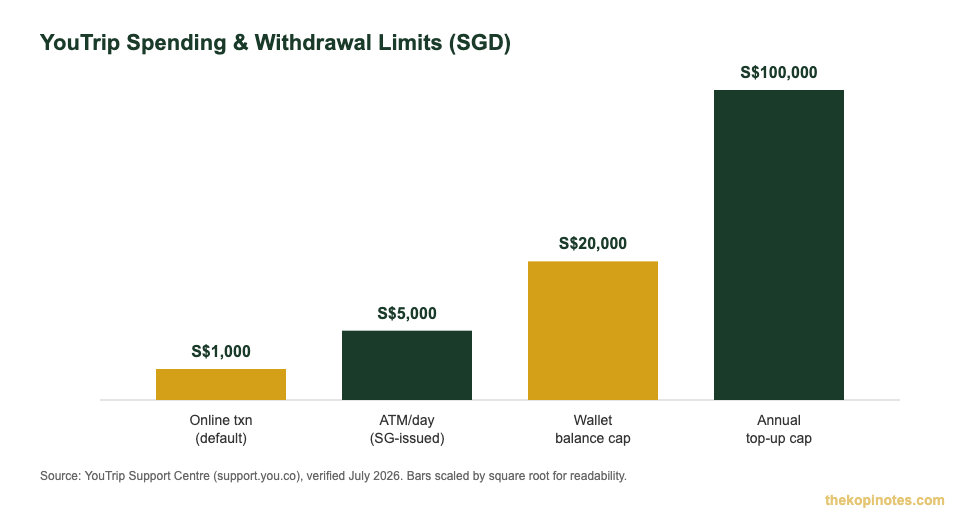
| Default online transaction limit | S$1,000 per transaction (adjustable in-app) |
| Physical/in-store card transactions | No fixed daily limit |
| Daily ATM withdrawal limit | S$5,000 (S$2,500 in Malaysia) — fixed, cannot be raised |
| Free ATM withdrawals | S$400 per calendar month, then 2% fee |
| Wallet balance cap | S$20,000 held at any time |
| Annual top-up / spending limit | S$100,000 every 365 days |
| Issuer | You Technologies Group (Singapore) Pte Ltd — MAS-licensed Major Payment Institution, Principal Member of Mastercard |
Source: YouTrip Support Centre — wallet limits, verified July 2026.
8 Most Common Reasons Your YouTrip Card Is Declined
Most YouTrip declines fall into one of eight categories. Here’s exactly what’s happening and how to fix each one — straight from YouTrip’s own support data.
| # | Reason | What’s Happening | How to Fix |
|---|---|---|---|
| 1 | Insufficient funds | Not enough balance in the currency wallet being charged | Top up instantly via the app |
| 2 | Exceeded online transaction limit | Single online payment above the S$1,000 default cap | Raise the limit under Settings > Card Controls |
| 3 | Card locked | You (or someone with app access) toggled the card off | Unlock the card from the Cards tab |
| 4 | Card not activated | New or replacement card was never activated | Activate under Cards > Manage |
| 5 | Contactless/chip fault | Reader or chip communication error | Insert the chip instead of tapping |
| 6 | Merchant restriction | Some merchants (forex trading platforms, certain charities) block prepaid Mastercards | Use a different payment method for that merchant |
| 7 | Flagged as suspicious | Fraud system flags an unusual transaction pattern | Confirm the transaction as legitimate in-app or via support |
| 8 | ATM daily limit exceeded | Withdrawal request above S$5,000/day (S$2,500 in Malaysia) | Split withdrawals across days, or use another source of cash |
Source: YouTrip Support Centre — “Why is my payment declined?”, verified July 2026.
Here’s the thing — reason #2 catches out more Singapore travellers than any other. If you’re buying a flight, hotel, or big-ticket item online, S$1,000 disappears fast. The fix takes seconds: open the app, go to Settings, then Card Controls, and raise your online transaction limit before you check out again.
How to Fix a Declined Transaction, Step by Step
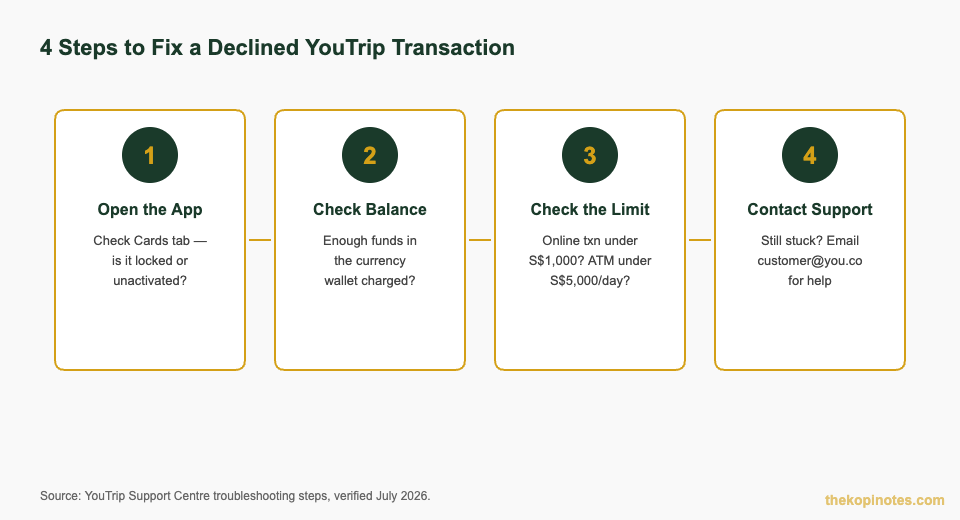
Follow this order — it resolves most YouTrip declines without needing to contact support.
Step 1: Open the app and check your card status. Go to the Cards tab. If the toggle shows “Locked”, switch it back on. If it’s a new or replacement card, activate it here first.
Step 2: Check your wallet balance. Make sure the specific currency wallet being charged has enough funds. YouTrip charges the matching currency wallet first — if you’re in Bangkok and your THB wallet is empty, a payment can fail even if your SGD wallet is full.
Step 3: Check your limits. For online payments, confirm you’re under the S$1,000 default cap (or raise it in Card Controls). For ATM withdrawals, confirm you’re under S$5,000 for the day (S$2,500 in Malaysia) — this one’s fixed and cannot be increased.
Step 4: Still stuck? Contact support. Email customer@you.co with your transaction details, or use the in-app chat — screenshots of the error help the team investigate faster.
Why Your YouTrip ATM Withdrawal Was Declined
ATM declines have their own set of causes, separate from card payment declines. A Singapore resident holding a YouTrip card cannot withdraw cash from local ATMs at all — YouTrip withdrawals only work overseas, at machines showing the Mastercard, Maestro, or Cirrus logo.
Beyond that restriction, four things typically cause an ATM decline: hitting the S$5,000 daily cap (S$2,500 in Malaysia), the ATM operator’s own withdrawal limit, a malfunctioning machine, or a “Pending” transaction that hasn’t cleared yet. Pending amounts are reversed within 8 days — if it’s been longer, that’s when to contact support.
Source: YouTrip Support Centre — “Why was my ATM withdrawal declined?”, verified July 2026.
When to Contact Support or File a Chargeback
Contact YouTrip support if a “Pending” transaction hasn’t reversed after 8 days, if a completed transaction looks wrong or unauthorised, or if you keep getting declined despite having funds and being under all limits. Reach the team at customer@you.co or through in-app chat.
If a transaction shows as “Completed” but you never authorised it, or the goods/services never arrived, you can request a chargeback dispute directly in the app under transaction details. Keep any evidence — receipts, screenshots, correspondence with the merchant — since this speeds up the review.
If you’re comparing how other Singapore digital wallets and cards handle disputes and declines, our YouTrip vs Trust Bank vs GXS comparison and Wise vs YouTrip guide cover this in more depth.
How to Avoid Declines Before Your Next Trip
A few habits prevent most declines before they happen. First, top up all the currency wallets you’ll actually spend in — not just SGD — a few days before you fly. Second, raise your online transaction limit in advance if you’re booking anything above S$1,000, like flights or hotels.
Third, activate and test your card with a small local purchase on day one of your trip, so you catch any activation issue before it matters. Fourth, budget your ATM withdrawals — since the S$5,000 daily cap can’t be raised, plan bigger cash needs across two days rather than one.
If you’re deciding between YouTrip and a bank card for your next trip, our Singapore retirement calculator and broader money tools can help you plan overseas spending as part of your wider budget — not just for travel, but for the year ahead. New to YouTrip? You can sign up through our YouTrip referral code page for the latest welcome offer.
Not financial advice. All figures are for educational reference only and were cross-checked against YouTrip’s official support pages. Data as at July 2026.
Frequently Asked Questions
Why is my YouTrip card being declined even though I have money in my wallet?
Your money might be in the wrong currency wallet — YouTrip charges the matching currency wallet first, so an empty THB wallet can decline a Bangkok purchase even if your SGD wallet is full. It could also be a locked card, an unactivated card, or an online payment above the S$1,000 default limit. Check the Cards tab and Card Controls in the app first.
What is YouTrip's default online transaction limit?
YouTrip sets a default online transaction limit of S$1,000 per payment. You can raise this yourself under Settings > Card Controls in the app — there’s no need to contact support for this specific limit.
Can I withdraw more than S$5,000 a day from a YouTrip card?
No. The daily ATM withdrawal limit is fixed at S$5,000 (S$2,500 in Malaysia) and cannot be increased, even on request. If you need more cash in a single day, you’ll need to split the withdrawal across two days or use another payment method.
How do I unlock a locked YouTrip card?
Open the YouTrip app, go to the Cards tab, select your card, and toggle the lock off. Cards are usually locked because a user manually froze them — for example, after misplacing the card — so double-check this wasn’t intentional before unlocking.
What should I do if my YouTrip transaction shows as 'Pending' after being declined?
A “Pending” status means the amount was provisionally held but the transaction wasn’t completed. YouTrip reverses these automatically within 8 days. If it hasn’t been returned after that window, contact YouTrip’s customer support team for help.
How do I contact YouTrip if my card keeps getting declined?
Email customer@you.co with your transaction date, amount, and merchant details, or use the in-app chat function. This is the right step once you’ve already checked your card status, wallet balance, and transaction limits and the decline still isn’t resolved.
Sorting Out Your Travel Money?
Get the most out of your YouTrip card, or compare it against other multi-currency options before your next trip.
This article was researched with the help of AI. While we strive to keep all information accurate and up to date, there may be errors. If you notice any discrepancies, please contact us.