Is YouTrip Safe? Security, MAS Regulation & Fraud Protection Guide (2026)
How the YouTrip card protects your money — MAS licensing, fund safeguarding, in-app security tools, and what to do if something goes wrong.
YouTrip is safe for everyday spending. Your YouTrip card is issued by a Monetary Authority of Singapore (MAS) licensed Major Payment Institution, and your money sits in segregated bank accounts, not YouTrip’s own funds. It isn’t covered by the Singapore Deposit Insurance Scheme (SDIC) like a bank account, though — so treat it as a spending wallet, not a savings account.
Not financial advice. All figures are for educational reference only. Data verified as at 29 July 2026 unless noted.
- YouTrip is MAS-licensed (Major Payment Institution) and keeps your funds in segregated accounts with DBS and Standard Chartered
- Your wallet balance is not SDIC-insured — unlike a bank savings account, so don’t treat it as your emergency fund
- Lock your card instantly in the app, or call the 24/7 Kill Switch line, if it’s lost, stolen, or compromised
Table of Contents
Contents — Click to expand
- Is YouTrip Safe? The Short Answer
- Is YouTrip Regulated by MAS?
- Where Your YouTrip Money Is Actually Held
- Is YouTrip Covered by SDIC?
- Security Features Built Into the YouTrip App
- What to Do If Your YouTrip Card Is Lost or Stolen
- How to Spot and Report Fraud on YouTrip
- YouTrip vs a Bank Card: Safety at a Glance
- Who Should (and Shouldn’t) Rely on YouTrip?
- Frequently Asked Questions
Is YouTrip Safe? The Short Answer
Yes — for everyday spending and overseas travel, your YouTrip card is safe. YouTrip is run by You Technologies Group (Singapore) Pte Ltd, which holds a Major Payment Institution (MPI) licence from MAS. That means it operates under real regulatory oversight, not as an unlicensed app.
Two things make YouTrip safe in practice. First, regulation: MAS requires the company to safeguard your money and follow strict anti-money-laundering rules. Second, in-app tools: you can freeze your card, get instant transaction alerts, and reach a 24/7 fraud line if something looks wrong.
However, YouTrip is not a bank. Your wallet balance is not protected the same way a bank deposit is. We’ll get into exactly what that means below.
Is YouTrip Regulated by MAS?
Yes. YouTrip’s operator, You Technologies Group (Singapore) Pte Ltd, is licensed under the Payment Services Act as a Major Payment Institution (MPI). This is the same licence class MAS uses for large e-money and cross-border transfer providers in Singapore — it’s a tier above the lighter “Standard Payment Institution” licence.
Under an MPI licence, MAS requires the company to: safeguard customer funds separately from company money, run anti-money-laundering and counter-terrorism financing checks, maintain minimum capital requirements, and report regularly to MAS. This oversight doesn’t make YouTrip a bank, but it does mean an independent regulator is watching how the company handles your money.
You can verify any payment company’s licence status yourself on the MAS Financial Institutions Directory — a two-minute check worth doing before you trust any fintech app with your money.
Where Your YouTrip Money Is Actually Held
When you top up your YouTrip wallet, that money doesn’t sit in YouTrip’s own corporate bank account. Under the Payment Services Act, licensed institutions must “safeguard” customer funds — usually by holding them in a trust account with a bank, or backing them with a bank guarantee.
For YouTrip, customer funds are held in segregated accounts with DBS Bank Ltd and Standard Chartered Bank (Singapore) Limited, kept separate from the company’s own operating funds. If You Technologies Group ran into financial trouble, this segregation is designed to stop your wallet balance from being swept up in a company insolvency the way an unsecured creditor’s claim would be.
That said, safeguarding under the PSA is not the same legal protection as deposit insurance. It reduces — but doesn’t eliminate — risk. That distinction matters for the next section.
Is YouTrip Covered by SDIC?
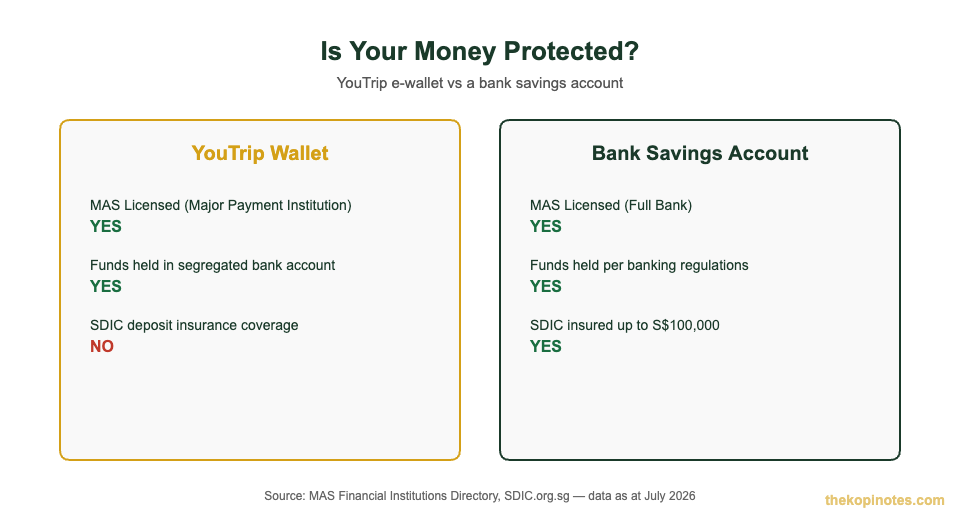
No. Money in your YouTrip wallet is not covered by the Singapore Deposit Insurance Scheme (SDIC), the scheme that protects up to S$100,000 of your money per depositor, per bank, if a bank fails. SDIC only covers deposits at full banks and finance companies that are Scheme members — payment institutions like YouTrip fall outside that scope entirely.
| Feature | YouTrip Wallet | Bank Savings Account |
|---|---|---|
| Regulator / Licence | MAS — Major Payment Institution | MAS — Full Bank |
| Fund Safeguarding | Segregated account (DBS & Standard Chartered) | Standard banking regulations |
| SDIC Deposit Insurance | Not covered | Up to S$100,000 per depositor |
Source: MAS Financial Institutions Directory; SDIC.org.sg, July 2026.
What this means practically: keep enough in your YouTrip wallet to cover upcoming trips or spending, but don’t use it as a place to park your emergency fund or long-term savings. For that, a proper retirement calculator and an SDIC-insured savings account will serve you better.
Security Features Built Into the YouTrip App
Beyond regulation, YouTrip gives you tools to protect your own account day to day. None of these cost extra, and most take seconds to use.
| Feature | What It Does | How to Use It |
|---|---|---|
| In-App Card Lock | Instantly blocks new transactions on your card | Card tab → “Lock Card” toggle |
| Kill Switch | Suspends your entire YouTrip account immediately | Call +65 6904 9334, available 24/7 |
| Slide-to-Approve | Confirms certain transactions in-app instead of by SMS OTP | Automatic prompt on supported transactions |
| Transaction Notifications | Alerts you the moment your card is charged | Enabled by default — check your phone’s notification settings |
| In-App Issue Reporting | Flags an unauthorised or incorrect charge directly to YouTrip | Tap the transaction → “Report an Issue” |
Source: YouTrip Support Centre & Security Guide, July 2026.
One important habit: YouTrip will never ask for an OTP via SMS to approve a transaction — approvals happen inside the app itself. If you ever receive a text message asking you to “verify” a YouTrip transaction by replying with a code, treat it as a scam attempt, not a real YouTrip message.
What to Do If Your YouTrip Card Is Lost or Stolen
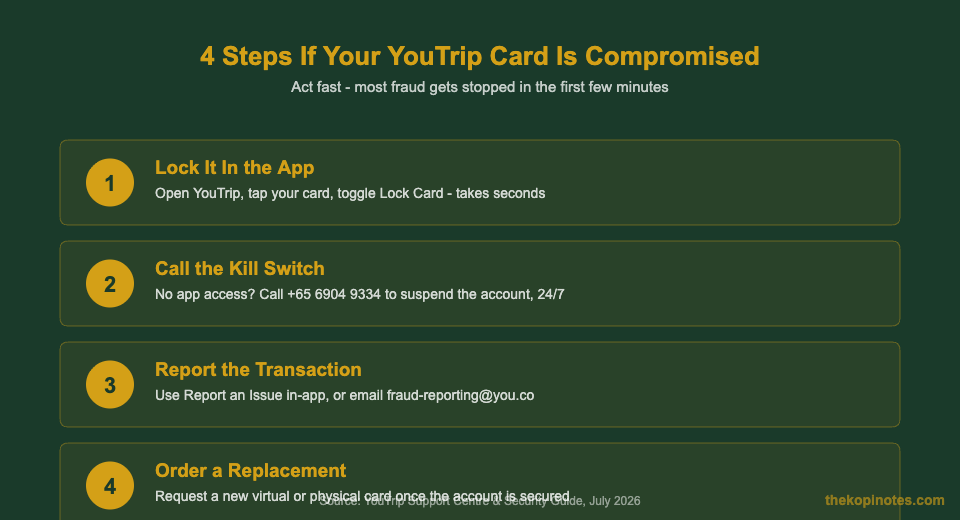
Speed matters here. Most fraud losses happen in the first few minutes after a card is compromised, so knowing the sequence in advance saves you time when it counts.
- Lock your card in the app immediately. This is the fastest option and takes seconds — go to your Card tab and toggle “Lock Card.”
- Can’t access the app? Call the Kill Switch line at +65 6904 9334 to suspend your entire YouTrip account, any time, day or night.
- Order a replacement — virtual instantly, or physical by post — once your account is secured.
- Check your transaction history for any charges you don’t recognise, going back to before you noticed the card was missing.
- Report fraudulent charges within 45 days using “Report an Issue” in-app, or by emailing fraud-reporting@you.co. YouTrip cannot dispute a transaction after this 45-day window closes, so don’t sit on it.
Here’s how it plays out in practice: say you’re travelling in Bangkok and notice a S$500 charge you didn’t make. Lock your card in the app within seconds of spotting it, then use “Report an Issue” on that specific transaction. YouTrip’s fraud team investigates from there — but the clock on your 45-day dispute window started on the transaction date, not the day you noticed it, so check your statement regularly rather than waiting until you’re home.
How to Spot and Report Fraud on YouTrip
Most fraud against YouTrip users doesn’t come from a hacked app — it comes from phishing. Here’s what to watch for.
Fake OTP requests. As covered above, YouTrip never sends SMS OTPs for approval. Any text asking you to “confirm” or “verify” a transaction by replying with a code is not from YouTrip.
Small “test” charges. Scammers sometimes run a tiny transaction (sometimes under S$5) to check a stolen card number works before attempting a larger charge. Don’t dismiss a small unfamiliar charge as “too small to matter” — report it.
Unsolicited “YouTrip support” contact. Genuine YouTrip support won’t cold-call or message you asking for your login details, PIN, or a one-time code.
If you spot anything suspicious, report it through YouTrip’s in-app reporting tool or email fraud-reporting@you.co. YouTrip’s customer service team operates 24/7 for exactly this reason.
YouTrip vs a Bank Card: Safety at a Glance
Neither option is “unsafe” — they’re built for different jobs. Here’s how they stack up on the factors that actually matter if something goes wrong.
| Factor | YouTrip Card | Bank Debit/Credit Card |
|---|---|---|
| Regulator | MAS (Major Payment Institution) | MAS (Full Bank) |
| Deposit Insurance | Not SDIC-covered | SDIC-covered up to S$100,000 (savings accounts) |
| Card Freeze Speed | Instant, self-service in-app | Usually instant via app; some banks still require a call |
| OTP Method | In-app slide-to-approve (no SMS OTP) | Usually SMS OTP or banking app approval |
| Exposure if Compromised | Limited to your wallet balance (capped at S$20,000) | Debit: linked account balance; Credit: cardholder liability limits typically apply |
Source: MAS Financial Institutions Directory, YouTrip Support Centre, July 2026. See our YouTrip card limits guide (linked below) for full wallet, top-up and ATM caps.
Who Should (and Shouldn’t) Rely on YouTrip?
YouTrip is a good fit if you: travel regularly and want to spend in foreign currency without markup fees, want a secondary card to keep your main bank details off overseas terminals, or need a simple way to split a trip’s spending float from your main account. Read our full YouTrip card review for the pros and cons beyond safety, or our guide on how to use your YouTrip card overseas if you’re planning your first trip with it.
Consider a bank account instead if you: want to hold your emergency fund or long-term savings somewhere SDIC-insured, need a large balance sitting untouched for months (YouTrip’s wallet cap is S$20,000 anyway), or want government-backed protection on every dollar rather than PSA-mandated safeguarding.
In practice, most Singapore users get the best of both: a bank account as their financial base, topped up into YouTrip only for upcoming spending or travel. If you’re weighing where to park savings versus where to spend, our retirement planning calculator is a useful starting point for the bigger picture.
New to YouTrip? You can sign up with our YouTrip referral code for a sign-up bonus (link below).
Frequently Asked Questions
Is YouTrip safe to use for everyday spending in Singapore?
Yes. YouTrip is licensed by MAS as a Major Payment Institution, and customer funds are held in segregated accounts with DBS and Standard Chartered. Combined with in-app card locking and a 24/7 fraud line, it’s considered safe for everyday and travel spending — just not as a place to store long-term savings.
Is YouTrip regulated by MAS?
Yes. YouTrip’s operator, You Technologies Group (Singapore) Pte Ltd, holds a Major Payment Institution licence under Singapore’s Payment Services Act. You can verify this directly on the MAS Financial Institutions Directory.
Is my money in YouTrip covered by SDIC?
No. The Singapore Deposit Insurance Scheme only covers deposits at full banks and finance companies that are Scheme members. YouTrip is a payment institution, not a bank, so SDIC’s up to S$100,000 protection doesn’t apply to your wallet balance.
What should I do if my YouTrip card is lost or stolen?
Lock it immediately in the YouTrip app under your Card tab. If you can’t access the app, call the Kill Switch line at +65 6904 9334 to suspend your account 24/7, then order a replacement card and report any unauthorised transactions.
Does YouTrip ever ask for my OTP by SMS?
No. YouTrip approves transactions through an in-app slide-to-approve prompt, never by SMS one-time password. Any text message asking you to reply with a code to “verify” a YouTrip transaction is a phishing attempt, not a genuine YouTrip message.
How long do I have to report a fraudulent YouTrip transaction?
You have 45 days from the transaction date to raise a dispute. After that window closes, YouTrip cannot contest the charge on your behalf, so check your transaction history regularly rather than waiting until you notice a problem.
Get the Most Out of Your YouTrip Card
Now that you know how YouTrip keeps your money safe, here’s how to use it well — and what else to compare it against.
This article was researched with the help of AI. While we strive to keep all information accurate and up to date, there may be errors. If you notice any discrepancies, please contact us.