YouTrip Card Fees, Limits & Top-Up Guide (2026)
Every fee, limit and top-up rule for the YouTrip card, checked against YouTrip’s own support pages.
The YouTrip card is a free multi-currency Mastercard that Singapore travellers use to spend and withdraw cash in over 150 currencies with no mark-up. There’s no card fee and no annual fee. Your wallet can hold up to S$20,000, and a single top-up can go as high as S$20,000. Overseas ATM cash stays free up to S$400 a month, then costs 2%.
Not financial advice. All figures are for educational reference only. Data verified against YouTrip’s official support pages as at 19 July 2026.
- The YouTrip card and account are free — no issuance fee, no annual fee, and no FX mark-up on spending or currency exchange.
- Your wallet can hold up to S$20,000 at a time, and you can top up or spend up to S$100,000 in any rolling 12 months.
- Overseas ATM cash is free up to S$400 a month. After that, YouTrip charges 2% on top of whatever the local bank charges.
Table of Contents
What Is the YouTrip Card?
YouTrip is Singapore’s original multi-currency travel wallet, run by You Technologies Group under a Major Payment Institution licence from the Monetary Authority of Singapore (MAS). Since launching in 2018, it has become one of the most widely used travel cards for Singaporeans heading overseas.
The YouTrip card is a prepaid Mastercard, not a credit or debit card. You top up SGD (or foreign currency) into the app first, then spend directly from that balance. You get a virtual card the moment you sign up, plus a physical card you can order for free and use at ATMs or in-store.
The card supports over 150 currencies at the real-time Mastercard exchange rate — check YouTrip’s exchange rate today before you convert — with no mark-up added on top. That’s different from a typical Singapore credit card, which usually adds a 2.5–3.5% foreign transaction fee. You exchange between currencies inside the app, then tap or swipe your card just like a bank card, funded from your own top-up instead of a credit line.
YouTrip Card Fees at a Glance
Here’s the part most people search for. Under normal use, YouTrip charges almost nothing. The table below lists every fee YouTrip discloses on its own support pages.
| Fee | Amount (SGD) |
|---|---|
| Card issuance & setup (physical + virtual) | Free |
| Annual fee | Free |
| Currency exchange fee | Free |
| Overseas transaction fee | Free |
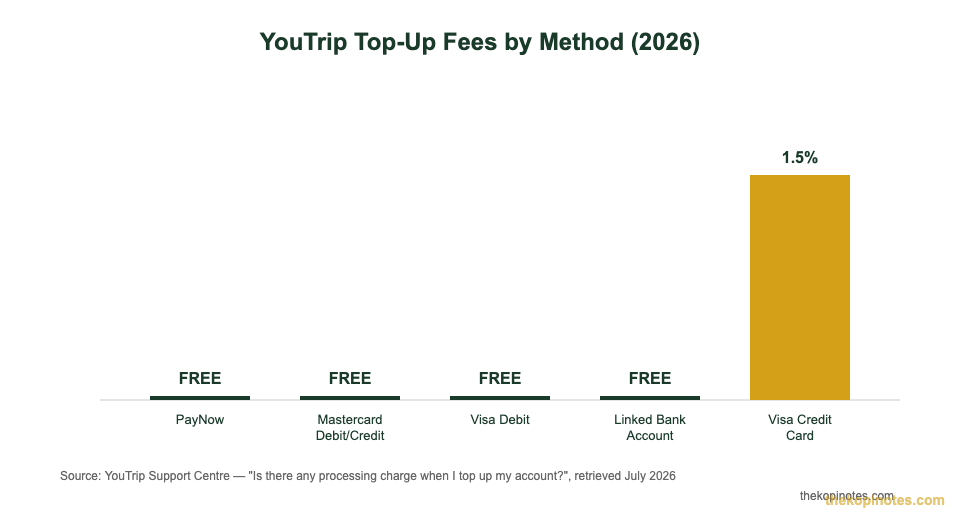
| Top-up via PayNow, Mastercard debit/credit, Visa debit | Free |
| Top-up via Visa credit card | 1.5% service fee |
| Card replacement & delivery | S$10.00 |
| Refund processing fee | S$10.00 |
| Recall request for overseas transfer | S$35.00 |
Source: YouTrip Support Centre, “What are the fees involved in using a YouTrip account?”, retrieved 19 July 2026.
In practice, the only fee most users ever pay is the 1.5% top-up charge — and only if they top up with a Visa credit card. Switch to PayNow or a Mastercard instead, and that fee disappears completely. The S$10 and S$35 charges only apply to specific actions: replacing a lost card, requesting a refund, or recalling an overseas bank transfer. You won’t hit any of these in normal day-to-day spending.
Top-Up Limits and Methods
YouTrip doesn’t restrict how you top up, but it does cap how much and how fast, depending on the method you use.
| Top-Up Method | Minimum | Maximum | Fee |
|---|---|---|---|
| PayNow | S$1 | S$20,000 | Free |
| Linked bank card (Mastercard/Visa debit) | S$20 | S$20,000 | Free |
| Linked bank account | S$20 | S$5,000/day* | Free |
| Apple Pay | S$20 | S$20,000 | Free |
| Visa credit card | S$20 | S$20,000 | 1.5% service fee |
*Linked bank account top-ups are capped at S$5,000/day by regulation, or your self-set linkage limit, whichever is lower. Source: YouTrip Support Centre, “What is the minimum and maximum top up for my YouTrip account?”, retrieved 19 July 2026.
Wallet and Annual Spending Limits
Two separate caps govern how much you can hold and use YouTrip for in a year. Both come from MAS rules on e-wallets, not from a choice YouTrip made on its own.
First, your wallet can hold up to S$20,000 at any one time, combined across every currency you’re holding. If your balance is near that cap, YouTrip blocks further top-ups or incoming funds until it drops.
Second, YouTrip caps how much you can top up or spend to S$100,000 within any rolling 365-day period, counted from your first top-up after 27 February 2020. For most travellers, this ceiling isn’t close to a problem — you’d need to be moving over S$8,000 a month through the app to bump into it.
If you do travel frequently or run a lot of spend through YouTrip — long-term expats, digital nomads, or frequent business travellers — it’s worth tracking your rolling 12-month total. Once you’re near S$100,000, consider spreading spend across a second card, such as a Trust Bank or GXS debit card, both of which also charge 0% on foreign transactions.
Overseas ATM Withdrawal Fees
Cash withdrawals work differently from card spending, and this is where people most often get caught off guard.
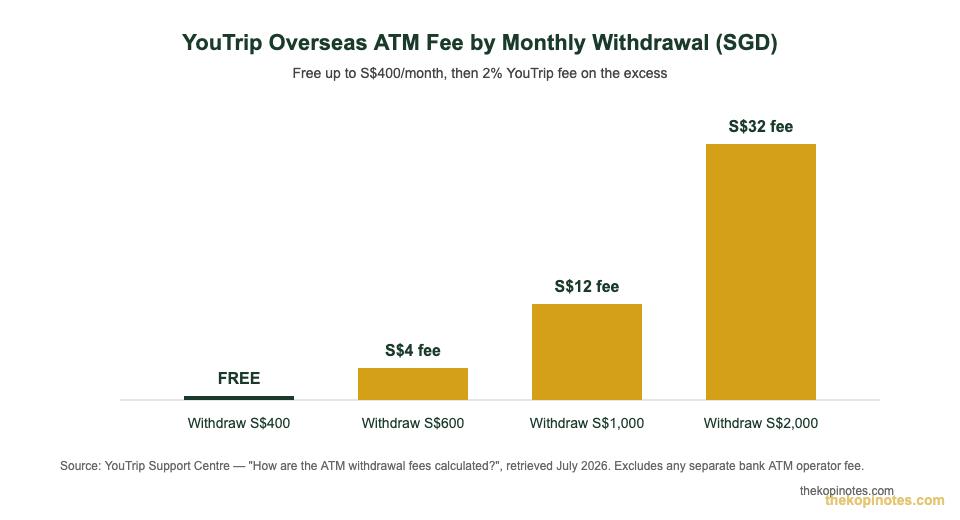
YouTrip gives you S$400 of free overseas ATM withdrawals every calendar month. Withdraw more than that in the same month, and YouTrip charges a 2% fee on the amount over S$400 — non-waivable, and deducted straight from your SGD wallet.
That YouTrip fee is separate from whatever the ATM operator itself charges. Overseas banks often add their own flat fee or percentage on top, shown on-screen before you confirm the withdrawal or printed on your receipt. You’re also capped at withdrawing up to S$5,000 (or the currency equivalent) per day.
One habit that saves you money: when a foreign ATM asks whether to charge you in SGD or the local currency, always choose the local currency. Accepting the SGD conversion triggers Dynamic Currency Conversion (DCC) — the ATM’s own, usually worse, exchange rate — on top of anything YouTrip charges. For a full walkthrough of tapping, swiping and PIN use overseas, see our guide on how to use your YouTrip card overseas.
How to Get a YouTrip Card in Singapore
Getting a YouTrip card takes about three minutes and doesn’t cost anything.
- Download the YouTrip app (iOS or Android) and sign up, verifying your identity with Singpass or your NRIC.
- Your virtual card is issued immediately — you can start topping up and spending online right away.
- Order your free physical Mastercard from within the app; it typically arrives by mail within about a week.
- Top up via PayNow, a linked bank card, a linked bank account, or Apple Pay.
- Exchange into the currencies you need at the live rate shown in the app, or let YouTrip auto-convert at the point of sale.
- Activate your physical card once it arrives, then spend or withdraw cash locally and overseas.
If you’re signing up for the first time, use our YouTrip referral code link — sign-up promotions periodically include cashback or fee-free top-up credit for new users.
If you run a small business or freelance and need a separate wallet for company expenses, YouTrip also offers YouTrip Biz, a companion product built for business spending with its own referral code (YOUygWAHwmo at sign-up), kept separate from your personal account and personal S$100,000 annual limit.
YouTrip Card vs Alternatives
YouTrip isn’t the only zero-FX-fee option in Singapore. Here’s how it compares with the cards people weigh it against most.
| Provider | Type | Annual Fee | FX Mark-Up | Free ATM Withdrawal | Wallet Cap |
|---|---|---|---|---|---|
| YouTrip | Multi-currency e-wallet | Free | 0% | S$400/month | S$20,000 |
| Wise | Multi-currency account | Free | Small conversion fee at mid-market rate | Varies by country | No fixed SGD cap |
| Revolut | Multi-currency e-wallet | Free (Standard plan) | 0% on weekday rates; fees can apply on some weekend/large conversions | Limited free allowance, then fee | Plan-dependent |
| Trust Bank Debit Card | Bank debit card | Free | 0% | Bank/ATM network rules apply | No dedicated wallet cap |
| GXS Debit Card | Bank debit card | Free | 0% (30 days’ notice before any change) | Bank/ATM network rules apply | No dedicated wallet cap |
Source: YouTrip, Wise, Revolut, Trust Bank and GXS official fee pages, retrieved July 2026.
The biggest structural difference isn’t fees — it’s how the exchange rate gets set. YouTrip and Wise let you lock in a rate ahead of time by pre-converting currency in the app. Trust Bank and GXS convert only at the moment you swipe, at whatever the card network rate happens to be, which is usually fine but means you can’t get ahead of a rate move the way you can with a wallet. For a closer side-by-side of the two most popular wallets, see our Wise vs YouTrip comparison.
Who Should Get a YouTrip Card?
YouTrip is a good fit if:
- You travel more than once or twice a year and want to avoid the 2.5–3.5% foreign transaction fees most Singapore credit cards charge.
- You want to lock in an exchange rate before a trip, rather than being at the mercy of the rate on the day you spend.
- You’re comfortable managing a prepaid balance instead of a credit line.
Consider a 0%-FX bank debit card instead if:
- Your overseas spend is occasional and modest — a debit card like Trust Bank or GXS needs no separate top-up step.
- You’d rather not think about topping up before every trip.
- You’re already close to YouTrip’s S$100,000 annual limit and need a second rail for spend.
For most Singaporean travellers, this isn’t an either/or choice. Many people carry both — YouTrip for the exchange-rate lock-in on bigger trips, and a 0%-FX debit card as backup. If you’re still comparing options, our roundup of the best travel card in Singapore covers how YouTrip stacks up against the full field.
This article is for general information only and isn’t financial advice. YouTrip’s fees, limits and terms can change — always check the YouTrip app or its official support pages for the latest figures before you rely on them. Figures on this page were verified against YouTrip’s official support centre on 19 July 2026.
Frequently Asked Questions
Is the YouTrip card really free?
Yes. There’s no card issuance fee for the physical or virtual card, and no annual fee, ever. The only fee most users pay is a 1.5% charge if they top up using a Visa credit card — switch to PayNow or a Mastercard and that disappears too.
What is the maximum I can top up on YouTrip?
Up to S$20,000 in a single top-up via PayNow, a linked Mastercard/Visa debit card, or Apple Pay. Linked bank account top-ups are capped lower, at S$5,000 a day, due to MAS regulation.
How much can I withdraw from an overseas ATM for free?
S$400 per calendar month. Withdraw more than that in the same month, and YouTrip charges 2% on the excess, on top of any fee the ATM operator itself charges.
Can I hold more than S$20,000 in my YouTrip wallet?
No. S$20,000 is the maximum wallet balance MAS allows for an e-wallet like YouTrip, combined across all currencies. You’ll need to spend down your balance before you can top up further.
Is YouTrip better than a bank debit card for overseas spending?
It depends on how you travel. YouTrip lets you lock in an exchange rate ahead of time and has no annual fee, but 0%-FX debit cards like Trust Bank or GXS need no top-up step at all. Frequent travellers often use both.
Does YouTrip charge a fee to exchange currencies?
No. Currency exchange inside the YouTrip app is free, with no transaction fee, at the live Mastercard rate across more than 150 currencies.
Ready to Get Your YouTrip Card?
Sign up in the app in about three minutes — the card and account are free for life.
This article was researched with the help of AI. While we strive to keep all information accurate and up to date, there may be errors. If you notice any discrepancies, please contact us.