How to Open a Wise Account in Singapore (2026 Complete Guide)
A Wise account is a free multi-currency account that lets you hold, send, and spend money in 40 currencies at the mid-market exchange rate. Regulated by the Monetary Authority of Singapore (MAS) as a Major Payment Institution, Wise is one of the cheapest ways to send money overseas from Singapore — with fees starting from just 0.19%. Opening an account takes about 10 minutes online.
Not financial advice. All figures are for educational reference only. Data verified as at September 2026 from official Wise and MAS sources.
- Opening a Wise account is completely free — you only pay when you send or convert money (from 0.19%)
- Wise uses the mid-market rate with no hidden FX markup, saving you significantly vs local bank transfers
- Takes about 10 minutes to sign up online; you’ll need a Singapore ID (NRIC, passport, or FIN) for verification
What Is a Wise Account?
Wise (formerly TransferWise) is a global financial platform that offers a multi-currency account, international money transfers, and a debit card. It launched in Singapore in 2014 and is now used by over 18.9 million people worldwide who collectively move more than $62 billion every quarter.
For Singapore residents, the key appeal is simple: Wise gives you the mid-market exchange rate — the same rate you see on Google or XE.com — with a small transparent fee. Local banks typically add a 2–3% FX spread on top of the interbank rate, which they don’t always show you upfront.
Here’s what you get with a Wise account:
| Feature | What It Means for You |
|---|---|
| 40 currencies | Hold USD, GBP, EUR, JPY, AUD and more in one account |
| Mid-market rate | No FX markup. You get the real exchange rate, always |
| Local account details | Receive money in 22 currencies using local bank-style account numbers |
| Wise debit card | Spend in 150 countries at the mid-market rate (SGD 8.50 one-time card fee) |
| Free to open | No monthly fees. You only pay when you send or convert money |
Source: Wise.com/sg/account, September 2026
Is Wise Safe in Singapore?
Yes. Wise is fully regulated in Singapore. The company operates through Wise Asia-Pacific Pte Ltd (UEN: 201422384R), which is licensed by the Monetary Authority of Singapore (MAS) as a Major Payment Institution under the Payment Services Act (licence: PS20200413).
You can verify this directly on the MAS Financial Institutions Directory.
Wise safeguards your funds by holding them in regulated financial institutions — your money is not mixed with Wise’s own operational funds. This is required under MAS rules for Major Payment Institutions.
Additionally, Wise uses two-factor authentication (2FA), 256-bit SSL encryption, and biometric app login to protect your account. In 10+ years of operation in Singapore, Wise has not had any major data breaches.
That said, Wise is not a bank. Your funds are not protected by the Singapore Deposit Insurance Scheme (SDIC), which covers deposits up to SGD 75,000 at member banks. For large amounts, it’s worth spreading your money across institutions.
How to Open a Wise Account in Singapore (Step-by-Step)
Opening a Wise account takes about 10 minutes. You can do it entirely online — no branch visit required.
What you’ll need:
- Singapore NRIC (if you’re a citizen or PR) or FIN + employment pass (if you’re an expat)
- A selfie or short video for identity verification
- A valid email address and Singapore phone number
Step 1: Go to wise.com and click “Sign up”
Visit wise.com/register. Enter your email address and create a password. You can also sign up with your Google or Apple account to skip this step.
Step 2: Choose “Personal” account
Select “Personal” (not Business). Most Singapore residents use the personal account for travel, remittances, and overseas spending.
Step 3: Enter your personal details
Fill in your full name, date of birth, and Singapore address. Make sure these match your NRIC exactly — mismatches cause verification delays.
Step 4: Verify your identity
Upload a clear photo of your NRIC (front and back) or passport. Then take a short selfie video — this is automatic in the app and takes about 30 seconds. Wise uses automated face-matching technology.
Most verifications are approved within minutes. Occasionally, Wise requests a manual review, which takes 1–3 business days.
Step 5: Add money and start using your account
Once verified, you can add money via PayNow, bank transfer, or debit card. Your account is ready to use immediately.
Wise Account Fees Singapore 2026
Wise’s pricing is genuinely transparent. Here are all the key fees for Singapore users:
| Service | Fee |
|---|---|
| Open an account | Free |
| Hold money (any currency) | Free |
| Send money overseas | From 0.19% of the amount |
| Convert between currencies | From 0.19% |
| Wise debit card (one-time) | SGD 8.50 |
| Spend with card abroad | Free (if funds in same currency) |
| ATM withdrawals (first SGD 100/month) | Free |
| ATM withdrawals (over SGD 100/month) | 1.75% of amount over the limit |
| Receive money (domestic, non-Swift) | Free |
| Receive USD wire/Swift | USD 6.11 per payment |
Source: Wise.com/sg/pricing, September 2026. Actual send fees vary by currency pair and amount.
One thing to note: Wise cannot be used for local ATM withdrawals in Singapore. The card is designed for overseas use.
Wise vs Bank Transfer: Which Is Cheaper?
This is where Wise really shines. Singapore banks charge two things when you send money abroad: a flat telegraphic transfer (TT) fee and a hidden FX spread. Together, these can easily add up to SGD 20–35 per transaction — plus you get a worse exchange rate.
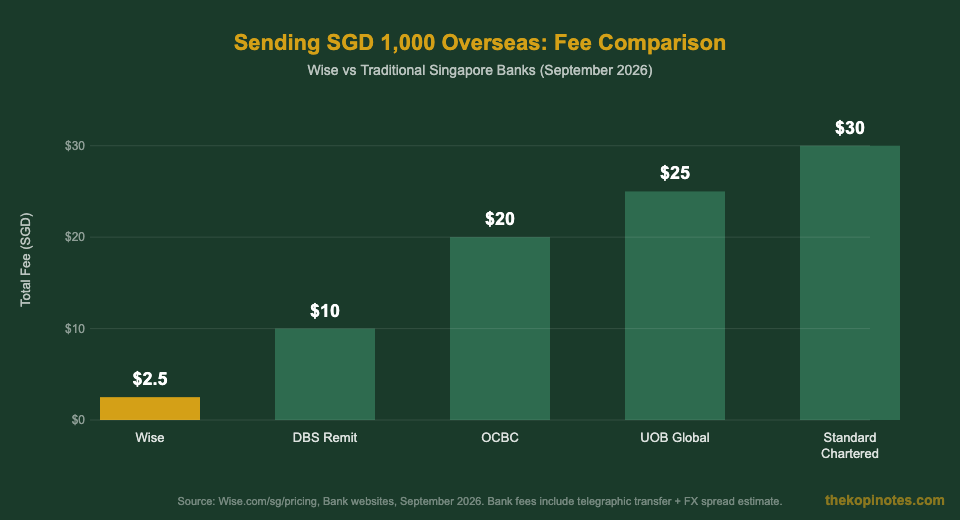
For example, if you send SGD 1,000 to Malaysia:
- Wise: approximately SGD 2.50 in fees at 0.25%, mid-market MYR rate
- DBS bank transfer: SGD 15–20 TT fee + FX spread of ~1.5%, costing you significantly more
- OCBC overseas transfer: typically SGD 20 flat fee + FX markup
The savings grow with the amount. On a SGD 10,000 transfer, Wise saves you hundreds of dollars compared to a standard bank telegraphic transfer.
That said, some local bank corridors are competitive. DBS Remit to select countries (e.g. Malaysia via DBS PayLah! to MayBank) can be free with zero spread. Always compare for your specific corridor before sending.
You can compare live rates using the Wise rate comparison tool against major banks.
How to Send Money with Wise
Once your account is verified and funded, sending money is straightforward:
- Open the Wise app or website and tap “Send money”
- Enter the amount in SGD (or the recipient’s currency)
- Add the recipient’s bank details (account number, SWIFT/BIC, IBAN depending on country)
- Review the fee and guaranteed exchange rate — Wise locks in the rate for a short window
- Confirm and fund the transfer via PayNow, Fast transfer, or debit card
Most transfers arrive same-day or next business day for major corridors. Wise guarantees a delivery date at checkout — if it’s late, you get a refund of the transfer fee.
Wise supports transfers to over 150 countries. For a broader overview of the most cost-effective ways to send money from Singapore, see our guide on Wise fees and what they mean for your transfers.
Wise Debit Card Singapore
The Wise debit card costs a one-time SGD 8.50 fee — there’s no annual fee after that. It works in 150+ countries and 40+ currencies.
When you spend abroad with the Wise card, it automatically uses the funds in the matching currency from your account. If you’re in Japan spending in JPY and you have JPY in your account, there’s zero conversion fee. If you don’t have JPY, Wise converts from another currency at the mid-market rate with a small conversion fee.
Key card features:
- Free ATM withdrawals up to SGD 100 per month (two free withdrawals)
- 1.75% fee on ATM withdrawals above SGD 100/month
- No foreign transaction fee on card spending
- Supports Apple Pay and Google Pay
- Freeze/unfreeze the card instantly in the app
- Works for online shopping in foreign currencies
Note: The Wise card cannot be used at Singapore ATMs for local cash withdrawals. It’s designed for overseas use.
If you’re comparing travel cards, our guide to the best travel credit cards in Singapore covers how Wise stacks up against YouTrip, Revolut, and credit cards with miles earning.
Wise vs YouTrip vs Revolut: Which Should You Choose?
All three cards use the mid-market rate and are popular with Singapore travellers. But they’re designed for slightly different use cases.
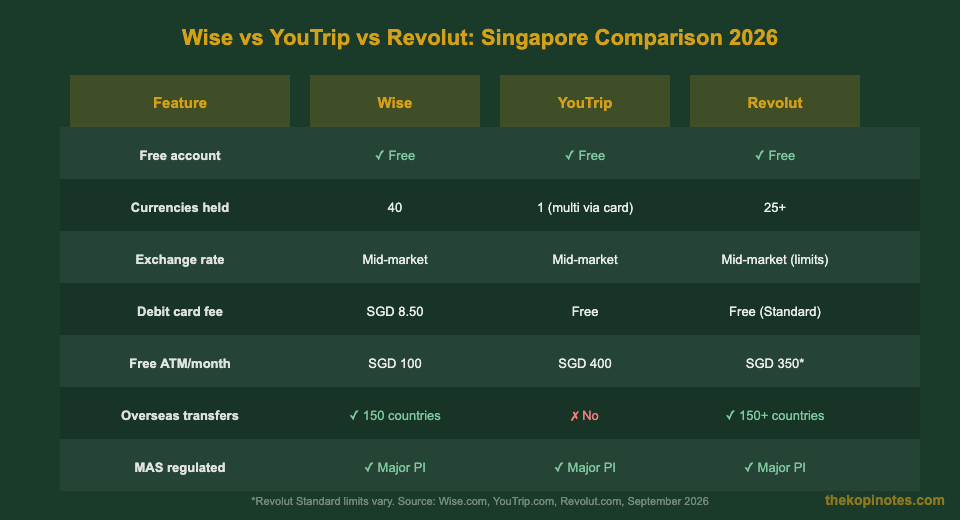
| Use Case | Best Choice | Why |
|---|---|---|
| Sending money overseas | Wise | 150 countries, transparent fees, same-day transfers |
| Simple travel card | YouTrip | Free card, SGD 400 free ATM/month, no account top-up fee |
| Multi-currency holding + transfers | Wise or Revolut | Both hold multiple currencies; Revolut offers more features at a price |
| Frequent traveller with cashback | Miles credit card | Travel cards don’t earn miles — best used alongside a miles card |
Source: Wise.com, YouTrip.com, Revolut.com, September 2026
If you already use YouTrip for travel and need to send money overseas, adding Wise makes sense. The two products complement each other well. You can sign up for YouTrip using our YouTrip referral code for a welcome bonus.
For a deeper dive, see our full best travel card Singapore comparison.
If you’re thinking about building long-term passive income alongside your travel savings, check out our Singapore retirement calculator to see how small consistent savings add up.
Frequently Asked Questions
Is a Wise account free in Singapore?
How long does Wise verification take in Singapore?
Can I use Wise to receive money in Singapore?
Is Wise better than DBS for overseas transfers?
Does Wise work in China?
What is the Wise transfer limit in Singapore?
Can foreigners or expats open a Wise account in Singapore?
This article was researched with the help of AI. While we strive to keep all information accurate and up to date, there may be errors. If you notice any discrepancies, please contact us.