How to Withdraw Money from moomoo Singapore: Step-by-Step Guide (2026)
Fees, processing times and every step explained — for Singapore investors.
To withdraw money from moomoo Singapore, go to Accounts > Transfers > Withdraw in the app, enter the amount, select your linked bank account, and verify with your trading password and a one-time passcode. SGD transfers to FAST-supported banks up to SGD 200,000 are completely free and arrive in 1 business day. Cash Plus withdrawals take 3–5 business days as funds must first be redeemed from the fund.
Not financial advice. All figures are for educational reference only. Data verified as at 28 October 2026 from moomoo Singapore’s official Help Centre.
Table of Contents
Before You Start: What You Need
Before you can withdraw money from moomoo Singapore, three things must be in place. First, your moomoo account must be fully verified through the complete KYC process — NRIC or passport plus SingPass verification. Second, you must have set up a trading password (separate from your login password). Third, your destination bank account must be pre-linked and verified in the app under Accounts > Profile > Bank Account.
moomoo only allows withdrawals to bank accounts registered in your own name — no third-party transfers. Most major Singapore banks are supported, including DBS/POSB, OCBC, UOB, Standard Chartered, Citibank, HSBC, and all FAST-enabled banks. If you are withdrawing USD or HKD, your bank must support the respective foreign currency. For a complete overview of the platform, see our moomoo Singapore brokerage review.
One important note: only settled cash can be withdrawn. If you have recently sold stocks, you must wait for settlement before the proceeds are available. US and Hong Kong equities settle T+2 (two business days after trade date). Singapore equities (SGX) also settle T+2. Margin collateral is not withdrawable while positions are open.
How to Withdraw from moomoo (Universal Account): Step-by-Step
The Universal Account is your main trading account in moomoo — this is where most investors hold their cash and equities, and where most withdrawals originate. Follow these four steps in the moomoo app (iOS or Android):
Step 1 — Open the Transfers Menu
Tap the Accounts icon at the bottom of the app (the person silhouette). Navigate to Transfers > Withdraw. The withdrawal request screen will open, showing your available withdrawable balance.
Step 2 — Enter the Amount and Select Source
Choose the currency (SGD, USD, or HKD) and confirm the source is set to Universal Account. Enter the withdrawal amount. Only the settled cash balance is available — unsettled amounts are greyed out and cannot be selected. There is no publicly stated minimum withdrawal amount; any positive settled balance can be withdrawn.
Step 3 — Select Your Destination Bank Account
Select the pre-linked bank account to receive the funds. If your bank is a FAST-supported bank (DBS/POSB, OCBC, UOB, Standard Chartered, Citibank, HSBC, Maybank, RHB, and most major Singapore banks), SGD transfers of SGD 200,000 or below are processed at no charge and typically arrive the next business day. For the full breakdown of which banks qualify and the associated fees, see the Withdrawal Fees Table below.
Step 4 — Submit and Verify
Tap Submit. moomoo requires you to verify with your trading password. You may also be prompted for a one-time passcode (OTP) via SMS or your authenticator app. Once verified, a push notification confirms the request is received. According to moomoo Singapore’s official withdrawal guide, that completes the process — there is no further action needed on your end while the transfer is being processed.
Withdrawal cut-off time: Withdrawals submitted before 3:00 PM SGT on a business day are generally processed that same day. Requests submitted after 3:00 PM or on weekends/public holidays are processed the next business day.
How to Withdraw from moomoo Cash Plus
moomoo Cash Plus is the platform’s cash management feature — it parks your idle cash into short-duration bond funds to earn a higher yield than a standard savings account. If you hold funds in Cash Plus and need to access them, note that the process is different from a Universal Account withdrawal and takes longer.
Cash Plus funds cannot be directly transferred to your bank. They must first be redeemed back to your Universal Account, and only then withdrawn to your bank. Here’s how:
Step 1 — Redeem from Cash Plus
From the app home screen, tap Cash Plus. Select Redeem and enter the amount. The system will move funds from Cash Plus back to your Universal Account. This step alone typically takes 1–2 business days depending on the fund’s settlement cycle.
Step 2 — Withdraw from Universal Account
Once the redeemed amount appears in your Universal Account as settled cash, follow the standard Universal Account withdrawal steps above. Total time from Cash Plus redemption to bank receipt is typically 3–5 business days. For SGD amounts below SGD 200,000 going to FAST banks, moomoo quotes 3 business days total.
Pro tip: If you might need to access funds quickly — for example, during a market opportunity or an emergency — keep your liquid reserve in the Universal Account as settled cash rather than in Cash Plus. The higher yield of Cash Plus comes at the cost of a 3–5 day redemption window. For a deeper look at how Cash Plus and the platform’s full fee structure work, see the moomoo Singapore platform fees guide.
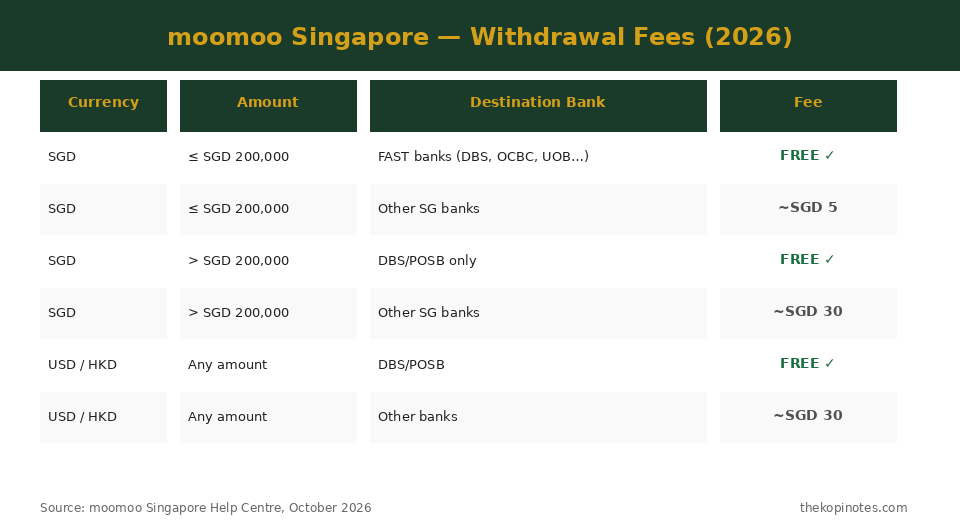
moomoo Withdrawal Fees: Full 2026 Table
moomoo structures its withdrawal fees around three variables: currency, amount, and destination bank. The most cost-efficient route for the majority of Singapore investors is a SGD FAST transfer of SGD 200,000 or below — this is free and arrives the next business day. The table below covers all fee scenarios as at October 2026:
| Currency | Amount | Destination Bank | Fee |
|---|---|---|---|
| SGD | ≤ SGD 200,000 | FAST-supported SG banks (DBS, OCBC, UOB, SCB, Citibank…) | Free |
| SGD | ≤ SGD 200,000 | Other SG banks (non-FAST) | ~SGD 5 |
| SGD | > SGD 200,000 | DBS/POSB only | Free |
| SGD | > SGD 200,000 | Other SG banks | ~SGD 30 |
| USD / HKD | Any amount | DBS/POSB multi-currency account | Free |
| USD / HKD | Any amount | Other SG banks (multi-currency) | ~SGD 30 |
| Any currency | Any amount | Banks outside Singapore | ~SGD 30 |
Source: moomoo Singapore Help Centre, October 2026. Exact charges may vary slightly; always verify in the app before withdrawing.
For most Singapore retail investors withdrawing below SGD 200,000 to a FAST bank, the effective withdrawal cost is zero. This compares favourably with some competing platforms — for a full comparison of broker fees, see the moomoo Singapore beginner’s guide which covers commissions, FX spreads, and platform fees in full.
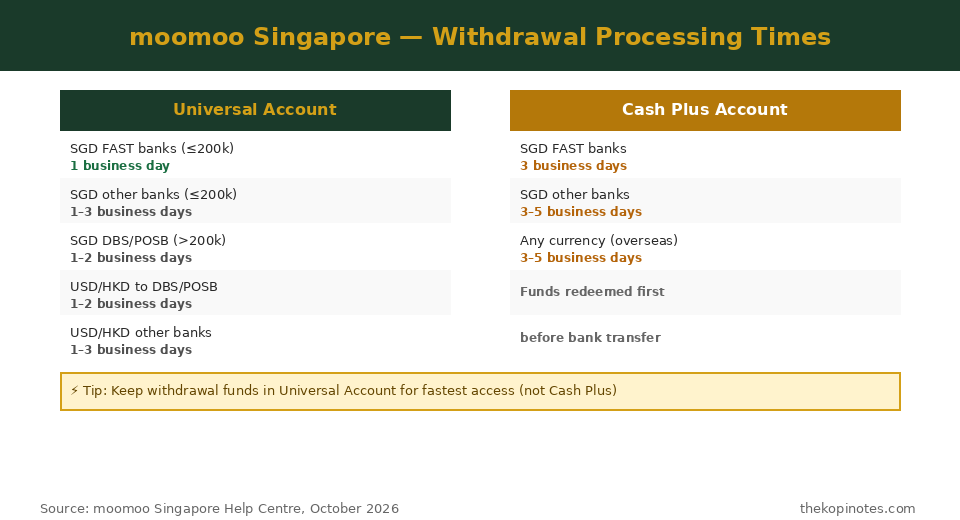
Withdrawal Processing Times: How Long Will It Take?
Processing times depend on which account you are withdrawing from and which bank you are transferring to. The table below consolidates all scenarios for October 2026:
| Account | Currency | Amount | Destination | Processing Time |
|---|---|---|---|---|
| Universal | SGD | ≤ SGD 200k | FAST banks | 1 business day |
| Universal | SGD | ≤ SGD 200k | Other SG banks | 1–3 business days |
| Universal | SGD | > SGD 200k | DBS/POSB | 1–2 business days |
| Universal | SGD | > SGD 200k | Other SG banks | 1–3 business days |
| Universal | USD / HKD | Any | DBS/POSB | 1–2 business days |
| Universal | USD / HKD | Any | Other SG banks | 1–3 business days |
| Cash Plus | SGD | ≤ SGD 200k | FAST banks | 3 business days |
| Cash Plus | Any | Any | Other SG banks | 3–5 business days |
Source: moomoo Singapore Help Centre — Withdrawal Processing Times, October 2026.
The key takeaway: Universal Account to a FAST bank is always the fastest and cheapest route. If your funds are in Cash Plus, plan for 3 business days minimum. Note that processing times are measured from when your request is received and verified — not from when you submit it. Requests submitted after the 3:00 PM SGT cut-off are processed from the next business day.
How to Check Your Withdrawal Status
After submitting a withdrawal request, you can track it in the moomoo app at any time. Navigate to Accounts > Transfers > Withdrawal > Fund Record. Your withdrawal will show one of the following statuses:
- Pending — The request is received and under processing by moomoo and/or your bank. Normal for the first 1–2 business days.
- Completed — Funds have been sent to your bank. Allow up to 1 additional business day for the bank to credit your account (FAST transfers are typically near-instant once completed by moomoo).
- Cancelled — The request was cancelled before processing completed. Funds return immediately to your Universal Account.
- Declined — The withdrawal was declined (e.g., insufficient settled cash, bank account verification failed). Funds remain in your account. Contact moomoo support via the in-app chat or email at clientservice@sg.moomoo.com.
- Reversed — The bank returned the funds to moomoo (e.g., bank account details mismatch or account closed). Funds return to your Universal Account. Update your bank details and retry.
moomoo also sends a push notification at each major status change. Make sure push notifications are enabled in your phone settings for the moomoo app.
Common Issues and How to Fix Them
Here are the four most frequent withdrawal problems Singapore investors report on moomoo, along with solutions:
1. “Insufficient Withdrawable Balance”
This almost always means your recent trades have not yet settled. US and HK stocks settle T+2 (two business days after the trade date). Wait for settlement — the app will show an increase in withdrawable balance once the trade settles. If you have outstanding margin borrowing, part of your cash may be held as collateral and is not withdrawable until the margin is repaid.
2. Withdrawal Status Stuck on “Pending” for Over 3 Business Days
Contact moomoo customer support. Provide the withdrawal reference number shown in your Fund Record. Normal processing for FAST SGD transfers is 1 business day; delays beyond 3 business days are uncommon and typically indicate a bank-side issue. moomoo support can be reached via the in-app chat (fastest response), email at clientservice@sg.moomoo.com, or by phone at +65 6321 8888 during business hours.
3. Wrong Bank Account Linked / Need to Change Bank
moomoo only allows withdrawals to pre-verified bank accounts. If you recently changed your bank, update your details in Accounts > Profile > Bank Account and complete the re-verification. This typically takes 1–2 business days. You cannot withdraw to the new account until verification is complete.
4. Forgotten Trading Password
Your trading password is separate from your login password. If you have forgotten it, reset via Accounts > Profile > Trading Password > Forgot Password. Identity verification via SingPass or NRIC upload is required. Once reset, allow up to 24 hours before the new password is usable for withdrawals (for security cooling-off).
For a broader comparison of brokers, see the Tiger Brokers Singapore fees and features review and our moomoo desktop app guide, which covers how to manage withdrawals and positions from a computer.
Frequently Asked Questions
How long does a moomoo withdrawal take in Singapore?
moomoo Singapore withdrawals from the Universal Account to a FAST-supported bank (DBS, OCBC, UOB, etc.) take 1 business day for amounts up to SGD 200,000. For other banks or larger amounts, allow 1–3 business days. Cash Plus withdrawals take 3–5 business days because funds must first be redeemed from the fund before they can be transferred to your bank.
Is there a withdrawal fee for moomoo Singapore?
SGD withdrawals of SGD 200,000 or below to FAST-supported Singapore banks are completely free. Above SGD 200,000, only DBS/POSB withdrawals remain free; other banks incur approximately SGD 30. USD and HKD withdrawals to a DBS/POSB multi-currency account are also free; other banks cost approximately SGD 30. International transfers incur approximately SGD 30 regardless of amount.
What is the minimum withdrawal amount for moomoo Singapore?
moomoo Singapore does not publicly specify a minimum withdrawal amount in its Help Centre. In practice, you can withdraw any positive settled cash balance. Contact moomoo support at clientservice@sg.moomoo.com or via in-app chat if you encounter an error on a very small withdrawal amount.
Can I withdraw USD or HKD directly to a Singapore bank?
Yes. moomoo Singapore supports direct USD and HKD withdrawals to Singapore bank accounts that hold foreign currency balances, such as DBS Multi-Currency Accounts or OCBC Multi-Currency Accounts. Withdrawals to DBS/POSB are free; other supported SG banks incur approximately SGD 30. Processing takes 1–3 business days.
Why is my moomoo withdrawal still showing Pending?
A Pending status is normal for the first 1–2 business days after submission. If it has been more than 3 business days without updating, contact moomoo customer service with your withdrawal reference number (found in Accounts > Transfers > Withdrawal > Fund Record). Reach support via in-app chat, email at clientservice@sg.moomoo.com, or phone at +65 6321 8888.
Is it safe to withdraw money from moomoo?
Yes. moomoo Singapore is operated by Moomoo Financial Singapore Pte. Ltd., which holds a Capital Markets Services (CMS) licence from MAS (licence number CMS101000). Client funds are held in segregated trust accounts, separate from company operating funds. All withdrawals require both your trading password and an OTP, with push notification confirmation sent for every request. Your Singapore-traded securities are also protected by the SGX Fidelity Fund up to SGD 50,000 per claimant.
Can I cancel a moomoo withdrawal after submitting?
You may be able to cancel a withdrawal while it is still in Pending status, before moomoo has processed it. Go to Accounts > Transfers > Withdrawal > Fund Record and tap the pending request to see if a cancellation option is available. Once the status changes to Processing or Completed, the withdrawal cannot be cancelled. Contact moomoo support immediately if you need to attempt a cancellation.
The Bottom Line
Withdrawing from moomoo Singapore is a straightforward four-step process. For the fastest and cheapest experience, keep your trading funds in the Universal Account (not Cash Plus) and use a FAST-enabled Singapore bank. Standard SGD transfers below SGD 200,000 are free and arrive in 1 business day — no hidden fees, no minimum balance requirement for the withdrawal itself.
If you are still evaluating whether moomoo is the right platform, our full moomoo Singapore brokerage review covers the complete picture — commissions, safety, promotions, and how it compares with Tiger Brokers, IBKR, and Syfe.
Disclaimer: Withdrawal fee and processing time data is sourced from moomoo Singapore’s official Help Centre and verified as at 28 October 2026. All figures are subject to change — always confirm the latest details in the moomoo app or Help Centre before initiating a withdrawal. This article is for informational purposes only and does not constitute financial advice. Moomoo Financial Singapore Pte. Ltd. holds CMS licence CMS101000 and MPI licence PS20200617 from MAS.
This article was researched with the help of AI. While we strive to keep all information accurate and up to date, there may be errors. If you notice any discrepancies, please contact us.