YouTrip Card in the USA: USD Rates, ATM Fees & Travel Tips (2026 Guide)
Everything Singapore travellers need to know about using YouTrip in America — exchange rates, ATM costs, gas station quirks, and tipping tips.
YouTrip works in the USA with zero FX fees and Mastercard wholesale exchange rates — no hidden markups. You get S$400 in free ATM withdrawals per calendar month, with a 2% fee after that. USD is one of YouTrip’s 12 wallet currencies, so you can pre-load and lock in your rate before flying. For card payments, YouTrip consistently beats Singapore bank debit and credit cards on the SGD/USD rate.
Not financial advice. All figures are for educational reference only. Data verified as at 25 August 2026.
- YouTrip gives you mid-market USD rates with 0% FX fees — saving you 2–3% vs most Singapore bank cards
- S$400 free ATM withdrawals/month; US bank operator fees add ~USD 5 per withdrawal regardless — so withdraw big, withdraw less often
- Pre-load USD in-app before your trip to lock in today’s rate; always choose USD (not SGD) on ATM and card terminals to avoid DCC surcharges
Table of Contents
Contents — Click to expand
- What Is YouTrip?
- Can You Use YouTrip in the USA?
- YouTrip USD Exchange Rate
- US ATM Fees with YouTrip
- YouTrip vs Other Cards for the USA
- How to Use YouTrip in the USA (Step-by-Step)
- Top Tips to Save Money in the USA
- The Gas Station Issue (Important!)
- Tipping in the USA: A Quick Guide
- Frequently Asked Questions
What Is YouTrip?
YouTrip is a Singapore-issued multi-currency prepaid Mastercard card. It’s licensed by the Monetary Authority of Singapore (MAS) under the Payment Services Act and issued by You Technologies Group (Singapore) Pte Ltd. The card is free to get, free to use, and charges no annual fees.
What makes it stand out is the exchange rate. YouTrip uses Mastercard wholesale exchange rates — also called mid-market rates — which are the same benchmark rates you see on Google or XE.com. No markup is added on top. Most Singapore bank debit and credit cards add a 1.5–3.25% spread on top of the mid-market rate every time you transact in a foreign currency. YouTrip doesn’t.
You can hold and manage 12 currencies in the app: SGD, USD, EUR, GBP, JPY, AUD, NZD, HKD, CHF, MYR, THB, and SEK. For other currencies not on this list, YouTrip auto-converts at Mastercard’s wholesale rate with no extra charge.
Top-up is free via PayNow or Mastercard. There’s a 1.5% fee if you use a Visa credit card to top up — easily avoided by switching to PayNow.
Can You Use YouTrip in the USA?
Yes — YouTrip works seamlessly across the entire United States. Mastercard is accepted at virtually every point of sale in America, from Times Square to rural gas stations. Tap-to-pay works at most merchants. Apple Pay and Google Pay are also compatible with YouTrip.
The US is one of the most card-friendly destinations you’ll visit. Most restaurants, shops, theme parks, grocery stores, and attractions accept cards with no minimum spend. That said, cash is still genuinely useful for:
- Tipping — hotel porters, valet, tour guides, and food truck vendors prefer or expect cash
- Smaller independent businesses — some remain cash-only or have card minimums
- Street food vendors and farmers markets
- Laundromats — coin-operated machines are still common in apartments and older hotels
A good rule of thumb: bring USD 100–200 (~S$128–S$256) in cash for incidental expenses, and put everything else on your YouTrip card.
YouTrip USD Exchange Rate
USD is one of YouTrip’s 12 wallet currencies, which gives you a useful advantage: you can pre-exchange SGD to USD in the app before your trip and lock in that day’s rate. If you expect the USD to strengthen against SGD before you fly, locking in early can save you money.
YouTrip also has a Rate Updates feature — enable it in the app to get real-time alerts when the SGD/USD rate hits its best level of the week or month. This is particularly useful for longer US trips where you’re loading a larger amount.
vs credit card rate: ~1 SGD ≈ 0.7600–0.7630 USD (after 2.5–3.25% markup) · Rates as at Apr 2026
At a spread of roughly 2–3%, the difference on a S$3,000 top-up (about USD 2,300 — a reasonable budget for a 10-day US trip) works out to S$60–S$90 in savings just on the exchange rate alone, before counting any foreign transaction fees your bank card would also charge.
| Card Type | FX Fee | USD Rate Markup | Saving on S$3,000 |
|---|---|---|---|
| YouTrip | 0% | 0% (mid-market) | Baseline |
| DBS/OCBC/UOB Debit | 1.5% | ~1% spread | Save ~S$75 |
| SG Credit Card (Visa/MC) | 2.5–3.25% | ~1% spread | Save ~S$105–S$128 |
Source: YouTrip official rates; DBS/OCBC/UOB published FX fee schedules. Savings are indicative and vary by transaction date and amount. Data as at August 2026.
US ATM Fees with YouTrip
Here’s where the USA gets expensive compared to most other destinations: US bank ATM operator fees are among the highest in the world. You need to understand two separate layers of fees before withdrawing cash.
Layer 1 — YouTrip’s fee: S$400 in free ATM withdrawals per calendar month. After that, YouTrip charges 2% on the amount withdrawn. If you’re a moderate cash user on a typical 10-day trip, you should stay well within the free allowance.
Layer 2 — The US bank’s operator fee: This is separate from YouTrip and goes directly to the ATM owner. Typical charges:
- Chase ATMs: USD 5 flat per withdrawal
- Bank of America ATMs: USD 5 flat
- Wells Fargo ATMs: USD 5 flat
- Allpoint network ATMs (at Walgreens, CVS, Target): usually surcharge-free for participating bank customers; foreign cardholders may still be charged
- Worst-case (bar/casino/tourist-area ATMs): up to USD 11 per withdrawal
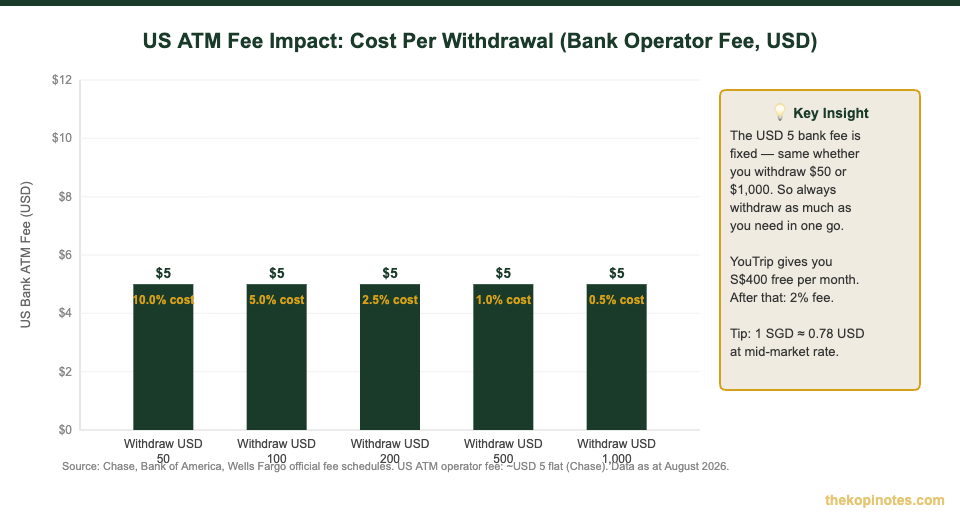
The practical implication is simple: the USD 5 fee is fixed whether you withdraw USD 50 or USD 1,000. Always withdraw the largest amount you need in one go rather than making multiple small withdrawals. The chart below illustrates exactly how much this matters.
YouTrip vs Other Cards for the USA
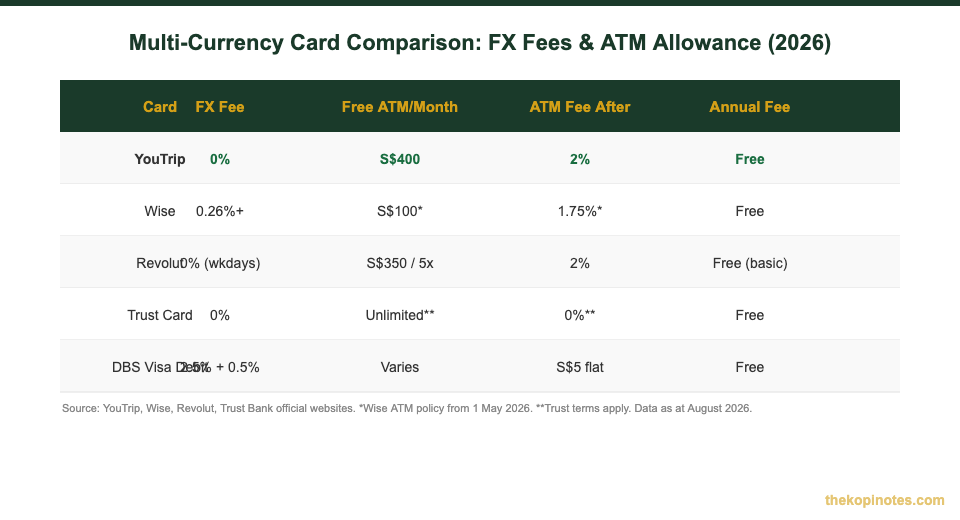
If you’re deciding which card to bring for your US trip, here’s how the main options stack up for Singaporeans. The chart above shows the headline numbers. Here’s what they mean in practice for a typical two-week US holiday with S$3,000 in spending.
YouTrip is the all-rounder: zero FX fees, mid-market rates, S$400 free ATM per month. USD is pre-loadable. No annual fee. The 2% fee after S$400 is only relevant if you’re withdrawing large amounts of cash — most travellers won’t hit it on a short US trip.
Wise also offers excellent rates (from 0.26% conversion fee), but from 1 May 2026, the free ATM allowance dropped to just S$100/month. After that, it’s a 1.75% fee. For cash-heavy US trips, Wise is now more expensive than YouTrip on ATM withdrawals. For purely cashless spending, rates are comparable.
Revolut gives you S$350 free ATM withdrawals or 5 withdrawals per month, then 2%. Weekend FX carries a 1% premium — not ideal if you make large conversions on Saturdays or Sundays. The free plan works well if you’re disciplined about timing your top-ups to weekdays.
Trust Card charges no FX fees and offers no Trust-side ATM fee overseas. However, you still pay the US ATM operator’s fee regardless — the USD 5 from Chase/BoA applies regardless of your card. Trust is a strong option especially if you’re already a Standard Chartered or FairPrice group customer.
For most Singaporeans heading to the USA, YouTrip + a backup credit card is the optimal combo: YouTrip for all purchases (zero FX fees), your best Singapore miles card as emergency backup. Use our best travel card Singapore guide for a full miles card comparison.
Want to dig deeper on YouTrip vs its competitors? Check out our detailed Wise vs YouTrip comparison and Revolut vs YouTrip breakdown.
How to Use YouTrip in the USA (Step-by-Step)
Using YouTrip in America is straightforward. Here’s the exact sequence to follow before and during your trip.
Before you fly:
- Open the YouTrip app → tap “Exchange” → convert SGD to USD at the live rate to lock in today’s rate
- Enable Rate Updates in the app to get alerts if the SGD/USD rate improves before you depart
- Make sure your YouTrip PIN is 4 digits — some US ATMs don’t support 6-digit PINs
- Top up a buffer: for a 10-day trip, loading SGD 2,500–4,000 in USD equivalent is a reasonable starting point
Paying at stores and restaurants:
- Tap to pay with YouTrip wherever Mastercard is accepted
- If asked “Debit or Credit?” — select Credit (YouTrip is a prepaid Mastercard, processed as credit)
- If a terminal asks “Do you want to pay in SGD?” — always say No, pay in USD. This avoids Dynamic Currency Conversion (DCC), a 3–5% hidden surcharge
Withdrawing USD cash from ATMs:
- Look for ATMs with the Mastercard logo — Chase, Bank of America, and Wells Fargo branches have the best coverage in major US cities
- Insert your YouTrip card and select “Savings account”
- Enter your 4-digit PIN
- Enter your desired USD amount — keep it within your S$400 free monthly allowance to avoid YouTrip’s 2% fee on top of the bank’s operator fee
- When asked about conversion — always choose USD, not SGD
For more tips on using YouTrip across different destinations, see our YouTrip Europe guide — many of the same card principles apply across borders.
Top Tips to Save Money in the USA with YouTrip
1. Withdraw large amounts less frequently. The USD 5 ATM operator fee is fixed regardless of withdrawal size. Withdraw USD 400–500 in one go rather than USD 50–100 multiple times. You’ll pay the same fee but spread it over more cash.
2. Time withdrawals across calendar months. YouTrip’s free S$400 ATM allowance resets on the 1st of each month. If your trip spans two months (e.g. 28 Jul–10 Aug), you get S$800 in total free withdrawals. Plan accordingly.
3. Avoid airport money changers in the US. Changi Airport money changers offer reasonable rates for popular currencies, but US airport currency exchanges are notoriously bad — spreads of 8–12% are common. Pre-load USD on YouTrip before you fly.
4. Stick to major bank ATMs. Chase and Bank of America ATMs are at airports, shopping malls, and hotel lobbies. Standalone ATMs in tourist areas, bars, and casinos can charge up to USD 11 per withdrawal.
5. Enable transaction alerts. Go to app settings and turn on push notifications. Every transaction appears instantly in the app so you can catch any fraudulent charges immediately. The US has higher card skimming rates than Singapore — stay vigilant.
6. Keep a backup card. Even though YouTrip works reliably, always carry a second card in case of technical issues. Store it separately from your YouTrip card. Planning your finances well ahead of a trip also helps your long-term wealth picture — use the Singapore retirement calculator for longer-term money planning when you’re back home.
The Gas Station Issue (Important!)
This catches almost every Singapore visitor off guard: you cannot pay at the pump at US petrol stations using a foreign card.
When you insert a card at an unattended US petrol pump, the machine asks for a US ZIP code (5-digit postal code) for billing verification. Foreign cards have no US ZIP code, so the machine declines the transaction. This is not a YouTrip-specific issue — it affects all non-US bank cards equally.
The solution is simple: always go inside the petrol station and pay the cashier directly. Tell the cashier which pump number you’re using and the amount you want to pre-pay. This works with YouTrip and any other foreign card at any US petrol station, every time.
Tipping in the USA: A Quick Guide
Tipping is not optional in the United States — it’s a cultural expectation and a meaningful part of service workers’ income. Here’s what you need to know:
| Situation | Standard Tip | Notes |
|---|---|---|
| Sit-down restaurant | 18–20% of bill | Tip on pre-tax amount |
| Bar (drinks) | USD 1–2 per drink | Or 18–20% on tab total |
| Hotel porter/bellhop | USD 1–2 per bag | Cash preferred |
| Taxi/Uber | 10–15% | Added on app for Uber/Lyft |
| Valet parking | USD 2–5 on collection | Cash preferred |
| Housekeeping | USD 2–5 per night | Leave on pillow daily |
| Tour guide (half day) | USD 10–20 per person | Cash or card via app |
Source: YouTrip US ATM Withdrawal Guide (April 2026); US cultural convention. Data as at August 2026.
Card tipping is perfectly normal at restaurants — the terminal will prompt you for a percentage or dollar amount after your meal. For porters, valet, and housekeeping, cash is preferred since they receive it immediately. This is why it pays to keep USD 50–100 in small bills for the duration of your US trip.
If you haven’t got your YouTrip card yet, use our YouTrip referral code to get a free S$5 credited to your account when you sign up — it covers a few ATM fees right from the start.
Frequently Asked Questions
Does YouTrip work in the USA?
Yes. YouTrip is a Mastercard prepaid card that works at any merchant or ATM in the US that accepts Mastercard — which is virtually everywhere. You can use it for in-store purchases, online shopping, hotel check-ins, and ATM withdrawals across all 50 states. YouTrip charges zero FX fees, and USD is one of its 12 pre-loadable wallet currencies.
What is YouTrip's SGD to USD exchange rate?
YouTrip uses Mastercard’s wholesale exchange rate — the same mid-market benchmark you see on Google or XE.com — with zero markup. As at April 2026, the indicative rate was approximately 1 SGD = 0.7852 USD. The rate changes in real time; check the live rate in the YouTrip app under “Exchange” before converting. You can also pre-load USD to lock in today’s rate before your trip.
How much does YouTrip charge for ATM withdrawals in the USA?
YouTrip gives you S$400 in free ATM withdrawals per calendar month. After that, YouTrip charges 2% on the withdrawn amount. Separately, US bank ATM operators charge their own fee — typically USD 5 flat per withdrawal (Chase, Bank of America, and Wells Fargo all charge USD 5). This US bank fee is unavoidable and applies regardless of which card you use, so always withdraw as much as you need in one transaction to minimise the cost-per-dollar impact.
Should I pre-load USD or let YouTrip auto-convert when I spend?
Both options use the same Mastercard wholesale rate with zero FX fee, so the rate itself is the same either way. Pre-loading USD gives you the option to lock in a favourable rate before departure — useful if you think the SGD/USD rate will worsen while you’re travelling. If you don’t pre-load, YouTrip auto-converts from your SGD balance at the rate at the moment of each transaction. Use YouTrip’s Rate Updates feature to monitor the rate and pre-load when it looks favourable.
What is Dynamic Currency Conversion (DCC) and how do I avoid it?
Dynamic Currency Conversion (DCC) is when a US merchant or ATM offers to charge your card in Singapore Dollars instead of US Dollars. It sounds convenient, but the merchant sets the exchange rate — typically 3–5% worse than the market rate. Always decline and choose to pay in USD instead. If an ATM screen asks “Would you like to be charged in SGD?” — press No or Decline. This applies to all foreign cards, not just YouTrip.
Why does my card get declined at US petrol stations and how do I fix it?
US petrol stations require a 5-digit US ZIP code to authorise card payments at the pump. Foreign cards have no US ZIP code, so the machine declines the transaction. This is not a YouTrip-specific issue — it affects all non-US bank cards. The fix: go inside the petrol station and pay the cashier directly at the counter. Tell the cashier which pump number you want and the amount to pre-authorise. This works every time with any foreign card.
Heading to the USA? Get YouTrip First.
Zero FX fees. Mid-market USD rates. S$400 free ATM withdrawals per month. Sign up for free and get S$5 credited to your account.
This article was researched with the help of AI. While we strive to keep all information accurate and up to date, there may be errors. If you notice any discrepancies, please contact us.