YouTrip Card for Japan & Korea Trips: JPY, KRW & Suica Guide (2026)
Which ATMs to use for JPY and KRW, how to top up Suica and ICOCA, and what a S$1,000 Japan-Korea trip really costs with a YouTrip card.
For Japan and Korea trips, spend or withdraw directly in JPY or KRW on your YouTrip card — never SGD. YouTrip charges 0% FX fees on both currencies and gives you S$400 in free ATM withdrawals every calendar month. In Japan, 7-Eleven’s Seven Bank ATMs are usually the cheapest place to withdraw; in Korea, look for ATMs marked “Global ATM”. Data verified as at 9 August 2026.
Not financial advice. All figures are for educational reference only and sourced from YouTrip’s official fee pages and blog. Data verified as at 9 August 2026.
- Always withdraw or spend in JPY/KRW, not SGD — declining Dynamic Currency Conversion keeps YouTrip’s 0% FX fee intact
- In Japan, 7-Eleven/Seven Bank ATMs are usually fee-free for Mastercard; in Korea, use “Global ATM” machines and favour KB Bank or Woori
- You can top up a virtual Suica or ICOCA card in Apple Wallet using your YouTrip Mastercard, with the same 0% FX rate
Table of Contents
Contents — Click to expand
- Why YouTrip Works Well for Japan & Korea Trips
- Best ATMs in Japan for YouTrip Cash Withdrawals
- Best ATMs in South Korea for YouTrip Cash Withdrawals
- Topping Up Suica & ICOCA With Your YouTrip Card
- What a S$1,000 Japan + Korea Trip Really Costs
- Preparing Your YouTrip Card Before You Fly
- Common Mistakes to Avoid
- Frequently Asked Questions
Why YouTrip Works Well for Japan & Korea Trips
Japan and Korea are two of the most popular trips for Singaporeans, and both still run partly on cash. Convenience stores, izakayas, and street food stalls in Japan often don’t take cards. Traditional markets and small vendors in Korea are the same. That means you’ll almost certainly need to withdraw local currency at some point, on top of tapping your card for hotels and bigger purchases.
Your YouTrip card charges 0% FX fees on both Japanese Yen (JPY) and Korean Won (KRW), and passes through the real Mastercard exchange rate with no markup. As at 9 February 2026, YouTrip’s own published reference rate was approximately 1 SGD = 123.43 JPY; as at 16 March 2026 it was approximately 1 SGD = 1,163 KRW. Rates move daily, so always check the live rate in your YouTrip app before converting.
Here’s the part most Singaporeans get wrong: when a card terminal or ATM asks whether you want to pay in SGD or the local currency, always choose local currency. Choosing SGD triggers Dynamic Currency Conversion (DCC) — the merchant’s own bank sets that exchange rate, and it’s almost always worse than what YouTrip gives you. If you’re heading to Malaysia instead, our YouTrip guide for JB and Malaysia trips covers the same DCC trap in more detail for that specific route.
Best ATMs in Japan for YouTrip Cash Withdrawals
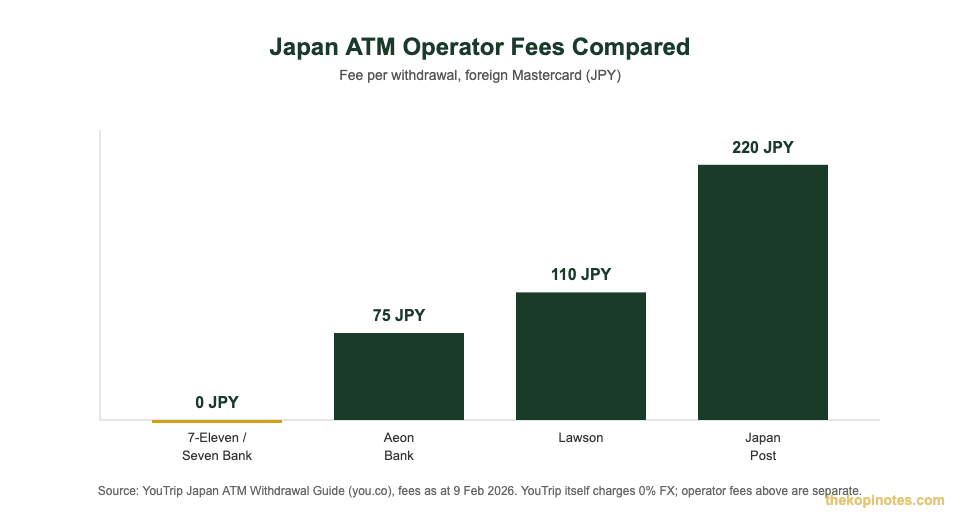
Not every ATM in Japan accepts foreign cards. Look for machines marked “International” or displaying the Mastercard, Maestro, or Cirrus logo. Here’s how the main options compare for a YouTrip cardholder.
| ATM Network | Operator Fee | Withdrawal Limit | Notes |
|---|---|---|---|
| 7-Eleven / Seven Bank | Often 0 JPY for Mastercard | 100,000 JPY (~S$811) | 27,000+ locations, open 24/7, English menu |
| Aeon Bank | 75 JPY (~S$0.61) | 50,000 JPY (~S$405) | Aeon malls, 7 languages supported |
| Lawson | 110 JPY (~S$0.89) | 50,000 JPY, 10,000 JPY increments | 13,000+ convenience stores |
| Japan Post | 220 JPY (~S$1.78) | 50,000 JPY (~S$405) | Good backup in rural areas, limited hours |
Source: YouTrip Japan ATM Withdrawal Guide (you.co), fees and limits as at 9 February 2026.
7-Eleven’s Seven Bank ATMs are the best default choice — they’re everywhere, open around the clock, and typically don’t charge their own fee on top of YouTrip’s terms. On top of the operator fee (if any), YouTrip gives you S$400 in free ATM withdrawals every calendar month, with a 2% fee on withdrawals beyond that. Always select “Savings Account” when prompted, and decline any offer to withdraw in SGD.
Best ATMs in South Korea for YouTrip Cash Withdrawals
Korea is highly cashless, but you’ll still want some Won for street food vendors, traditional markets like Gwangjang, and smaller taxis. Not every Korean ATM accepts foreign cards — look specifically for machines marked “Global ATM” or “Global Services”.
KB Bank and Woori Bank ATMs are generally known for charging lower fees to foreign cardholders. You’ll also find foreign-card-friendly ATMs at convenience stores (CU, GS25, 7-Eleven), subway stations, and inside Incheon Airport. Korea ATM withdrawal limits typically run between 400,000 KRW (~S$339) and 1,000,000 KRW (~S$846) per transaction, depending on the bank.
| Factor | Detail |
|---|---|
| Typical local ATM fee | Around 2.43%–2.68% at some Korean banks, on top of your card issuer’s own fees |
| YouTrip FX fee | 0% — real Mastercard exchange rate |
| YouTrip free ATM allowance | S$400/month, then 2% fee |
| Withdrawal limit per transaction | 400,000–1,000,000 KRW (~S$339–S$846), varies by bank |
Source: YouTrip South Korea ATM Withdrawal Guide (you.co), as at 16 March 2026.
The steps are the same as in Japan: insert your card, select “Savings Account,” key in your PIN, and withdraw in KRW. When the machine asks if you want to see the amount in SGD, decline — that’s DCC again, and it will cost you more than paying in Won. YouTrip’s overseas ATM withdrawal limit is capped at S$5,000 a day, which is more than enough for most Korea trip cash needs.
Topping Up Suica & ICOCA With Your YouTrip Card
Japan’s IC transit cards — Suica, ICOCA, and PASMO — let you tap onto trains and buses and pay at convenience stores without cash. If you’re on an iPhone, you can add a virtual Suica or ICOCA card to Apple Wallet and top it up directly with your YouTrip card, at the same 0% FX rate you get everywhere else.
Here’s how: add your YouTrip Mastercard to Apple Pay first. Then open the Wallet app, tap the “+” icon, choose “Travel Card,” search “Suica,” and top up your desired JPY amount. Note that Suica top-ups only accept Mastercard, not Visa — so this only works if your YouTrip card is issued on the Mastercard network, which it is by default.
Android users without a Japan-bought Osaifu-Keitai-compatible phone can’t add a virtual Suica. The workaround is the Welcome Suica, a prepaid IC card for tourists available at Narita, Haneda, and select JR East service centres. It’s free to obtain but only tops up with cash at the station — you can’t load it directly with your YouTrip card. Physical Suica cards have also faced supply shortages in recent years, so the virtual card via Apple Wallet remains the most reliable option for iPhone users.
What a S$1,000 Japan + Korea Trip Really Costs
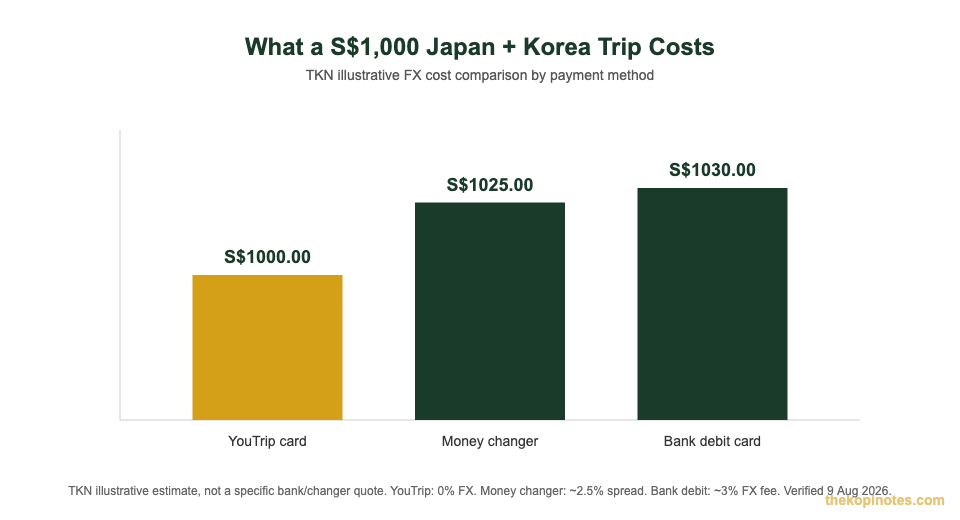
Say you spend S$1,000 equivalent across JPY and KRW on a combined Japan-Korea trip — hotels, food, shopping, transport. Here’s how the total cost stacks up by payment method. This is a TKN illustrative calculation: the bank debit card figure uses YouTrip’s own published typical SG bank FX fee range of 2.5%–3.5% (midpoint 3%), and the money changer figure uses a commonly cited SG money changer spread of around 2%–3% (midpoint 2.5%). Both are estimates for comparison, not quotes from a specific institution.
| Payment Method | FX Cost | Total for S$1,000 Spend |
|---|---|---|
| YouTrip card | 0% FX fee | S$1,000.00 |
| Money changer | ~2.5% spread* | ~S$1,025.00 |
| Bank debit card | ~3% FX fee* | ~S$1,030.00 |
*TKN illustrative estimate, not a quote from a specific bank or money changer. Bank debit card uses YouTrip’s published typical SG bank FX fee range (2.5%–3.5%); money changer uses a commonly cited SG spread range (2%–3%). Actual fees vary by issuer and changer. Verified 9 August 2026.
On top of the FX savings, remember that Japan’s convenience-store ATMs also carry their own small operator fees (0–220 JPY depending on the network), and some Korean banks charge roughly 2.43%–2.68% on withdrawals. A YouTrip card doesn’t eliminate every fee in the chain, but it removes the FX markup entirely and gives you S$400 a month in free ATM access — which is where most of the savings on a two-country trip come from.
If you want to see exactly how much YouTrip’s zero-markup rate has saved past users, our breakdown of how much YouTrip’s exchange rate saves you walks through the maths in more detail.
Preparing Your YouTrip Card Before You Fly
A few minutes of prep before you leave saves you from surprises at the airport. Here’s what to check:
1. Top up your YouTrip wallet a few days before you fly — PayNow is instant and free, with no linked card needed.
2. Check how much of your S$400 monthly free ATM allowance you’ve already used this month, since it resets on the 1st, not per trip.
3. If you’re an iPhone user, set up your virtual Suica or ICOCA card in Apple Wallet and link your YouTrip Mastercard before you land, so you can tap straight through the gates at Narita or Incheon.
4. Set or confirm your ATM PIN in the app under Cards > Manage, especially if it’s a new or replacement card.
5. Turn on transaction notifications so you can spot anything unusual immediately.
6. If your card ever gets rejected at checkout, our troubleshooting guide for a declined YouTrip transaction covers the 8 most common causes and how to fix each one in the app.
Common Mistakes to Avoid
Even frequent Japan and Korea travellers slip up on a few of these. First, accepting “pay in SGD” at a terminal or ATM — that’s DCC, and it always costs more than paying in JPY or KRW directly. Second, assuming every convenience store ATM in Japan is fee-free; only 7-Eleven’s Seven Bank machines are usually free, while Aeon, Lawson, and Japan Post all charge a small operator fee on top.
Third, forgetting that your S$400 free ATM allowance is monthly, not per trip — if you’ve already withdrawn S$400 in Japan, a Korea leg later that month starts incurring the 2% fee immediately. Fourth, trying to top up a virtual Suica with a Visa card; Suica only accepts Mastercard top-ups, so check your YouTrip card’s network before you rely on it for transit.
Frequently Asked Questions
Which ATMs should I use in Japan with a YouTrip card?
7-Eleven’s Seven Bank ATMs are usually the best choice — they’re widespread, open 24/7, and often don’t charge their own fee for Mastercard withdrawals. Aeon Bank (75 JPY), Lawson (110 JPY), and Japan Post (220 JPY) are reasonable backups if you can’t find a Seven Bank machine.
Can I use YouTrip in South Korea?
Yes. YouTrip charges 0% FX fees on Korean Won transactions and gives you the same S$400 monthly free ATM allowance as elsewhere. Look for ATMs marked “Global ATM” or “Global Services”, and KB Bank or Woori Bank machines tend to have lower local fees.
Can I top up Suica or ICOCA with my YouTrip card?
Yes, if you’re on an iPhone. Add your YouTrip Mastercard to Apple Pay, then add a virtual Suica or ICOCA card to your Apple Wallet and top it up directly. Note that Suica top-ups only accept Mastercard, not Visa. Android users without a Japan-bought compatible phone will need the cash-only Welcome Suica instead.
Does YouTrip charge FX fees in Japan or Korea?
No. According to YouTrip’s official fee schedule, currency exchange and overseas transaction fees are both 0%, whether you’re spending JPY, KRW, or any other supported currency.
How much can I withdraw for free from ATMs in Japan and Korea?
Up to S$400 a month, free, across all countries combined — not per country. Withdrawals beyond that incur a 2% fee. Your overall daily overseas ATM limit is S$5,000, per YouTrip’s wallet limits page. Japanese and Korean ATM operators may also charge their own separate fee, shown on screen before you confirm.
Should I load JPY and KRW before I fly, or spend directly?
Either works. You can pre-convert some balance to JPY or KRW in the app to lock in a rate you like, or simply spend and withdraw directly — YouTrip auto-converts from your SGD balance at the same 0% FX rate at the point of sale or withdrawal. Pre-converting is only useful if you want to lock in a specific rate ahead of a trip.
Ready for Your Japan or Korea Trip?
Get a free YouTrip card and start saving on JPY and KRW FX fees before you fly. If you’re also setting up your everyday banking, our partner referral pages below have the latest sign-up offers.
YouTrip Biz (for freelancers & small business owners): code YOUygWAHwmo at our YouTrip Biz referral page | Google Pay: code d10dl1s at our Google Pay referral page
Trust Bank: code HTWYQP95 at our Trust Bank referral page | GXS Bank: code YONG477 at our GXS referral page
This article was researched with the help of AI. While we strive to keep all information accurate and up to date, there may be errors. If you notice any discrepancies, please contact us.