Endowus Login Singapore: Step-by-Step Guide to Access Your Account (2026)
The direct sign-in link, password reset steps, SMS OTP troubleshooting, and safety facts every Endowus user should know.
Log in to Endowus at app.sg.endowus.com/login using your registered email and password, or through the Endowus app on iOS and Android. If you’re signing in from a new phone or browser, Endowus sends an SMS one-time password (OTP) before letting you in. Endowus itself never holds your money directly — your assets sit with custodian UOB Kay Hian, under MAS Capital Markets Services Licence 101051.
Not financial advice. All figures are for educational reference only. Data verified as at July 2026 unless otherwise stated.
- Bookmark the real login page — app.sg.endowus.com/login — instead of Googling it every time
- New device or browser? You’ll get an SMS OTP. That’s normal, not a glitch
- Locked out or forgot your password? Jump to the reset steps or common-fixes section below
Table of Contents
Contents — Click to expand
- What Is Endowus? (Quick Recap)
- Key Facts at a Glance
- How to Log In to Endowus (Step-by-Step)
- Web Login vs the Endowus App
- Forgot Your Password? How to Reset It
- Why Endowus Asks for an SMS OTP
- Common Login Issues and How to Fix Them
- Is It Safe to Log In to Endowus?
- Endowus Fees at a Glance
- Frequently Asked Questions
What Is Endowus? (Quick Recap)
Endowus is a Singapore-based digital wealth platform. It launched in 2017 and has raised around US$95 million from investors, including global banks and family offices. Endowus was the first platform in the region to let you invest cash, CPF, and SRS savings from one account.
Endowus is not a bank. It is licensed by the Monetary Authority of Singapore (MAS) as a fund management company, under Capital Markets Services (CMS) Licence 101051. It is also regulated by the Securities and Futures Commission (SFC) in Hong Kong. For a broader walkthrough of what Endowus offers, see our full Endowus Singapore guide.
Once your account is open, you manage everything — deposits, fund choices, CPF or SRS transfers, and statements — by logging in through the website or the mobile app. That is what this guide walks you through.
Key Facts at a Glance
| Item | Detail |
|---|---|
| Login URL | app.sg.endowus.com/login |
| Sign-Up URL | endowus.com/app/create-account |
| Mobile App | iOS App Store & Google Play |
| Regulator | MAS (CMS Licence 101051); also SFC-regulated in Hong Kong |
| Custodian | UOB Kay Hian (segregated trust account in your own name) |
| Founded | 2017, Singapore |
| Account Opening Time | Approx. 3–5 business days after signup |
| Support | support@endowus.com / WhatsApp +65 3129 0038 (SG) |
Source: Endowus Help Centre & endowus.com/about-us, verified July 2026.
How to Log In to Endowus (Step-by-Step)
You can log in through your browser or the mobile app. Both take you to the same account. Here’s how each works.
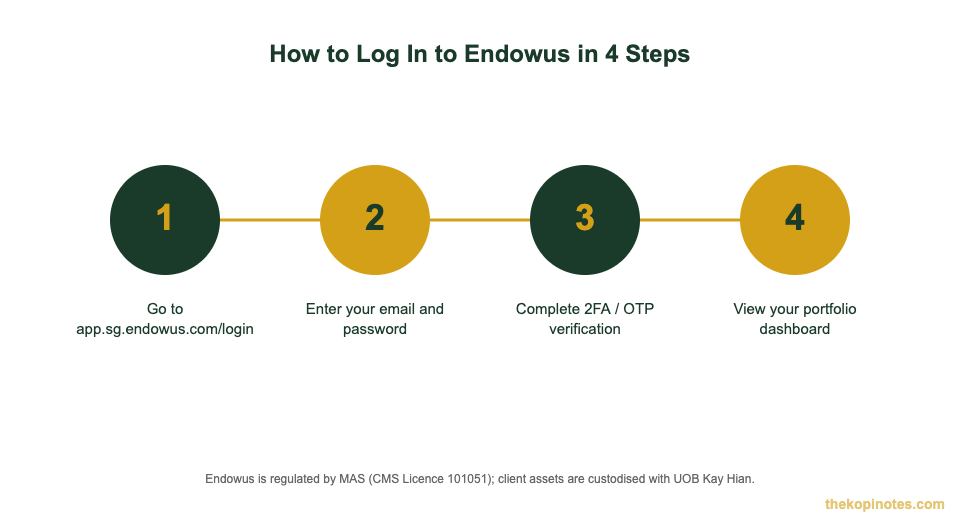
On the web:
- Go to app.sg.endowus.com/login — bookmark this page. Don’t rely on search engine results every time, since scam sites sometimes copy real login pages.
- Enter the email address and password you used when you signed up.
- If you’re on a new device or browser, Endowus texts you a one-time password (OTP). Enter it before it expires.
- You’ll land on your dashboard, showing your portfolio value, holdings, and any pending transactions.
On the app:
- Download the Endowus app from the App Store (iOS) or Google Play (Android).
- Open the app and tap “Log In.”
- Enter your registered email and password.
- Verify with an SMS OTP if prompted, then you’re in.
Web Login vs the Endowus App
Both give you full account access. The difference is convenience, not features. The app is faster for a quick portfolio check on the go. The web version is easier if you’re comparing funds side by side or reading longer statements on a bigger screen.
Either way, you’re logging into the same underlying account. Changes you make on one — like updating your risk profile or adding a new goal — show up instantly on the other.
Forgot Your Password? How to Reset It
It happens. Here’s the fix:
- Go to the Endowus password reset page.
- Enter the email address linked to your account.
- Check your inbox — and your spam folder — for a reset link. It usually arrives within a few minutes.
- Click the link and set a new password.
- Log in again with your new password. You may be asked for an SMS OTP if this counts as a new session.
If the reset email doesn’t show up after 10–15 minutes, double-check you used the exact email you registered with. Still stuck? Email support@endowus.com or WhatsApp +65 3129 0038 — Endowus support can verify your identity and help you back in.
Why Endowus Asks for an SMS OTP
Since 4 April 2022, Endowus has required an SMS one-time password whenever you log in from a device or browser it doesn’t recognise. This applies on both the web app and the mobile app. It’s a standard security layer called two-factor authentication (2FA) — your password alone isn’t enough to get in from an unfamiliar device.
Once a device is recognised, Endowus remembers it for a period of time, so you won’t be asked for an OTP every single time you log in from the same phone or laptop.
If you receive an OTP you didn’t request, or you’ve lost the phone linked to your account, contact support@endowus.com immediately. That could mean someone else has your password and is trying to get in.
Common Login Issues and How to Fix Them
Most login problems fall into a handful of categories. Here’s how to work through them.
Wrong password, too many tries. Repeated failed attempts can temporarily lock your account. Wait a few minutes, then try again, or reset your password using the steps above.
OTP not arriving. Check that your registered mobile number is correct and that you have signal. Use the “resend” option if it’s available before requesting a new one repeatedly. If it still doesn’t arrive, contact support.
Outdated app version. Endowus periodically updates its app for security patches. If login keeps failing on mobile, update the app first.
Phishing links. Only enter your Endowus credentials on app.sg.endowus.com or inside the official app. Never log in through a link sent by email, SMS, or social media — Endowus, like every finance platform, is a target for fake look-alike login pages.
Forgot your registered email. Check for the “Your SGD Cash Account is ready to invest” welcome email from when you signed up, or contact support@endowus.com with your NRIC/passport details for verification.
Is It Safe to Log In to Endowus?
Yes — with an important distinction from a bank. Endowus is not a bank, so your cash isn’t covered by SDIC deposit insurance the way a savings account is, up to S$100,000. Instead, protection comes from asset segregation: all client assets are custodised in a segregated trust account with UOB Kay Hian, held in your own name, not commingled with Endowus’s own funds.
That structure means Endowus never directly touches your money. If Endowus ceased operations tomorrow, your holdings at UOB Kay Hian would still legally belong to you. Combined with MAS licensing and SMS OTP login security, this is broadly the same custody model used by other licensed robo-advisors in Singapore. If you’re weighing Endowus against a bank-linked CPF strategy, our CPF investment strategy guide covers how CPF-OA investing fits alongside options like Endowus.
Endowus Fees at a Glance (Once You’re Logged In)
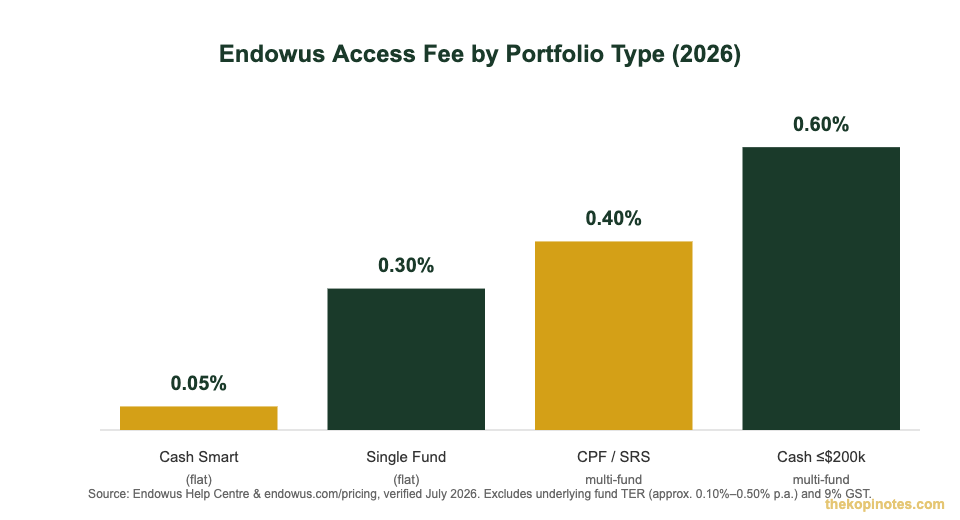
Once you’re in, the fee you pay — Endowus calls it the “Access Fee” — depends on what you’re invested in and which account you funded it from, not on how many funds you hold within that portfolio type.
| Portfolio Type | Access Fee (p.a.) |
|---|---|
| Cash Smart (money market/short-duration) | 0.05% flat |
| Single Fund portfolio | 0.30% flat |
| CPF-OA / SRS, multi-fund | 0.40% |
| Cash, multi-fund (up to S$200,000) | 0.60% |
| Cash, multi-fund (S$200,001–S$1,000,000) | 0.50% |
Source: Endowus Help Centre & endowus.com/pricing, verified July 2026. The Endowus Fee is subject to 9% GST. Underlying fund expense ratios (typically 0.10%–0.50% p.a. for institutional share classes) apply on top and are not shown here.
For the full fee breakdown across every portfolio combination, see our dedicated Endowus fees explained article. If you’re deciding between platforms, our Syfe vs Endowus comparison breaks down how the two compare on cost and fund choice.
New to Endowus? Sign up using Endowus referral code 2V343 to earn S$20 in fee credits when you invest at least S$1,000 and hold it for 90 days — verified as the current offer in July 2026. Already thinking about the long game? Run your numbers through our Singapore retirement calculator to see how CPF, SRS, and cash investing fit together.
Not financial advice. This guide covers login and account access only. Refer to Endowus’s official Terms & Conditions and help centre for definitive account, security, and fee information. The Kopi Notes may earn a referral fee if you sign up via our links, at no extra cost to you.
Frequently Asked Questions
What is the correct Endowus login page?
The official Endowus login page is app.sg.endowus.com/login. This is different from endowus.com, which is the public marketing site. Always check the URL carefully before entering your password, since look-alike phishing pages exist for most finance platforms.
Why do I need an OTP to log in to Endowus?
Since April 2022, Endowus requires an SMS one-time password whenever you log in from a device or browser it doesn’t recognise. This two-factor authentication step protects your account even if someone else gets hold of your password.
I forgot my Endowus password. What do I do?
Go to the Endowus password reset page, enter your registered email, and follow the link sent to your inbox to set a new password. If you don’t receive the email within 15 minutes, contact support@endowus.com.
Is it safe to log in to Endowus on public Wi-Fi?
It’s best avoided. Public Wi-Fi networks can be intercepted more easily than home or mobile data connections. If you must check your account while out, use your phone’s mobile data or a trusted personal hotspot instead, and make sure you’re on the genuine app.sg.endowus.com domain.
Can I access CPF or SRS funds after logging in to Endowus?
Yes. Once logged in, you can view and manage CPF-OA and SRS-funded portfolios alongside your cash investments, all from the same dashboard. Fees differ by funding source — CPF-OA and SRS multi-fund portfolios are charged at 0.40% p.a., as shown in the fee table above.
What happens to my money if Endowus shuts down?
Your assets are held in a segregated trust account at custodian UOB Kay Hian, in your own name — not inside Endowus itself. This means your holdings would remain legally yours even if Endowus ceased operations, though you should still read Endowus’s official disclosures for full details.
Ready to Log In or Get Started with Endowus?
Bookmark the login page, or open a new account with a sign-up bonus using our referral link.
This article was researched with the help of AI. While we strive to keep all information accurate and up to date, there may be errors. If you notice any discrepancies, please contact us.