How to Use YouTrip Card Overseas: Complete Guide (2026)
The go-to travel card for Singapore travellers — no FX fees, real exchange rates, and works in 150+ countries.
YouTrip is a multi-currency travel card for Singapore residents that lets you spend in 150+ countries with zero foreign transaction fees. You top up SGD in the app, lock in mid-market exchange rates before your trip, and pay with the physical Mastercard wherever you go. For most destinations — Japan, Korea, Europe, Malaysia, the US — YouTrip gives you the cheapest way to pay overseas without a traditional bank account.
Not financial advice. All figures are for educational reference only. Data as at June 2026 unless noted.
- Tap, swipe or insert your YouTrip card at any Mastercard-accepting terminal overseas — no extra steps needed.
- Top up the currency you need before your trip via the YouTrip app for the best mid-market rate.
- ATM withdrawals work in most countries but incur a 1% fee — use card payments where possible to save.
Table of Contents
Contents — Click to expand
How YouTrip Works Overseas
YouTrip is a e-money account — not a bank account. You load SGD from your Singapore bank into the YouTrip app. The app lets you exchange SGD into over 10 supported currencies (JPY, EUR, USD, GBP, MYR, AUD, HKD, IDR, KRW, THB) at the mid-market rate before your trip. Any currency not in that list is converted automatically at the point of transaction using Mastercard’s wholesale rate.
The physical YouTrip card is a Mastercard debit card. It works at any merchant or ATM that accepts Mastercard worldwide — which covers most of the planet. You don’t need to notify YouTrip when travelling. Just top up, fly, and spend.
One thing to note: YouTrip is an e-money licence issued by the Monetary Authority of Singapore (MAS). It is not a bank, so your balance is not covered by SDIC (Singapore Deposit Insurance Corporation). Keep only what you need for your trip in the app — don’t park large sums in it.
What to Do Before Your Trip
The best way to use YouTrip overseas is to top up the local currency before you fly. Exchange rates in the YouTrip app are live and typically better than airport money changers and far better than your credit card’s DCC (Dynamic Currency Conversion) rate. Here’s exactly what to do:
Step 1: Download the YouTrip app and activate your card. If you haven’t applied yet, the card takes 5–7 business days to arrive. Don’t leave this to the last minute.
Step 2: Top up SGD into your YouTrip wallet. Minimum SGD 20 per transaction. Link your Singapore bank account (DBS, OCBC, UOB, Standard Chartered, Maybank) or PayNow. Top-ups are instant via PayNow.
Step 3: Exchange into the local currency of your destination. Open the app → Wallet → Exchange → select currency → enter amount. The rate shown is locked in immediately. You pay no fee to exchange — just the mid-market rate.
Step 4: Enable your card for overseas use. YouTrip cards are enabled for overseas by default once activated. Check the card settings in the app to confirm it’s active. You can also set spending limits per transaction for security.
Step 5: Enable overseas ATM withdrawals (if needed). In the app, go to Card → Settings → Overseas Withdrawal. Toggle this on if you plan to withdraw cash. Note: a 1% fee applies on withdrawals.
How to Pay With YouTrip Overseas
Using your YouTrip card at a checkout terminal is exactly like using any other debit card. Tap, swipe, or insert — it works on all three methods.
One critical rule: always choose to pay in the local currency, not SGD. When a terminal abroad asks “Pay in SGD or [local currency]?”, always pick the local currency. This avoids DCC — a merchant trick that adds a 3–4% markup to the rate. Your YouTrip app handles the SGD conversion at the mid-market rate automatically.
For contactless payments, YouTrip supports Apple Pay and Google Pay. Add your card to your phone’s wallet before you travel. This is the safest and fastest way to pay — you don’t need to carry the physical card everywhere.
For online purchases in foreign currencies while travelling (booking hotels, tours, etc.), use your YouTrip card number at checkout. The 16-digit card number, expiry, and CVV are all visible in the app. You’ll pay in the foreign currency at the same zero-fee rate.
| Payment Method | Works With YouTrip? | Notes |
|---|---|---|
| Tap (NFC contactless) | ✅ Yes | Via Mastercard contactless |
| Chip + PIN | ✅ Yes | PIN set via the app |
| Swipe (magnetic stripe) | ✅ Yes | Older terminals, some US merchants |
| Apple Pay / Google Pay | ✅ Yes | Add card to wallet before travelling |
| Online checkout | ✅ Yes | Use card details from app |
| Alipay / WeChat Pay | ⚠️ Limited | YouTrip launched Alipay+ support — check app |
Source: YouTrip app features, June 2026
ATM Withdrawals With YouTrip
YouTrip supports ATM cash withdrawals in most countries. Here’s what you need to know:
Fee: 1% of the amount withdrawn (charged by YouTrip). On top of this, the local ATM operator may charge their own fee — this varies by country and ATM network. In Japan, 7-Eleven ATMs (run by Seven Bank) are reliable and charge low fees. In Europe, avoid Euronet ATMs at tourist spots — they add aggressive surcharges.
How to withdraw: Insert your YouTrip card at any Mastercard/Maestro-compatible ATM. Enter your PIN (set this in the app before you go — a common mistake is forgetting to set it). Select the local currency amount. Choose “without conversion” or “local currency” if prompted — same DCC rule applies at ATMs.
YouTrip ATM withdrawal limits (as at June 2026):
| Limit Type | Amount |
|---|---|
| Per withdrawal | SGD 500 equivalent |
| Per day | SGD 1,000 equivalent |
| Per month | SGD 3,000 equivalent |
Source: YouTrip official website, June 2026. Limits subject to change — check the app for current limits.
If you need more cash than this, top up more to the relevant wallet in the app before hitting the ATM. The 1% withdrawal fee means card payments are always cheaper — use ATM cash only for markets, hawker stalls, and situations where cards aren’t accepted.
YouTrip by Destination: Malaysia, Japan, China & More
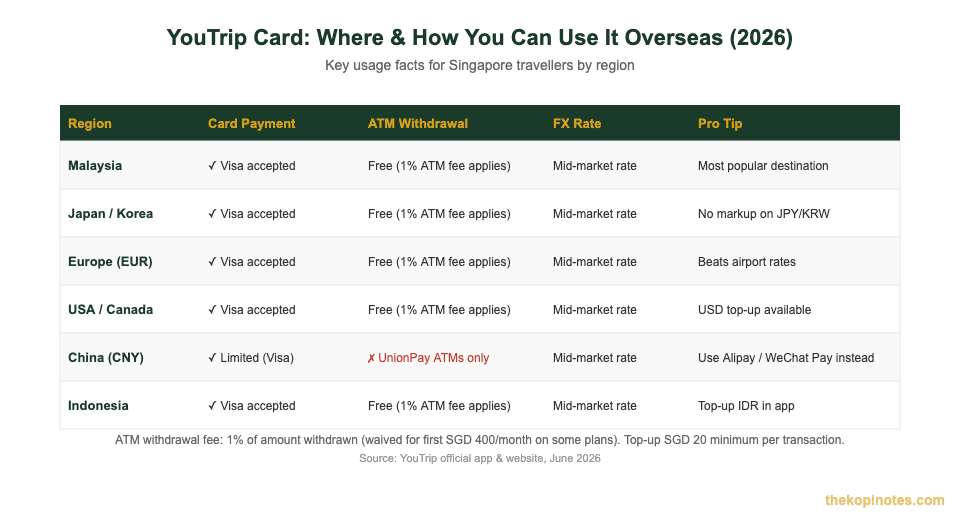
YouTrip works across 150+ countries. Here’s how it performs at the most popular Singapore travel destinations:
Malaysia
This is YouTrip’s most popular use case. Exchange SGD to MYR in the app before crossing the Causeway. You’ll get the mid-market rate — typically 2–4% better than money changers in Johor Bahru. Use the card at most malls, restaurants, and petrol stations. For smaller pasar malam (night market) vendors, carry some MYR cash withdrawn at an ATM.
Japan & South Korea
Both countries are cash-heavy, but card acceptance is improving rapidly. Top up JPY or KRW in the YouTrip app before flying. In Japan, use 7-Eleven (Seven Bank) ATMs — they’re reliable and accept Mastercard. In Korea, most ATMs accept Mastercard. For card payments, most department stores, restaurants, and convenience stores accept Mastercard contactless.
Europe (EUR / GBP)
Top up EUR and GBP separately in the app. Europe is now largely contactless-friendly. YouTrip’s mid-market EUR rate consistently beats airport counters and typical credit card rates. Avoid Euronet ATMs — look for bank-branded ATMs instead.
United States & Canada
The US is highly card-friendly — most payments are tap or chip. Top up USD in the YouTrip app. Watch out for tips (gratuities): some terminals add a tip prompt after you tap, which can cause the final charge to exceed your wallet balance. Always keep a small buffer. If you’re spending on passive income Singapore investments in USD, YouTrip is handy for small FX transfers too.
China (CNY)
China is the trickiest destination for YouTrip. Visa and Mastercard acceptance is very limited — most Chinese merchants exclusively use Alipay or WeChat Pay. YouTrip has added Alipay+ support (check the latest version of the app), which allows some QR code payments in China. However, as at June 2026, you should not rely on YouTrip as your primary payment method in China.
The recommended approach for China: set up Alipay international (which allows foreign Mastercard linking for top-up) before you fly. Use YouTrip mainly for hotel check-in, international chains (McDonald’s, Starbucks), and ATM withdrawals to get CNY cash for local payments. For more on this, check out the YouTrip referral code page which has updated travel tips.
Indonesia & Thailand
Both countries have good Mastercard acceptance at malls, hotels, and tourist areas. You can top up IDR and THB in the YouTrip app. For Indonesia, note that some local ATMs (non-Bersama network) may not accept Mastercard — look for ATMs with the Mastercard logo. In Thailand, dynamic currency conversion (DCC) is aggressively pushed at ATMs — always decline and choose THB.
YouTrip vs Other Travel Cards: FX Fee Comparison
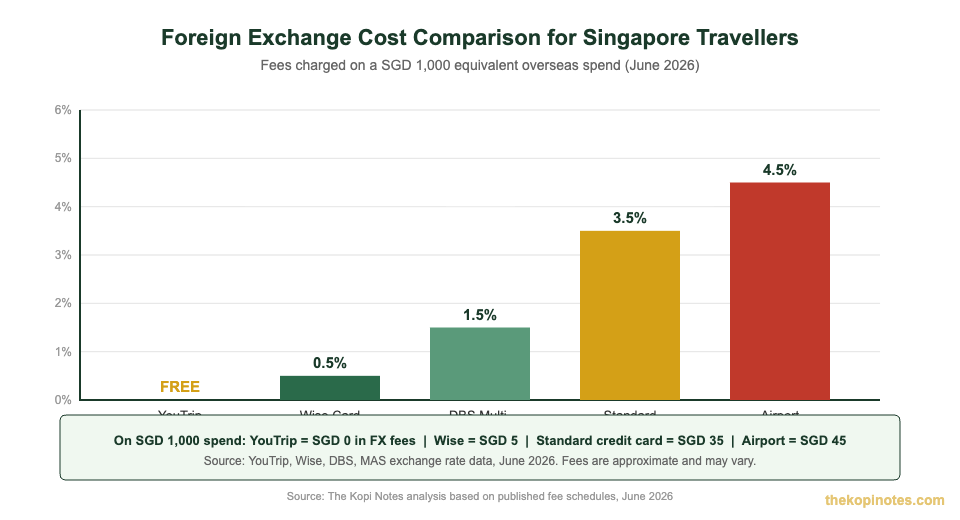
YouTrip competes directly with Wise, Revolut, and traditional bank multi-currency cards. Here’s how they stack up for Singapore travellers:
| Card | FX Fee | ATM Fee | Top-up Method | Best For |
|---|---|---|---|---|
| YouTrip | 0% | 1% of amount | Bank transfer, PayNow | Simple travel card, no subscriptions |
| Wise Card | ~0.3–0.5% | Free up to SGD 350/month | Bank transfer, PayNow, debit card | More currencies (50+), ATM-heavy trips |
| Revolut | 0% on plan days | Free up to SGD 350/month (Standard) | Bank transfer, card | Frequent travellers on paid plans |
| DBS Visa Debit (MC) | 1.5% admin fee | SGD 5 + 1% fee | DBS account | Existing DBS customers, convenience |
| Standard credit card | 3–3.5% | SGD 5–15 + 3% fee | N/A | Emergencies only overseas |
Source: The Kopi Notes analysis of published fee schedules, June 2026. Rates may vary.
The verdict: YouTrip wins on simplicity. No subscription, no monthly fees, no complex fee tiers. You get 0% FX on card payments with mid-market rates. Wise edges it slightly on ATM withdrawals (free first SGD 350/month vs YouTrip’s 1% always). If you want to compare these two in depth, our wise vs youtrip comparison covers every scenario.
Pro Tips for Using YouTrip Overseas
These tips come from real Singapore travellers and save headaches at the checkout:
1. Set your PIN before you fly. YouTrip cards require a PIN for chip-and-PIN terminals (common in Europe and Japan). Set it via the app under Card → PIN Management. Easy to forget — easy to fix, but only if you do it before boarding.
2. Always pay in local currency. If a machine says “pay in SGD” — say no. Always choose the local currency. DCC at merchants and ATMs is the single most common way travellers lose money overseas.
3. Pre-exchange currencies before rates move. YouTrip lets you lock in exchange rates any time. If you’re travelling in 2 weeks and JPY looks good today, exchange now and hold it in your wallet. The rate won’t change once locked.
4. Keep a small cash buffer in the local currency wallet. If your SGD wallet has balance but your JPY wallet is empty, YouTrip will auto-convert at the prevailing rate. That’s still good — but pre-loading the local currency is better.
5. Use Tap to Pay for small purchases. For transactions under SGD 50 equivalent, contactless is instant. Add YouTrip to Apple Pay or Google Pay before your trip. Your Singapore retirement calculator savings will thank you for every unnecessary FX fee you avoid.
6. Enable travel notifications in the app. YouTrip sends real-time push notifications for every transaction. Turn these on — it’s your early warning system for any unauthorised charges.
7. Split costs with friends easily. YouTrip has a group feature that lets you split expenses on the go. Useful for group trips where one person fronts costs.
8. Load YouTrip from your CPF OA — you can’t. YouTrip is not a CPF-approved investment. If you’re thinking about using investment accounts for travel funds, read up on your CPF investment strategy separately.
Not financial advice. YouTrip is an e-money service regulated by MAS. Balances are not insured by SDIC. Data as at June 2026.
Frequently Asked Questions
How do I use my YouTrip card overseas?
Just tap, insert, or swipe at any Mastercard terminal — exactly like a regular debit card. Before you go, top up SGD in the YouTrip app and exchange into the local currency of your destination. At checkout, always choose to pay in the local currency (not SGD) to avoid DCC surcharges. No need to notify YouTrip you’re travelling — your card works internationally by default once activated.
Can I use YouTrip card in Malaysia?
Yes — Malaysia is YouTrip’s most popular overseas destination for Singapore users. Exchange SGD to MYR in the app before crossing the Causeway to lock in the mid-market rate. The YouTrip card works at Mastercard terminals across Malaysia, including petrol stations, major retail chains, and restaurants. For night markets and small stalls, withdraw some MYR cash from an ATM (1% withdrawal fee applies).
Can I use YouTrip in China?
YouTrip can be used in China, but with significant limitations. Most Chinese merchants use Alipay or WeChat Pay, not Mastercard. Visa and Mastercard acceptance is mainly limited to international hotels, some malls, and larger restaurants in major cities. YouTrip has introduced Alipay+ support (check the latest app version), but as at June 2026, you should set up Alipay international separately as your primary payment method for China and use YouTrip mainly for ATM cash withdrawals and international chain payments.
Does YouTrip charge ATM fees overseas?
Yes. YouTrip charges a 1% fee on all overseas ATM withdrawals (e.g. SGD 5 fee on a SGD 500 withdrawal). The local ATM operator may add their own surcharge on top of this. To minimise ATM fees, use card payments wherever possible and only withdraw cash when needed. Wise gives you free ATM withdrawals up to SGD 350 per month if you do a lot of cash-heavy travel.
How do I use YouTrip in Japan?
Top up JPY in the YouTrip app before flying to Japan. For ATM withdrawals in Japan, use 7-Eleven (Seven Bank) ATMs — they’re the most reliable for foreign Mastercard cards and have English interfaces. Most convenience stores (Lawson, FamilyMart) and department stores now accept contactless Mastercard. Markets, small izakayas, and traditional vendors often still prefer cash, so carry some JPY.
Is YouTrip safe to use overseas?
YouTrip is regulated by the Monetary Authority of Singapore (MAS) under an e-money licence and uses Mastercard’s fraud protection network. The app lets you freeze your card instantly if lost or stolen, set spending limits, and view every transaction in real time. Only keep what you need for your trip in the wallet — balances are not insured by SDIC (unlike bank deposits). Enable push notifications so you catch any suspicious transaction immediately.
Can I use YouTrip for online shopping in foreign currencies?
Yes. YouTrip works for online purchases in foreign currencies — just use your card number, expiry date, and CVV from the app at checkout. The transaction will be charged at the mid-market rate with no foreign transaction fee. This is useful for booking overseas hotels, tours, or shopping on international sites while you’re still in Singapore.
Ready to Get Your YouTrip Card?
Apply for free and use a referral code for a sign-up bonus on your first top-up. Takes 5–7 business days to arrive.
This article was researched with the help of AI. While we strive to keep all information accurate and up to date, there may be errors. If you notice any discrepancies, please contact us.