MariBank Money Lock & Kill Switch: How to Lock Down Your Savings From Scams (2026)
What Money Lock and Kill Switch actually do, how to turn them on, and whether locking your cash costs you any interest.
Table of Contents
Jump to a section ▼
- What Is MariBank Money Lock?
- How Money Lock Works, Step by Step
- Kill Switch: Freezing Your Whole Account Instantly
- Why MariBank Built These Features
- Does Locking Your Money Cost You Interest?
- Money Lock vs a Regular Balance vs a Fixed Deposit
- How to Turn On Money Lock Today
- Frequently Asked Questions
MariBank Money Lock lets you ring-fence part of your Mari Savings Account so it cannot be withdrawn without extra verification — even if a scammer gets into your account. Unlocking requires SingPass Face Verification plus a 12-hour cooling period, and locked funds keep earning the normal Mari Savings Account interest rate. Paired with Kill Switch, which instantly freezes your entire account, these are MariBank’s two strongest defences against the phishing scams that cost Singapore residents tens of millions of dollars a year.
Not financial advice. All figures are for educational reference only. Data verified as at November 2026 unless noted.
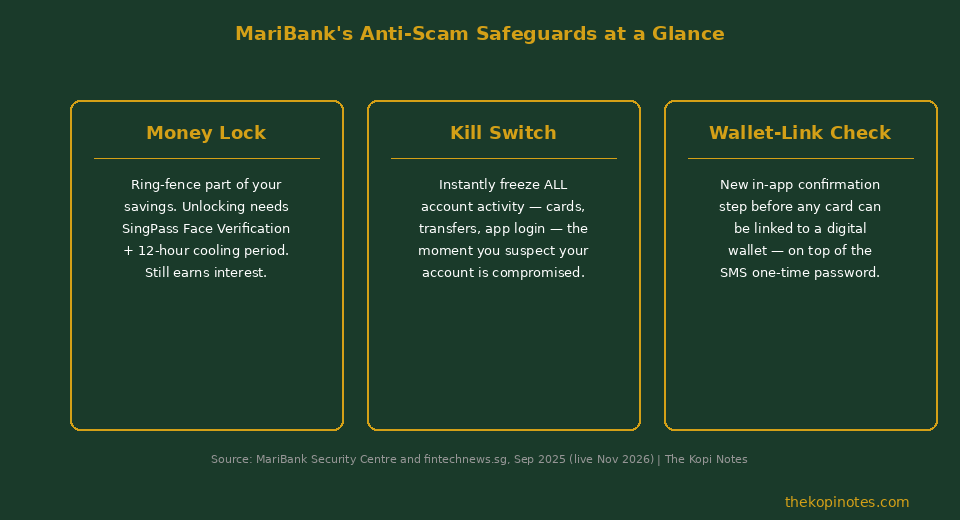
- Money Lock ring-fences part of your Mari Savings Account — unlocking needs SingPass Face Verification plus a 12-hour cooling period, and locked funds keep earning interest.
- Kill Switch freezes your entire account instantly if you suspect it has been compromised.
- Both sit on top of MariBank’s SDIC deposit insurance (up to S$100,000) and a new in-app check before any card can be linked to a digital wallet.
What Is MariBank Money Lock?
Money Lock is a feature inside the MariBank app that lets you set aside a portion of your Mari Savings Account balance into a protected state. Once locked, that amount cannot be transferred, withdrawn, or spent — not even by you, in the moment — without going through an additional verification step.
MariBank introduced Money Lock alongside a second safeguard: a new in-app confirmation step that must be completed before any card can be linked to a digital wallet, on top of the existing SMS one-time password. Both features were developed in collaboration with Singapore authorities after police data showed phishing scams had stripped at least S$59.4 million from victims in a single year, largely through fake e-commerce sites and phishing links used to harvest card details and OTPs.
The logic behind Money Lock is simple: most phishing and remote-access scams succeed because the scammer, once inside your account or in control of your screen, can move your entire balance in seconds. Money Lock removes that single point of failure by making a portion of your savings deliberately slow and hard to move — slow enough that you, or your bank, have a window to notice something is wrong.
How Money Lock Works, Step by Step
Setting up Money Lock takes a few taps inside the MariBank app:
- Open the Mari Savings Account page in the MariBank app and select the Money Lock option.
- Choose the amount you want to lock. You decide how much of your balance to ring-fence — you don’t have to lock your entire account, and most users keep a working balance outside the lock for day-to-day transfers.
- Confirm the lock. The amount is immediately moved into a protected state and stops being available for instant transfer or withdrawal.
- To unlock, you must complete SingPass Face Verification — matching your live face against your government-verified identity — and then wait out a mandatory 12-hour cooling period before the funds become transferable again.
That cooling period is deliberate. It gives you a window to cancel the unlock request if you realise you didn’t actually initiate it — for example, if a scammer is on the phone pressuring you to “verify your account” in real time. It also means Money Lock is not meant for cash you might need same-day; treat it as a safeguard for money you don’t plan to touch on short notice.
Kill Switch: Freezing Your Whole Account Instantly
Where Money Lock protects a portion of your savings, Kill Switch is the blunt-force option for your entire account. If you suspect your phone has been compromised, your login details have leaked, or you simply can’t account for activity on your MariBank app, Kill Switch lets you instantly suspend all account activity — card transactions, transfers, and app access — from within the app itself.
This matters because the fastest-moving scams (remote-access-trojan apps, screen-sharing scams, and SIM-swap attacks) depend on speed: the scammer wants to drain an account before the victim can react. Kill Switch gives you a single action that stops everything at once, rather than having to individually freeze a card, then a transfer, then a login session while the clock is running.
Why MariBank Built These Features
MariBank, wholly owned by Sea Limited and licensed by the Monetary Authority of Singapore, rolled out Money Lock, Kill Switch, and the wallet-linking verification step as a package after a sustained rise in phishing and card-fraud cases across Singapore’s digital banking sector. Natalia Goh, CEO of MariBank, said the safeguards were “developed in close collaboration with authorities” and reflect a commitment to “staying one step ahead of bad actors.”
The context matters for anyone comparing digital banks on security, not just interest rates. GXS Bank and Trust Bank have their own anti-scam tooling, but MariBank’s combination of a hard 12-hour cooling period plus SingPass-level identity verification on unlock is a stricter friction model than a simple PIN or OTP re-entry — it is specifically designed to defeat scams where the victim is being coached in real time by a fraudster.
Does Locking Your Money Cost You Interest?
No — and this is the detail that makes Money Lock worth using rather than just manually moving cash elsewhere. Funds held in Money Lock continue to earn interest at whatever the prevailing Mari Savings Account rate is, exactly as if they were sitting in your regular balance.
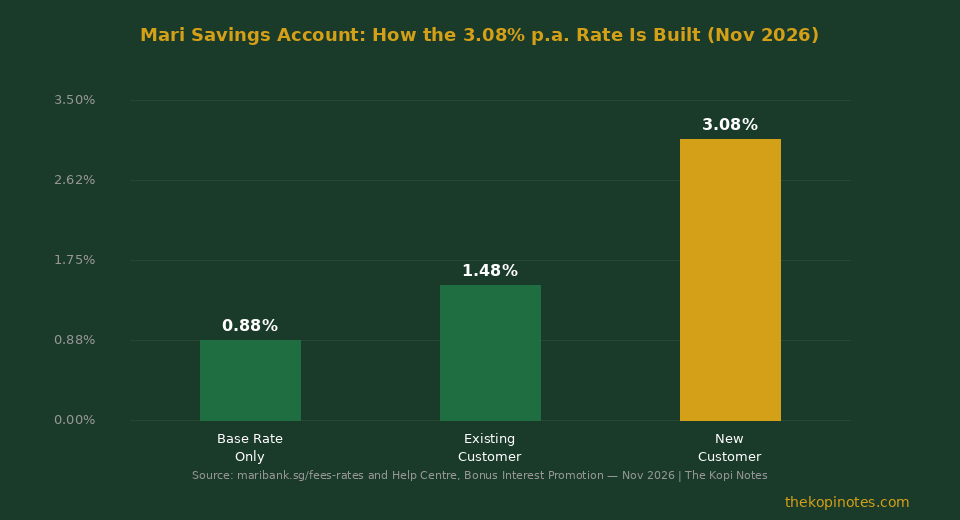
As at November 2026, that base rate is 0.88% p.a. on SGD balances (effective 18 Oct 2026), with a separate 1.88% p.a. USD promotional rate running until 31 Dec 2026. New customers can stack a Bonus Interest Promotion on top of the base rate, taking the total as high as 3.08% p.a. for the first 30 days; existing customers can still reach 1.48% p.a. by linking salary crediting and an active ShopeeVIP subscription.
| Interest Component | New MariBank Customers | Existing Customers |
|---|---|---|
| Base Rate | 0.88% p.a. | 0.88% p.a. |
| New User Bonus (first 30 days) | +1.60% p.a. | — |
| Salary Crediting Bonus | +0.20% p.a. | +0.20% p.a. |
| ShopeeVIP Bonus | +0.40% p.a. | +0.40% p.a. |
| Total Interest Rate | 3.08% p.a. | 1.48% p.a. |
Source: maribank.sg Help Centre, “What is the Mari Savings Account Bonus Interest Promotion?” and maribank.sg/fees-rates/mari-savings-account, effective 18 Oct 2026. SGD balances; a separate 1.88% p.a. USD promotional rate applies to USD balances until 31 Dec 2026.
In practical terms: a Singapore saver who locks S$10,000 under the new-customer promotional rate earns roughly the same S$25–S$26 over 30 days whether that money is locked or sitting in the open balance — Money Lock adds withdrawal friction, not an interest penalty.
Money Lock vs a Regular Balance vs a Fixed Deposit
Money Lock sits between an easily-accessible savings balance and a Mari Fixed Deposit in terms of how hard your money is to move:
| Where Your Spare Cash Sits | Withdrawal Friction | Interest While Held | Best For |
|---|---|---|---|
| Regular Mari Savings balance | Instant, no extra checks | 0.88%–3.08% p.a. | Day-to-day spending cash |
| Money Lock | SingPass Face Verification + 12-hour cooldown | Same Mari Savings rate | Emergency fund / savings you don’t want to touch on impulse (or under duress) |
| Mari Fixed Deposit | Early withdrawal forfeits bonus interest | Fixed tenure rate, locked in | Cash you already know you won’t need for a set period |
Source: maribank.sg/product/mari-savings-account and maribank.sg/product/mari-fixed-deposit, Nov 2026. Fixed Deposit rates and terms vary by tenure — check the MariBank app for current promotions.
If you already keep a dedicated emergency fund or know a sum of cash you won’t touch for months, a Fixed Deposit will usually offer a defined, often higher promotional rate in exchange for an actual lock-in tenure. Money Lock is better suited to money you still want earning the flexible savings rate and want accessible eventually — just not instantly, and not without you personally clearing a SingPass check.
How to Turn On Money Lock Today
If you’re opening a new MariBank account via a referral code, Money Lock and Kill Switch are available from day one once your Mari Savings Account is active:
- Download the MariBank app and complete onboarding (you’ll need Singpass for identity verification either way, so completing it upfront makes unlocking later faster too).
- Fund your Mari Savings Account and decide how much of your balance you’re comfortable setting aside.
- Navigate to the Money Lock feature inside your savings account and lock the amount you’ve chosen.
- Separately, familiarise yourself with where Kill Switch sits in the app before you ever need it — the worst time to learn how a safety feature works is mid-scam.
For a full walkthrough of MariBank’s account opening process, savings rates, and credit card, see our MariBank Singapore Review 2026. If you’re still comparing MariBank against GXS Bank on day-to-day security tooling, our Is GXS Bank Safe? guide covers the equivalent MAS licensing and SDIC insurance questions for that platform.
Deposits with MariBank are insured by the Singapore Deposit Insurance Corporation (SDIC) up to S$100,000 per depositor, the same scheme that covers full banks and other MAS-licensed digital banks — Money Lock and Kill Switch sit on top of that insurance as additional, self-directed protection against fraud rather than institutional failure.
Not financial advice. For educational purposes only. Figures are for reference only and may change at MariBank’s discretion — always check the MariBank app or official site for the latest terms before acting. Data as at November 2026, sourced from maribank.sg and Fintech News Singapore.
Frequently Asked Questions
What is MariBank Money Lock?
Money Lock is a MariBank app feature that lets you ring-fence part of your Mari Savings Account so it can’t be withdrawn or transferred without extra verification. To unlock, you need to complete SingPass Face Verification and then wait through a mandatory 12-hour cooling period, which is designed to stop scammers from draining your account quickly even if they gain access to it.
Do I lose interest on money I put in Money Lock?
No. Funds held in Money Lock continue to earn interest at the prevailing Mari Savings Account rate — the same rate (0.88% p.a. base, up to 3.08% p.a. for new customers with the Bonus Interest Promotion, as at November 2026) that applies to your regular, unlocked balance.
How is Kill Switch different from Money Lock?
Money Lock protects a specific amount you choose to set aside, with a defined unlock process. Kill Switch is broader and more immediate — it instantly freezes all activity across your entire MariBank account, including cards, transfers, and app access, the moment you suspect you’ve been compromised.
How long does it take to unlock Money Lock?
After completing SingPass Face Verification, there is a mandatory 12-hour cooling-off period before locked funds become available again. This delay is intentional — it gives you time to cancel the unlock request if you later realise you didn’t genuinely intend to move the money, which is the exact window many phishing and remote-access scams try to close before a victim can react.
Is MariBank safe to keep my savings in?
MariBank is licensed by the Monetary Authority of Singapore (MAS) as a digital full bank, and deposits are insured by the Singapore Deposit Insurance Corporation (SDIC) up to S$100,000 per depositor — the same protection that applies to Singapore’s traditional banks. Money Lock and Kill Switch are additional, self-directed safeguards against fraud and scams; they operate separately from, and in addition to, that institutional deposit insurance.
Why did MariBank introduce these features now?
MariBank rolled out Money Lock, Kill Switch, and an added in-app verification step for linking cards to digital wallets after Singapore police data showed phishing scams had stripped at least S$59.4 million from victims in a single year. The features were developed in collaboration with authorities specifically to counter fast-moving scams where victims are pressured in real time to authorise fraudulent transfers.
Open a MariBank Account and Turn On Money Lock
Protect your savings from phishing scams while still earning up to 3.08% p.a. as a new customer.
This article was researched with the help of AI. While we strive to keep all information accurate and up to date, there may be errors. If you notice any discrepancies, please contact us.