moomoo Desktop App Singapore: How to Download, Set Up & Trade (2026 Guide)
Updated October 2026 | Windows & Mac | MAS-Licensed Broker
The moomoo desktop app is a free, MAS-licensed trading platform for Singapore investors available on Windows (7+) and Mac (macOS 10.15+). It delivers advanced charting with 22+ drawing tools, free Level 2 market data for US, Singapore, and Korean markets, and full access to SGX, US, HK, and Australia stocks — all from a larger screen than your phone. The latest version (16.35.27108, released October 15, 2026) supports CPFIS-OA and SRS trading for Singapore users.
Not financial advice. All figures are for educational reference only. Data as at October 2026 unless noted.
In This Guide
- What Is the moomoo Desktop App?
- System Requirements at a Glance
- How to Download moomoo Desktop on Windows
- How to Download moomoo Desktop on Mac
- Desktop vs Mobile: Feature Comparison
- How to Place a Trade on moomoo Desktop
- Fees & Charges for Singapore Users
- Who Should Use moomoo Desktop?
- Frequently Asked Questions
What Is the moomoo Desktop App?
The moomoo desktop app is the Windows and Mac version of the moomoo trading platform, developed by Futu Holdings Ltd (Nasdaq: FUTU). While most Singapore users start on the mobile app, the desktop version is built for traders and investors who want a bigger screen, more data panels side by side, and deeper technical analysis tools.
Who regulates it? moomoo operates in Singapore through moomoo Financial Singapore Pte. Ltd., which holds a Capital Markets Services (CMS) licence issued by the Monetary Authority of Singapore (MAS). It is also an Exempt Financial Adviser. This makes moomoo a fully regulated brokerage for Singapore residents — the desktop app is simply the PC version of the same regulated platform you use on mobile.
The desktop app was substantially redesigned in 2024 and has continued to receive regular updates. As of October 2026, Version 16.35.27108 (released October 15, 2026) is the current stable release for both Windows and Mac. The app is free to download and requires no minimum deposit to open an account.
Unlike some brokers’ desktop platforms, moomoo desktop is genuinely cross-platform: the same version number (16.35.27108) is released for Windows and Mac simultaneously, and your account data — watchlists, portfolio, settings, pending orders — syncs automatically between desktop and mobile via the cloud. Switching between your computer and phone is seamless.
Markets available on moomoo desktop in Singapore:
- Singapore (SGX) — stocks, ETFs, REITs
- United States (NASDAQ, NYSE, AMEX) — stocks, ETFs, options
- Hong Kong (HKEX) — stocks, ETFs
- China A-shares (via Stock Connect through HK)
- Australia (ASX) — stocks, ETFs
- Japan (JPX) — stocks
A notable October 2026 update added Starshares trading for CPFIS-OA and SRS accounts on the desktop platform — meaning Singapore investors can now use their CPF Ordinary Account savings or Supplementary Retirement Scheme funds to buy eligible shares directly through moomoo desktop.
For a full review of moomoo’s overall offering including account types, promotions, and platform ratings, see our moomoo Singapore review.
System Requirements at a Glance
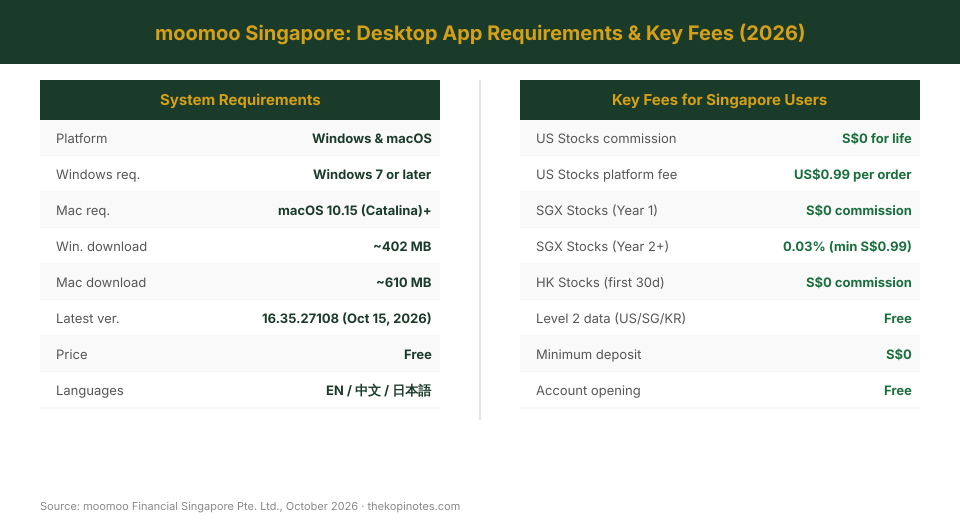
| Specification | Windows | Mac |
|---|---|---|
| Minimum OS | Windows 7 or later | macOS 10.15 (Catalina) or later |
| Download size | ~402 MB | ~610 MB |
| Latest version | 16.35.27108 | 16.35.27108 |
| Last updated | October 15, 2026 | October 15, 2026 |
| Apple Silicon (M1–M4) | N/A | ✓ Supported |
| Download link | moomoo.com/download/window | moomoo.com/download/mac |
| Price | Free | Free |
Source: moomoo Financial Singapore Pte. Ltd., October 2026. Verified against official moomoo download pages.
How to Download moomoo Desktop on Windows
Downloading moomoo on Windows takes less than five minutes. Here’s the exact process for Singapore users:
Step 1: Visit the official download page.
Go to moomoo.com/sg and scroll to the footer, or go directly to moomoo.com/download/window. Click the “Download for Windows” button. The installer file (.exe, ~402 MB) will download to your browser’s default downloads folder.
Step 2: Run the installer.
Double-click the .exe file. The setup wizard is straightforward — accept the licence agreement and choose your installation folder (the default is fine). The installer does not require administrator rights by default.
Step 3: Launch and log in.
Once installed, open the moomoo app from your Start menu or desktop shortcut. Log in with your existing moomoo account. If you don’t have one, you can create an account directly from the app — just click “Register” and use your Singpass details for the identity verification step, which takes about 2–3 minutes.
Step 4: Customise your workspace.
On first login, moomoo desktop opens a default layout. You can drag and rearrange panels — watchlist, charts, order book, news feed — to your preference. Saved layouts sync across all devices.
Recommended settings for Singapore users:
- Set your default market to Singapore (SGX) for local stock searches
- Enable SGX price alerts (Settings → Price Alerts)
- Link your CDP account if you want direct SGX share ownership (Settings → Accounts → CDP Linkage) — this takes 2–3 business days to process
- Configure the SGX market session time display (SGX regular hours: 9am–5pm SGT)
Note on Windows Defender SmartScreen: On Windows 10 and 11, you may see a blue “Windows protected your PC” warning when first running the installer. Click “More info” then “Run anyway” — this is standard for newly downloaded .exe files and does not indicate a problem with moomoo’s installer.
How to Download moomoo Desktop on Mac
The Mac version of moomoo desktop is slightly larger (~610 MB) and requires macOS 10.15 Catalina or later. It runs natively on both Intel and Apple Silicon (M1/M2/M3/M4) Macs.
Step 1: Download the .dmg file.
Visit moomoo.com/download/mac and click “Download for Mac”. The .dmg disk image will save to your Downloads folder.
Step 2: Open and install.
Double-click the .dmg file to mount it. Drag the moomoo icon into your Applications folder as shown in the installer window. Eject the disk image after copying.
Step 3: Handle Gatekeeper.
On first launch, macOS may block the app with the message “moomoo cannot be opened because it is from an unidentified developer.” To resolve this: go to System Preferences (or System Settings on macOS Ventura+) → Privacy & Security → scroll to the bottom → click “Open Anyway” next to moomoo. You’ll need to do this only once.
Step 4: Log in and sync.
Sign in with your moomoo Singapore credentials. Your watchlists, portfolio data, and app settings will sync from the cloud automatically.
Apple Silicon note: The moomoo Mac app runs natively on M-series chips. You do not need Rosetta 2 emulation. Performance on M1 and newer chips is generally better than on older Intel Macs.
Recommended: Enable notifications. Go to System Preferences → Notifications → moomoo → Allow Notifications. This lets moomoo send you price alerts and order status updates even when the app is in the background.
Desktop vs Mobile: Feature Comparison
The most common question from Singapore moomoo users: do I even need the desktop app if I already have mobile? The short answer depends on how you invest.
For passive investors who buy ETFs or REITs periodically and check their portfolio once a week, the mobile app is fully sufficient. But if you trade US options, run multi-leg strategies, do detailed technical analysis, or want to monitor several tickers simultaneously during US market hours, the desktop app is a meaningfully better experience.
| Feature | Desktop | Mobile |
|---|---|---|
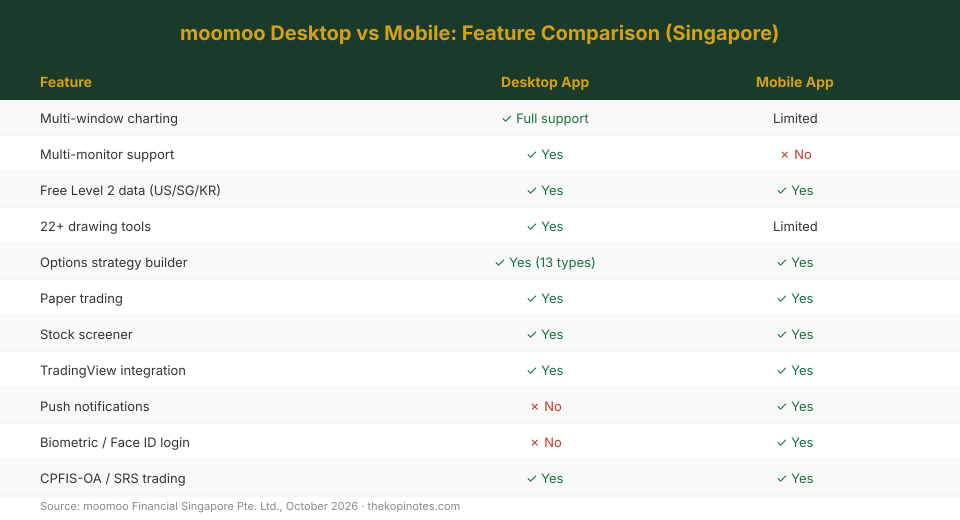
| Multi-window charting | ✓ Full support | Limited |
| Multi-monitor support | ✓ Yes | ✗ No |
| Free Level 2 data (US/SG/KR) | ✓ Yes | ✓ Yes |
| 22+ drawing tools (Fibonacci, Elliot Wave…) | ✓ Yes | Limited |
| Options strategy builder (13 strategies) | ✓ Yes | ✓ Yes |
| Paper trading (simulated) | ✓ Yes | ✓ Yes |
| Stock screener (14+ dimensions) | ✓ Yes | ✓ Yes |
| TradingView chart integration | ✓ Yes | ✓ Yes |
| Push notifications | ✗ No | ✓ Yes |
| Biometric / Face ID login | ✗ No | ✓ Yes |
| CPFIS-OA / SRS trading (Starshares) | ✓ Yes (since Oct 2026) | ✓ Yes |
Source: moomoo Financial Singapore Pte. Ltd., October 2026 · thekopinotes.com
The practical sweet spot for most Singapore investors: run moomoo desktop during US market hours (9:30pm–4am SGT) for active monitoring and charting, and use the mobile app during the day for SGX trading, checking your portfolio, and receiving price alerts.
How to Place a Trade on moomoo Desktop (Step-by-Step)
Once you have downloaded and logged into moomoo desktop, here is how to place your first trade as a Singapore user:
Step 1: Search for your stock or ETF.
Use the search bar at the top of the screen. For SGX stocks, type the company name or ticker (e.g. “ES3” for the SPDR STI ETF, “D05” for DBS). For US stocks, type the ticker directly (e.g. “AAPL”, “VOO”). The dropdown will show results from all exchanges — make sure to select the correct one.
Step 2: Review the quote page.
The quote page shows real-time price, Level 2 order book, recent trades, charts, financials, and analyst ratings. For SGX stocks, check both the bid-ask spread and the lot size (SGX trades in lots of 100 shares for most counters).
Step 3: Open the order ticket.
Click “Buy” or “Sell” on the quote page. Choose your order type:
- Market order: Executes immediately at the best available market price. Good for highly liquid US blue-chip stocks. Use with caution on thin SGX counters with wide spreads.
- Limit order: Sets a maximum price to buy (or minimum to sell). The order fills only if the market reaches your price, or better.
- Stop order: Triggers a market order once the stock hits your specified stop price. Useful for stop-losses.
- Stop-limit order: A stop and a limit combined — triggers at the stop price but executes only at the limit price or better.
Step 4: Enter your quantity and confirm.
For SGX stocks, enter in lots (1 lot = 100 shares). For US stocks, enter in individual shares (no lot restrictions). Review the estimated total and commission before confirming. moomoo shows a pre-trade cost breakdown.
Step 5: Monitor your order.
Your live order appears in the “Orders” tab at the bottom of the screen. You can modify or cancel an unfilled limit order from here. Once filled, the position moves to your “Portfolio” panel.
Singapore-specific: CDP vs custodian. By default, moomoo holds your SGX shares under its custodian structure (not your personal CDP account). This means you will not receive shareholder mail, AGM invites, or physical scrip — but you can still receive dividends. If you want to hold shares directly under your own CDP account, link it in Settings → Accounts → CDP Linkage. CDP-linked trades must also meet SGX’s S$100 minimum order size.
If you are new to investing and want to practise before committing real money, moomoo desktop has a built-in paper trading mode. You get a virtual S$1 million to trade with real market data and zero risk. Access it via the “Paper Trading” tab in the top navigation bar.
To maximise your returns at sign-up, use the moomoo sign up bonus — eligible new accounts can receive welcome rewards including trading fee coupons and fractional shares of popular US stocks.
Fees & Charges for Singapore Users (2026)
moomoo’s fee structure is one of the main reasons it has grown rapidly in Singapore. Here is a full breakdown as at October 2026:
| Market | Commission | Platform / Other Fees |
|---|---|---|
| US Stocks & ETFs | $0 for life | US$0.99 platform fee per order |
| SGX Stocks (Year 1) | $0 commission | SGX clearing & access fees |
| SGX Stocks (Year 2+) | 0.03% (min S$0.99) | SGX clearing & access fees |
| HK Stocks (first 30 days) | $0 commission | HK stamp duty, exchange fees |
| Level 2 market data (US/SG/KR) | Free | Included |
| Account opening / minimum deposit | Free / S$0 | — |
Source: moomoo Financial Singapore Pte. Ltd., October 2026. Fees subject to change — verify at moomoo.com/sg/pricing before trading.
US dividend withholding tax: US stocks held in moomoo pay a default 30% withholding tax on dividends for non-US residents. Singapore investors can submit a W-8BEN form through the moomoo app to reduce this to 15% under the US-Singapore tax treaty. This applies to both desktop and mobile accounts — it is an account-level setting, not platform-specific.
Currency conversion: moomoo maintains separate currency wallets (SGD, USD, HKD, AUD). If you fund your account in SGD and buy US stocks, moomoo will convert at the market rate plus a spread. To minimise FX costs on large US purchases, convert SGD to USD manually in the Funds section (at a lower spread) rather than letting each trade convert automatically.
For long-term wealth building beyond trading, you might also explore a Singapore retirement calculator to understand how your investment returns compound over time across different asset allocations.
Who Should Use moomoo Desktop?
moomoo desktop is the better choice if you:
- Trade US markets actively and need to monitor multiple tickers and charts simultaneously during the US session (9:30pm–4am SGT)
- Use technical analysis seriously — Fibonacci retracements, Elliot Wave tools, Bollinger Bands, MACD — and need 22+ drawing tools on a large screen
- Run multi-leg options strategies (covered calls, iron condors, credit spreads) using the 13-strategy options analysis suite
- Want paper trading on a bigger canvas — practise with real market data on a virtual S$1 million before committing real capital
- Work from home and prefer a dedicated trading window that sits alongside Bloomberg Terminal, Google Sheets, or other research tools on a second monitor
- Trade CPFIS-OA or SRS funds and want the full Starshares desktop experience added in October 2026
The mobile app is fully sufficient if you:
- Invest passively in index ETFs or REITs and check your portfolio once a week
- Need to place quick SGX trades during lunch or from your phone
- Rely on push notifications for price alerts and order confirmations
- Prefer Face ID or Touch ID for fast, secure log-in
Most active Singapore investors end up using both: desktop for analysis and US market trading, mobile for on-the-go monitoring and SGX daytime trades.
moomoo also has four physical branches in Singapore — at 313@Somerset, Jem, Bugis, and Parkway Parade — where you can get in-person onboarding help if you prefer to set up your account face-to-face.
Not sure moomoo is the right broker for you? Our full moomoo Singapore review compares it against Tiger Brokers, Interactive Brokers, and Syfe Trade across fees, platform, and account types.
Frequently Asked Questions
Is the moomoo desktop app free to download?
Can I use the same account on both mobile and desktop?
Does moomoo desktop work on Apple Silicon Macs (M1, M2, M3, M4)?
Can I trade SGX stocks and CPF investments on moomoo desktop?
What is the moomoo referral code for Singapore?
Is moomoo desktop safe for Singapore users?
How do I update the moomoo desktop app?
This article was researched with the help of AI. While we strive to keep all information accurate and up to date, there may be errors. If you notice any discrepancies, please contact us.