How to Use moomoo Singapore: Complete Beginner’s Guide (2026)
Your step-by-step walkthrough — from opening an account to placing your first trade on Singapore’s popular zero-commission trading platform.
moomoo Singapore is a MAS-licensed brokerage (Capital Markets Services licence) operated by Futu Singapore Pte. Ltd. It lets you trade US, SGX, HK, Japan, and Korean stocks from one app. Download moomoo, complete the in-app sign-up with your NRIC details, fund via PayNow, then search for a stock and tap “Buy.” The entire process takes under 10 minutes once your account is approved — typically within 1–3 business days.
Not financial advice. All figures are for educational reference only. Data as at October 2026 unless noted.
What Is moomoo Singapore?
moomoo is the retail brokerage platform of Futu Holdings, a financial technology company listed on Nasdaq (ticker: FUTU). In Singapore, it operates through Futu Singapore Pte. Ltd., which holds a Capital Markets Services (CMS) licence issued by the Monetary Authority of Singapore (MAS) — your account is fully regulated under Singapore law.
The platform gives retail investors access to five markets in one account: US stocks (NYSE, Nasdaq), Singapore (SGX), Hong Kong (HKEX), Japan (TSE), and South Korea (KRX). Beyond equities, moomoo Singapore offers US options, crypto trading, US Treasuries, a Regular Savings Plan (RSP), and Cash Plus — a SGD money market feature that earns interest on idle funds. For a deeper evaluation of its strengths and limitations, read our full moomoo Singapore review.
| Feature | Details |
|---|---|
| Operator | Futu Singapore Pte. Ltd. |
| MAS Licence | Capital Markets Services (CMS) Licence |
| Parent Company | Futu Holdings (Nasdaq: FUTU) |
| Markets Available | US, SGX, HKEX, Japan, South Korea |
| Products | Stocks, ETFs, REITs, Options, Crypto, US Treasuries, Cash Plus, RSP |
| Free Level 2 Data | US & SGX stocks (until 31 Dec 2026) |
| Minimum Deposit | No official minimum |
Source: moomoo Singapore official website, October 2026
How to Open a moomoo Account
Opening a moomoo account is done entirely in-app. Here is the step-by-step process for Singapore residents:
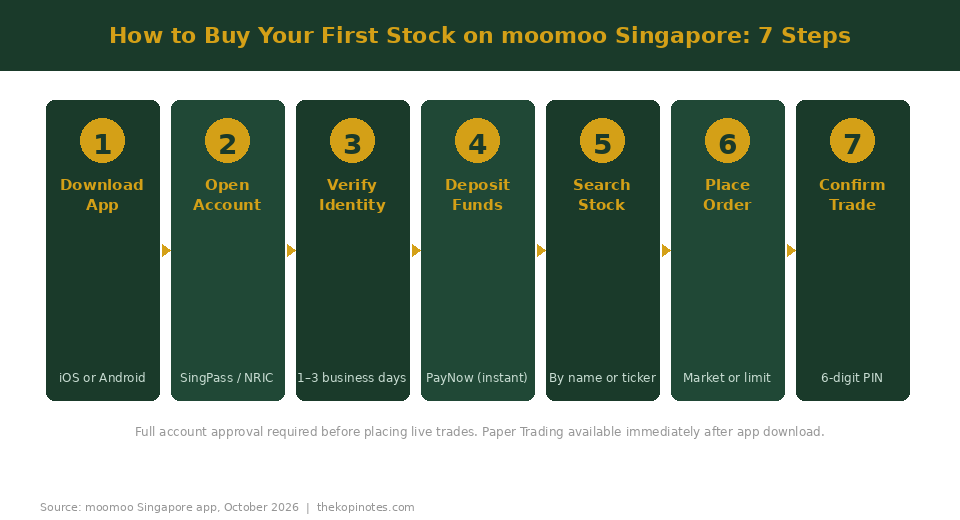
- Download the moomoo app — available on the iOS App Store and Google Play. You can also sign up at moomoo.com.sg on desktop.
- Tap “Open Account” and select Singapore as your region.
- Enter your personal details — full legal name as per NRIC or passport, NRIC or passport number, date of birth, residential address, employment status, and tax residency.
- Upload your identity documents — Singapore citizens and PRs upload the front and back of their NRIC. Foreign nationals upload a passport and a valid Singapore pass (Employment Pass, Dependent Pass, etc.).
- Complete the risk assessment questionnaire — you’ll answer questions about your investment experience, risk appetite, and financial situation. This is a mandatory MAS requirement for all brokerage accounts in Singapore.
- Wait for verification — moomoo typically approves accounts within 1–3 business days. Accounts that pass automated identity checks are sometimes approved in under an hour. You’ll receive an email when your account is ready.
- Set your trading PIN and 2FA — before your first trade, you’ll be asked to set a 6-digit trading PIN and enable two-factor authentication for security.
Tip: Have your NRIC and a recent payslip or bank statement ready before you begin. Incomplete submissions are the most common reason for delayed approvals.
How to Deposit Money into moomoo
Once approved, you can fund your moomoo account in SGD or USD. SGD via PayNow is the fastest and most cost-effective method for most Singapore investors.
Depositing SGD via PayNow (recommended):
- In the moomoo app, go to Assets > Deposit.
- Select SGD as the deposit currency and choose PayNow.
- Note moomoo’s PayNow UEN or scan the QR code displayed in the app.
- Open your banking app, transfer to moomoo’s PayNow address, and use the reference number provided.
- SGD typically reflects in your moomoo account within minutes during business hours.
There is no official minimum deposit. For USD deposits (to avoid FX conversion on each US trade), you can send via SWIFT to moomoo’s custodian bank. Note that your bank may charge an outgoing SWIFT fee of SGD 20–30 per transfer, so batch your transfers where possible. Always check the current T&Cs in the moomoo app, as promotional minimum funded balances may apply to unlock certain features.
How to Buy Stocks on moomoo (Step-by-Step)
Once your account is funded, here is how to place your first trade. This walkthrough uses US stocks as the example, but the process is identical for SGX, HKEX, Japan, and Korean stocks — only the market selection differs.
- Open the moomoo app and log in with your credentials and 2FA.
- Tap the search icon and type the company name or ticker — e.g. “Apple” or “AAPL” for a US stock, or “DBS” for a SGX stock.
- Select the stock from the results. Verify the exchange shown (e.g. Nasdaq for AAPL, SGX Main Board for DBS).
- Tap “Trade” then “Buy” on the stock’s detail page.
- Choose your order type:
- Market Order — executes at the current best available price, immediately during market hours. Best for liquid large-cap stocks.
- Limit Order — you set the maximum price you’ll pay. The order only fills if the stock reaches your limit or lower. Better for less liquid stocks or when you want price control.
- Enter the quantity — for US stocks, moomoo supports fractional shares to 4 decimal places, so you can buy USD 50 of Apple regardless of the share price. For SGX stocks, the standard lot size is 100 shares.
- Review the order summary — verify stock name, exchange, order type, quantity, and the estimated total cost including fees.
- Tap “Submit” and enter your 6-digit trading PIN to confirm.
Your order appears under the Orders tab. Market orders for US stocks during regular US trading hours (9:30 pm – 4:00 am SGT) typically fill within seconds. Limit orders remain open until filled or cancelled. To view your holdings, go to Assets > Positions.
For complete beginners who want to practise before using real money, activate moomoo’s Paper Trading mode under Me > Paper Trading. It uses live market prices with virtual funds — a realistic test environment at zero risk.
Key moomoo Features Worth Knowing
moomoo packs professional-grade tools into its consumer app. Here are the features most useful for Singapore retail investors:
Cash Plus — Earn Interest on Idle SGD
Cash Plus sweeps uninvested SGD in your moomoo account into a qualifying money market fund, letting you earn interest rather than letting cash sit idle. The annualised yield fluctuates with interest rates — check the current rate in the moomoo app before depositing. Same-day liquidity is available, making it useful for short-term cash parking between trades. Note that Cash Plus is not a bank deposit and is not covered by the Singapore Deposit Insurance Scheme (SDIC).
Paper Trading — Practise Risk-Free
The paper trading mode gives you a virtual SGD/USD portfolio with real-time market prices. It is ideal for beginners testing their first limit orders, investors exploring options strategies, or anyone who wants to get comfortable with the interface before committing real money. Activate it under Me > Paper Trading at any time.
Free Level 2 Market Data
Most retail brokers charge SGD 20–30 per month for Level 2 data (the full order book showing multiple bid and ask prices). moomoo offers it free for both US and SGX stocks until 31 December 2026 — a meaningful advantage for investors who use order flow to time entries.
Stock Screener with 200+ Filters
The built-in stock screener lets you filter the entire US or SGX market by fundamentals (P/E ratio, dividend yield, EPS growth), technicals (RSI, moving averages), and ownership metrics (institutional holdings, short interest). Save custom screens and set alerts when a stock enters your criteria.
Regular Savings Plan (RSP)
The RSP automates monthly investing into stocks or ETFs of your choice. Set a monthly amount and a date; moomoo handles the rest. This is ideal for dollar-cost averaging without manual execution each month. To work out how much to invest monthly for your retirement goal, our Singapore retirement calculator can help you build that plan.
moomoo Academy
For beginners, moomoo Academy provides structured investing courses on fundamentals, technical analysis, options basics, and Singapore-specific topics. Courses are free and completing them can unlock rewards under moomoo’s points system.
moomoo Fees and Charges
Understanding the full trading cost on moomoo is more nuanced than just the commission rate. Here is a clear breakdown, by market:
| Market | Commission | Platform Fee | Min Per Order |
|---|---|---|---|
| US Stocks / ETFs | $0.0049/share | $0 (promo) | USD 0.99 |
| SGX Stocks / REITs / ETFs | 0.03% | 0.03% | SGD 0.99 |
| HKEX Stocks | 0.03% | 0.03% | HKD 3 |
| China A-Shares | 0.03% | 0.03% | CNY 3 |
| US Options | $0.65/contract | — | USD 0.99 |
Source: moomoo Singapore fee data, October 2026. SGX trades additionally attract an SGX clearing fee (0.0325%) and access fee (0.0075%). 9% GST applies on all moomoo fees. Commission waivers are subject to current promotions and T&Cs.
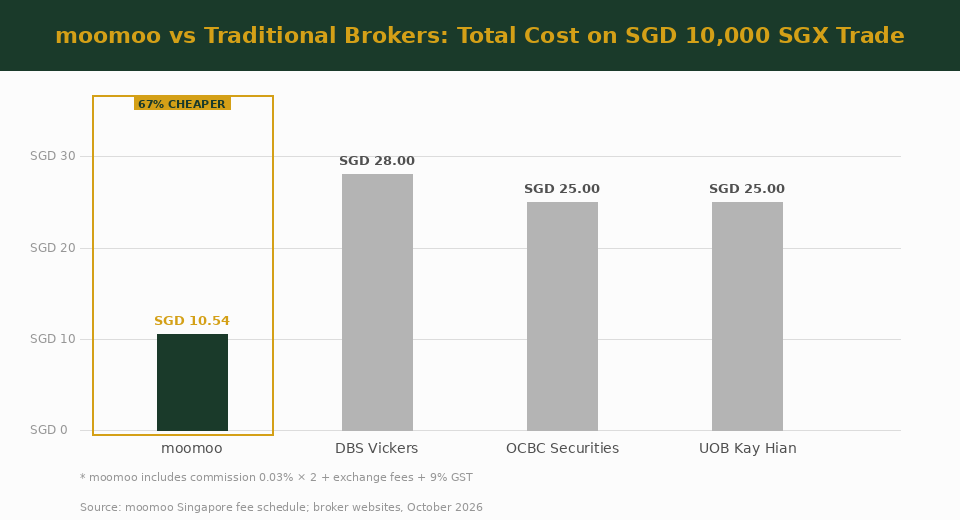
Worked example — buying SGD 10,000 of DBS Bank (SGX):
- moomoo commission: 0.03% × SGD 10,000 = SGD 3.00
- moomoo platform fee: 0.03% × SGD 10,000 = SGD 3.00
- SGX clearing fee: 0.0325% × SGD 10,000 = SGD 3.25
- SGX access fee: 0.0075% × SGD 10,000 = SGD 0.75
- GST (9%) on moomoo fees only: (SGD 3 + SGD 3) × 9% = SGD 0.54
- Total: SGD 10.54 (0.11% of trade value)
For comparison, DBS Vickers charges 0.28% per SGX trade (minimum SGD 25), making moomoo meaningfully cheaper for most retail trade sizes. One important caveat: moomoo’s “0 commission” promotions waive only the brokerage commission — exchange fees, clearing fees, and GST still apply on every trade.
moomoo is not the only platform worth knowing about. For hands-off investors who prefer a robo-advisory approach, a Syfe referral code gets you started with a welcome bonus. For access to a wider range of unit trusts and ETFs, the FSMOne referral code opens one of Singapore’s largest fund supermarkets. If you are also building a CPF-OA investment strategy alongside your cash brokerage account, our guide to CPF investment strategy Singapore covers how to maximise both together.
Frequently Asked Questions
How do I use moomoo to buy stocks in Singapore?
To buy stocks on moomoo Singapore, open the app and search for the stock by name or ticker symbol. Tap on the stock, select “Trade” then “Buy”, choose a market or limit order type, enter your quantity, review the total cost including fees, then confirm with your 6-digit trading PIN. For SGX stocks the minimum lot size is typically 100 shares; for US stocks, fractional shares allow you to invest any dollar amount. Your account must be funded before you can place an order.
Is moomoo safe for Singapore investors?
Yes. moomoo Singapore operates through Futu Singapore Pte. Ltd., which holds a Capital Markets Services (CMS) licence from the Monetary Authority of Singapore (MAS). Client assets are held in segregated accounts — your holdings and cash are kept separately from moomoo’s own company funds. Singapore-listed securities held through moomoo are also custodied via the SGX Central Depository (CDP) system. As with any investment platform, your capital is at risk based on market movements, not platform failure risk.
What is the minimum amount to start investing on moomoo Singapore?
There is no official minimum deposit to open or maintain a moomoo Singapore account. The practical floor is set by the per-order minimum commission — USD 0.99 for US stocks and SGD 0.99 for SGX stocks. In practice, most investors start with at least SGD 200–500 to make individual trades worthwhile relative to fees. For the Regular Savings Plan (RSP), check the current minimum monthly amount in the app, as it can vary with promotional offers.
How long does it take to open a moomoo account?
Most moomoo Singapore accounts are approved within 1–3 business days. Accounts that pass automated identity verification are sometimes approved in under an hour. You will receive an email notification when your account is approved and ready for funding. During high-traffic promotional periods, manual review may take longer. Once approved, you can deposit via PayNow and start trading the same day.
What is moomoo Cash Plus and is it worth using?
Cash Plus is moomoo’s SGD money market feature that earns interest on uninvested cash in your brokerage account. Instead of leaving idle SGD earning nothing, Cash Plus automatically sweeps it into a qualifying money market fund. The yield fluctuates with interest rates — check the current annualised rate in the app. It offers same-day liquidity, making it a convenient holding place between trades. It is not a bank deposit and is not covered by the Singapore Deposit Insurance Scheme (SDIC), so it carries a small counterparty risk tied to the underlying money market fund.
Can I use moomoo for SRS or CPF investing?
Currently, moomoo Singapore does not support Supplementary Retirement Scheme (SRS) or CPF Investment Scheme (CPFIS) investing. To invest SRS funds, you need an SRS-approved operator such as DBS Vickers, OCBC Securities, or UOB Kay Hian. For CPF-OA investing, you need a CPF Investment Account linked to an approved broker. Many investors use moomoo for their cash portfolio while managing CPF-OA investments separately — our guide to CPF investment strategy Singapore covers how to structure both approaches together.
Ready to Start Trading on moomoo?
Open your account today and use our referral link for exclusive welcome rewards. Already investing? Check if you’re on track for retirement.
This article was researched with the help of AI. While we strive to keep all information accurate and up to date, there may be errors. If you notice any discrepancies, please contact us.