How to Use YouTrip in Singapore: Complete App & Card Guide (2026)
Step-by-step setup, top-up methods, currency loading, ATM tips, and fee breakdown for Singapore travellers.
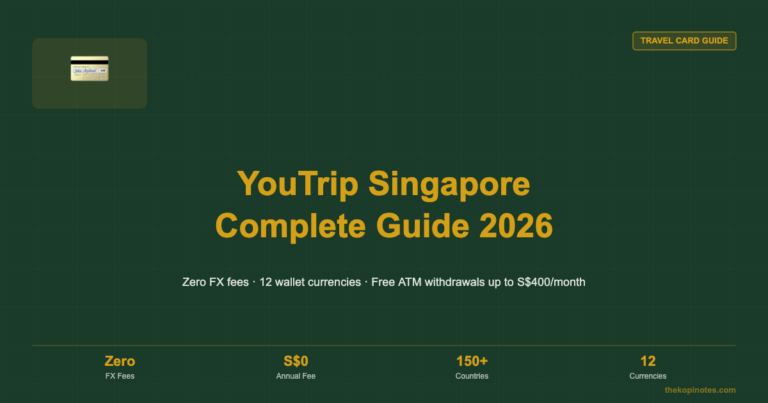
YouTrip is a multi-currency e-wallet and Mastercard prepaid card built for Singapore travellers. You top up with SGD via PayNow — free and instant — then spend in over 150 currencies worldwide at the real Mastercard rate with zero foreign transaction fees. There is no annual card fee and no FX markup, making it one of the most cost-effective travel cards available in Singapore.
Not financial advice. All figures are for educational reference only. Data verified as at September 2026.
- YouTrip has zero annual fees and zero foreign transaction fees — the FX saving is real and adds up fast on every overseas trip.
- Top up via PayNow for free and instantly. Avoid credit card top-ups (1.5% fee).
- ATM withdrawals are free up to S$400/month in foreign currency; a 2% fee applies after that threshold.
Table of Contents
Contents — Click to expand
- What Is YouTrip?
- How to Download and Set Up the YouTrip App
- How to Top Up Your YouTrip Wallet
- How to Load and Exchange Foreign Currencies
- How to Use YouTrip for Payments
- YouTrip ATM Withdrawals
- YouTrip Business — For Freelancers and SMEs
- YouTrip Fees and Limits at a Glance
- Tips to Get the Most from YouTrip
- Frequently Asked Questions
What Is YouTrip?
YouTrip launched in Singapore in 2018 as the country’s first multi-currency travel e-wallet. It is issued on the Mastercard network and regulated by the Monetary Authority of Singapore (MAS) under the Payment Services Act as a Major Payment Institution licensee.
The product has two parts: the YouTrip mobile app (iOS and Android) and a physical Mastercard prepaid card. You manage everything in the app — checking your balance, loading foreign currencies, reviewing transactions, and locking your card if needed.
What makes YouTrip different from a regular bank debit card is the exchange rate. When you spend in a foreign currency, YouTrip applies the wholesale Mastercard interbank rate with zero markup. Your standard Singapore bank card, by contrast, typically charges a 1.5–3.5% foreign transaction fee on top of a less favourable base rate.
On a S$5,000 overseas trip, avoiding a 2.5% fee saves you S$125. Across several trips a year, those savings add up fast. YouTrip also has no annual card fee — ever — which means the YouTrip annual fee question has a simple answer: S$0.
How to Download and Set Up the YouTrip App
Setting up YouTrip takes around 10 minutes. You need to be a Singapore resident aged 16 or above with a valid NRIC or passport.
Step 1: Download the App
Search “YouTrip” on the App Store (iPhone) or Google Play Store (Android). Download and install the free app.
Step 2: Register with Your Mobile Number
Open the app and enter your Singapore mobile number. YouTrip sends a one-time password (OTP) to verify it. Create a 6-digit PIN to secure your account.
Step 3: Verify Your Identity
MAS regulation requires identity verification for all e-wallet accounts. Take a clear photo of your NRIC (front and back) or your passport. The app also prompts a selfie liveness check. Most verifications are approved in minutes; some take up to 24 hours during peak periods.
Step 4: Get Your Card
Once approved, your virtual Mastercard card number appears immediately in the app. You can use this for online payments straight away — no waiting needed. To get a physical card for in-store use, tap “Request Physical Card” in the app. Delivery to your Singapore address is free and takes 5–7 business days.
How to Top Up Your YouTrip Wallet
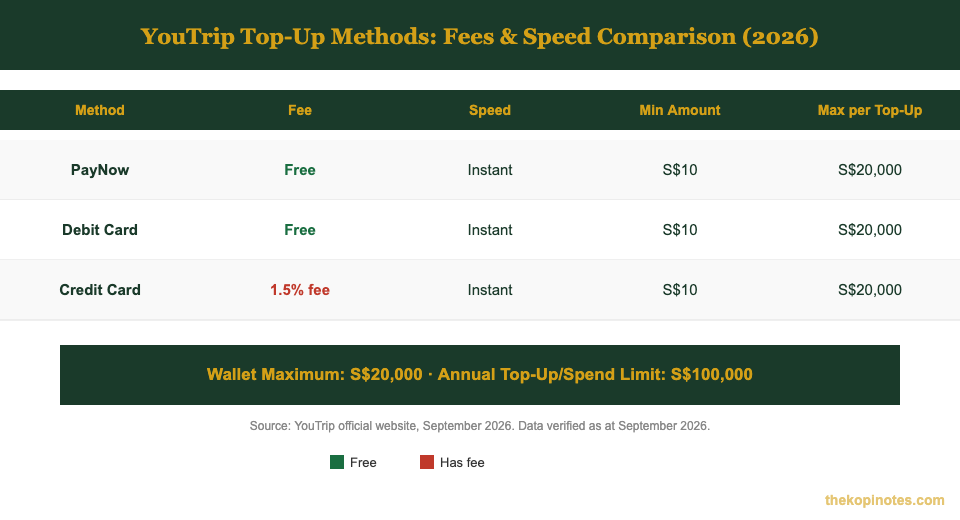
Your YouTrip wallet holds Singapore Dollars (SGD). You load funds from your bank first, then optionally exchange into a foreign currency. Here are your top-up options:
PayNow (recommended): Open the app → tap “Top Up” → select “PayNow” → scan the QR code or use YouTrip’s UEN number. Funds appear in your wallet instantly. This method is completely free and is the most cost-effective way to fund your YouTrip wallet.
Debit card: Link a Singapore-issued debit card in the app and tap to top up. Also free and instant. Works with most major bank debit cards issued in Singapore.
Credit card: YouTrip accepts credit card top-ups but charges a 1.5% processing fee. On a S$1,000 top-up, that is S$15 in fees — which quickly erodes the FX savings you came to YouTrip for. Use PayNow whenever possible.
| Top-Up Method | Fee | Speed | Min Amount |
|---|---|---|---|
| PayNow | Free | Instant | S$10 |
| Debit Card | Free | Instant | S$10 |
| Credit Card | 1.5% fee | Instant | S$10 |
Source: YouTrip official website, September 2026. Data verified as at September 2026.
Your wallet can hold a maximum of S$20,000 at any time. The annual rolling top-up and spend limit is S$100,000.
How to Load and Exchange Foreign Currencies in YouTrip
After funding your SGD wallet, you can exchange SGD into a specific foreign currency inside the app. This locks in the Mastercard exchange rate at that exact moment — handy if you are travelling soon and today’s rate looks favourable.
To exchange: tap “Exchange” in the YouTrip app → choose a currency (e.g. Japanese Yen, JPY) → enter the SGD amount to convert → confirm. The converted amount sits in a separate currency purse for that destination.
YouTrip supports over 150 currencies, including JPY, USD, EUR, GBP, THB, MYR, IDR, HKD, AUD, and KRW.
You can also skip pre-loading and just pay directly with your SGD wallet. YouTrip auto-converts at the current Mastercard rate at the moment of payment. Both approaches give you zero-markup rates. Pre-loading lets you lock in a rate; auto-convert gives you flexibility. Neither charges a conversion fee.
How to Use YouTrip for Payments
Once your wallet is funded, paying with YouTrip is as simple as tap, insert, or enter card details online.
In-store (overseas): Tap your YouTrip Mastercard on any contactless terminal. For older terminals, insert the chip or swipe. YouTrip is accepted anywhere Mastercard is accepted — over 90 million merchants in 200+ countries.
In-store (Singapore): YouTrip works for SGD purchases in Singapore at no fee. It is a useful everyday backup card if your main bank card is at home.
Online shopping: Use your virtual card details (card number, expiry, CVV) from the app for any website that accepts Mastercard. No need to wait for the physical card.
Dynamic Currency Conversion (DCC) — always reject it: Sometimes a merchant or ATM will offer to charge you in SGD instead of the local currency. This is called Dynamic Currency Conversion and it is almost always a worse rate. Always choose to pay in the local currency and let YouTrip handle the conversion. For a full breakdown of overseas payment scenarios, see our full overseas card usage guide.
YouTrip ATM Withdrawals
YouTrip lets you withdraw cash at any Mastercard-accepting ATM worldwide. The free withdrawal limit resets on the 1st of every calendar month.
The first S$400 equivalent in foreign currency you withdraw each calendar month is completely free. Above S$400, YouTrip charges a 2% fee on the excess amount withdrawn.
Worked example: You are in Bangkok and withdraw S$600 equivalent in Thai Baht this month. The first S$400 is free. The remaining S$200 incurs a S$4 fee (2% of S$200). Total cost: S$4. Still much cheaper than a standard Singapore bank card charging S$5 flat plus 1.5–3% conversion on every withdrawal.
Daily ATM withdrawal limit: S$1,500 equivalent per day. Always choose “local currency” at the ATM screen — never select “SGD” when the ATM prompts you.
YouTrip Business — For Freelancers and SMEs
If you travel for work or run a company with overseas expenses, YouTrip Business gives you corporate Mastercard cards with centralised expense tracking.
YouTrip Business includes: multiple corporate cards per account, a web dashboard for expense management, receipt uploads in the app, real Mastercard FX rates with zero markup, and support for employee reimbursement workflows.
It is particularly useful for: freelancers with recurring overseas SaaS subscriptions (AWS, Adobe, Notion, Figma), SMEs with staff who travel frequently, and businesses paying international vendors in foreign currencies.
To sign up, use YouTrip Business referral code YOUygWAHwmo when registering to receive a bonus credit on account activation.
YouTrip Fees and Limits at a Glance
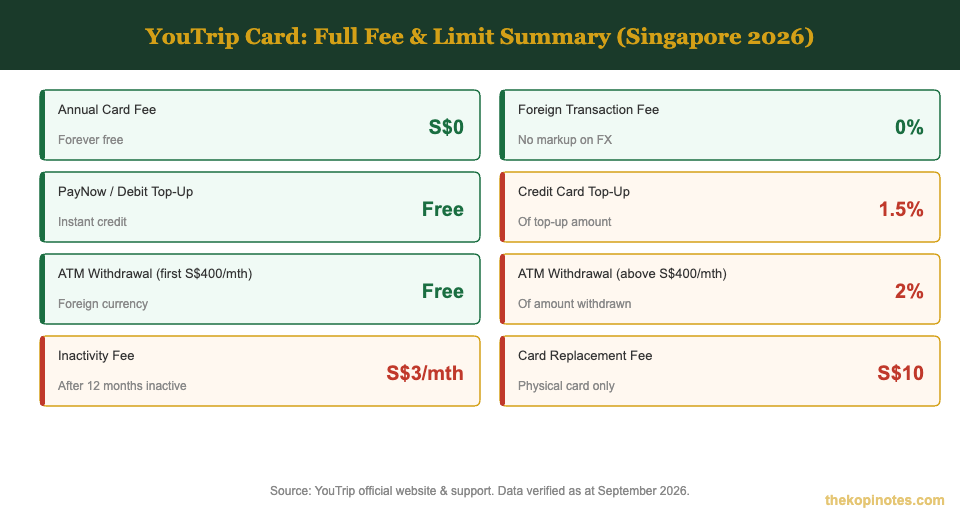
Here is every YouTrip fee and limit in one place. All figures are verified against YouTrip’s official website as at September 2026.
| Fee / Limit Type | Amount | Notes |
|---|---|---|
| Annual Card Fee | S$0 | Permanently free |
| Foreign Transaction Fee | 0% | Real Mastercard rate, no markup |
| PayNow / Debit Top-Up | Free | Instant credit |
| Credit Card Top-Up | 1.5% | Of top-up amount |
| ATM (first S$400/mth) | Free | Foreign currency; resets 1st of each month |
| ATM (above S$400/mth) | 2% | Of excess amount withdrawn |
| Inactivity Fee | S$3/month | After 12 months of no activity |
| Wallet Maximum Balance | S$20,000 | At any given time |
| Annual Top-Up / Spend Limit | S$100,000 | Rolling 12-month limit |
Source: YouTrip official website and support centre, September 2026. Data verified as at September 2026.
Tips to Get the Most from YouTrip
A few simple habits will help you avoid all unnecessary fees and always get the best rate.
Always top up via PayNow. It is instant, free, and available 24/7. Credit card top-ups cost 1.5% — that quietly erodes the FX savings you came to YouTrip for in the first place.
Load currencies before you travel. Check the rate a few days before departure and load your holiday budget if the rate looks favourable. You lock in today’s Mastercard rate and avoid uncertainty on arrival.
Reject DCC every time. Whether at an overseas ATM or a merchant terminal, always pay in the local currency. Dynamic Currency Conversion is a merchant-side fee trap — YouTrip cannot protect you if you accept it.
Keep a small SGD buffer. If your foreign currency purse runs empty mid-trip, YouTrip auto-converts from your SGD wallet at the real Mastercard rate. A S$200–500 SGD buffer ensures you are never caught out.
Use your referral code. When you sign someone up with your YouTrip referral code, both of you earn a bonus credit. Share it before every trip — it is a small but effortless saving.
Compare your options. YouTrip is excellent for most travellers, but it is worth knowing the alternatives. Our Wise Card vs YouTrip guide and our Revolut vs YouTrip breakdown show you exactly where each card wins and loses for Singapore users.
Frequently Asked Questions
Can I use YouTrip in China?
How long does the YouTrip physical card take to arrive?
What is the minimum top-up and wallet limit for YouTrip?
What should I do if my YouTrip card is lost or stolen?
Does YouTrip earn cashback or air miles?
Is YouTrip safe and regulated in Singapore?
The Bottom Line
YouTrip is one of the simplest, most cost-effective travel cards available to Singaporeans. Setup takes 10 minutes, PayNow top-ups are free and instant, and the zero-markup FX rate saves you real money on every overseas payment.
Whether you are planning a weekend in Johor Bahru or a month-long Europe trip, loading your budget in advance and tapping to pay at every merchant will consistently save you compared to using a standard bank debit card abroad.
Not financial advice. All fees and limits verified against YouTrip’s official website as at September 2026.
This article was researched with the help of AI. While we strive to keep all information accurate and up to date, there may be errors. If you notice any discrepancies, please contact us.