YouTrip Card for India Travel: INR Exchange Rate & ATM Guide (2026)
Everything Singapore travellers need to know about using YouTrip in India — rates, fees, ATM tips, and how much cash to bring.
YouTrip is one of the best cards for Singapore travellers heading to India. It charges 0% foreign transaction fees and uses the Mastercard wholesale rate — so when you spend in INR or withdraw cash from an Indian ATM, you get close to the mid-market SGD to INR rate. As of August 2026, that’s around 1 SGD = 75 INR. You’ll save 2.5–3.5% versus most credit cards, and up to 4.5% versus airport money changers.
Not financial advice. All figures are for educational reference only. Data verified as at 26 August 2026.
- YouTrip charges 0% FX fees for INR — you get the Mastercard wholesale rate, very close to the mid-market rate
- ATM withdrawals are free up to S$400/month; a 2% fee applies above that limit
- Cash is still essential in India outside major cities — always carry some INR for street food, tuk-tuks, and rural areas
SGD to INR: What Rate Does YouTrip Give You?
As of August 2026, 1 SGD buys approximately 75 Indian Rupees (INR) at the YouTrip rate. YouTrip always uses the Mastercard wholesale rate with zero markup — what you see in the app is what you get.
Here’s how that compares to other ways to get INR:
| Method | FX Markup | INR per S$100 | Extra Cost on S$500 |
|---|---|---|---|
| YouTrip | 0% | ~₹7,500 | S$0 |
| Wise | ~0.41% | ~₹7,469 | ~S$2 |
| DBS/POSB Debit Card | ~2.5% | ~₹7,313 | ~S$12.50 |
| Credit Card (average) | ~3.25% | ~₹7,256 | ~S$16.25 |
| Airport Money Changer (SIN) | ~4.5% | ~₹7,163 | ~S$22.50 |
Source: YouTrip, Wise published pricing, MAS exchange rate data — August 2026. Figures are indicative; rates change daily. Always verify before travel.
For context, the 2026 average rate has been around 72–75 INR per SGD. The Rupee has strengthened modestly against the Singapore Dollar this year, so if you’re planning a trip later in 2026, keep an eye on the rate in the app.
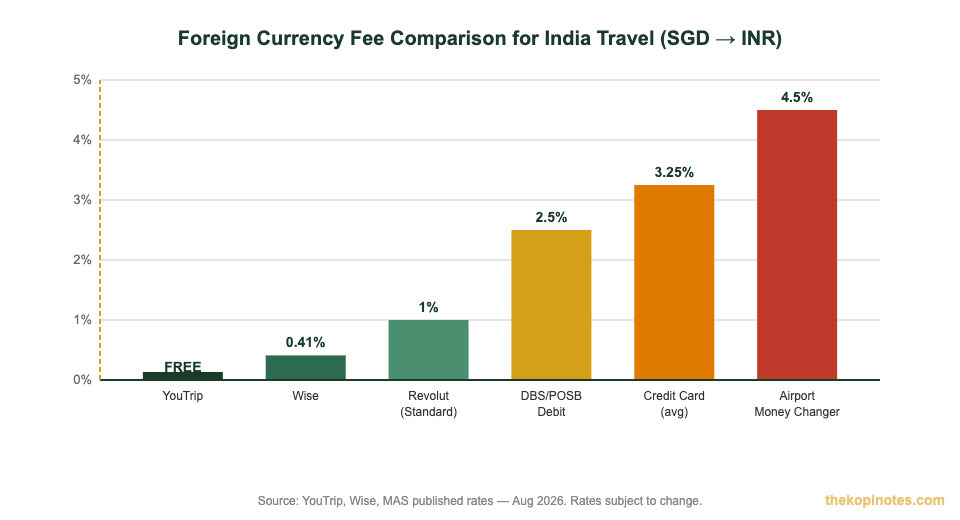
YouTrip saves you 2.5–4.5% vs standard credit cards and airport changers for India travel spending. Source: The Kopi Notes, Aug 2026.
YouTrip Fees for India Travel
One of YouTrip’s biggest selling points is what it doesn’t charge. Here’s the full fee picture for India travel:
| Fee Type | YouTrip Amount | Notes |
|---|---|---|
| Card fee / Annual fee | Free | No ongoing charges |
| Overseas transaction fee (spending in India) | 0% | No FX surcharge on card spending |
| Currency exchange fee (in-app) | Free | Lock in SGD→INR rate in the app anytime |
| ATM withdrawals (first S$400/month) | Free | Resets every calendar month |
| ATM withdrawals (above S$400/month) | 2% of withdrawn amount | Deducted from your SGD wallet; cannot be waived |
| Top-up via PayNow / Mastercard debit | Free | Use PayNow for instant, fee-free top-ups |
| Top-up via Visa credit card | 1.5% service fee | Avoid this — use PayNow instead |
| Card replacement | S$10 | One-time fee if card is lost/damaged |
Source: YouTrip Support Centre — Fees Article and ATM Withdrawal Fee FAQ, verified August 2026.
The 2% ATM fee applies only to the amount above S$400 in a calendar month — not the whole withdrawal. For example, if you’ve already withdrawn S$300 and then withdraw another S$200, only S$100 triggers the 2% fee (that’s just S$2 extra). For more details on limits, see our YouTrip card fees and limits guide.
Using YouTrip at ATMs in India
You can withdraw INR at any ATM in India that displays the Mastercard, Maestro, or Cirrus logo. That covers virtually every major bank ATM across India — ICICI, HDFC, SBI, Axis, Kotak, and more.
Here’s what you need to know before you tap that ATM screen:
Step 1: Find an ATM with Mastercard/Cirrus logo. ICICI and HDFC ATMs are widespread in airports, shopping malls, and city centres. SBI has the largest network overall, including rural areas.
Step 2: Always choose INR — never SGD. The ATM may ask if you want to withdraw in Indian Rupees or your home currency (SGD). Always pick INR. Choosing SGD triggers Dynamic Currency Conversion (DCC) — a hidden markup that can cost you 3–5% extra. YouTrip always charges in local currency automatically when you don’t select DCC.
Step 3: Check for ATM operator fees. Some Indian ATMs charge a flat fee for international cards. This is set by the ATM operator, not YouTrip. It’s typically ₹100–₹200 per withdrawal. You’ll see it on-screen before confirming — you can cancel if it’s too high.
Step 4: Withdraw in larger amounts. Each withdrawal may trigger an ATM operator fee. Fewer, larger withdrawals save on per-transaction costs. Indian ATMs typically allow between ₹10,000–₹30,000 per transaction, depending on the bank.
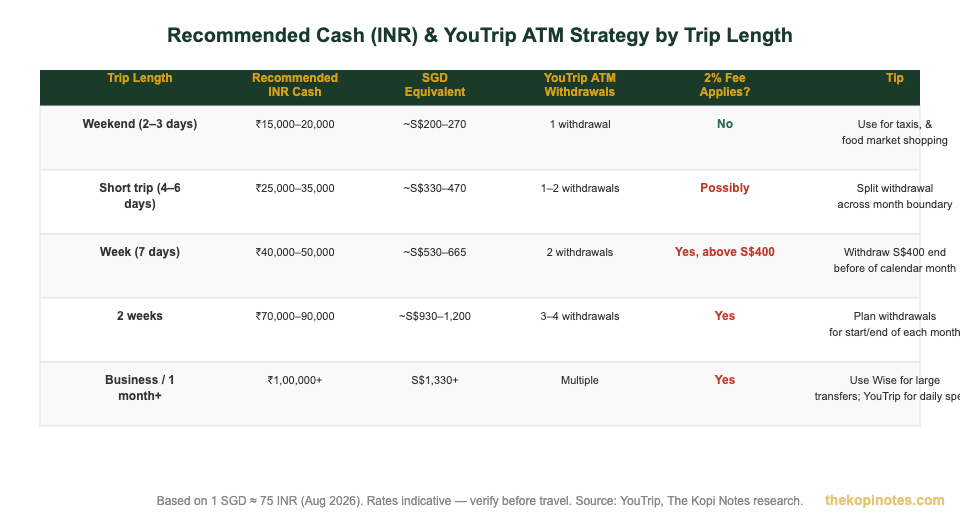
Plan your YouTrip ATM withdrawals to stay under the free S$400/month threshold where possible. Source: The Kopi Notes, Aug 2026.
Where YouTrip Works Best in India
YouTrip works as a card payment (tap or insert) anywhere that accepts Mastercard. In India’s major cities, that covers most hotels, restaurants, and shopping malls. For everything else, cash is king.
Works great with YouTrip card:
- 5-star hotels and international hotel chains
- Major restaurant chains and mid-range restaurants in cities
- Shopping malls and branded clothing stores
- Airport retail, cafes, and duty-free shops
- Ola and Uber rides (set up the card in the app before you go)
- Zomato food delivery orders (add card before you leave Singapore)
Use cash (INR) here:
- Street food stalls, local dhabas, and hawker-style eateries
- Auto-rickshaws and cycle rickshaws
- Local markets and bazaars (Chandni Chowk, Crawford Market)
- Entry fees to some temples, forts, and heritage sites
- Rural guesthouses and homestays outside big cities
- Train ticket counters and local bus services
A good rule of thumb: carry at least ₹3,000–₹5,000 in cash at all times when travelling outside Mumbai, Delhi, or Bengaluru. In tier-2 and tier-3 cities, even less infrastructure accepts cards. For more context on how to use your YouTrip card overseas, our complete guide covers all regions.
Cash vs Card in India: What You Actually Need
India is still very much a cash-driven country outside the major metros. While UPI (Unified Payments Interface) dominates domestic payments, it isn’t available to Singapore visitors — UPI requires an Indian phone number and bank account.
So your options as a Singapore traveller are:
- YouTrip card for card payments (where Mastercard is accepted)
- Cash (INR) for everything else
- Wise or your bank’s debit card as a backup (for large amounts or if YouTrip ATM limit is reached)
For a typical 7-day India trip spending S$1,500–S$2,000, you’ll likely use your YouTrip card for hotel bookings, airport rides, and major restaurant meals — that’s maybe S$700–900 on card. The remaining S$600–800 equivalent you’ll need in INR cash, mainly for street experiences, local transport, and tips.
If you’re wondering how YouTrip stacks up versus Wise for larger transfers, our YouTrip vs Wise comparison breaks it down in detail. For most India travellers, using YouTrip for daily card payments and cash ATM withdrawals is the sweet spot.
Top Tips for Using YouTrip in India
1. Top up before you fly. Top up your YouTrip wallet via PayNow (instant, free) before you leave Singapore. Don’t rely on topping up at the airport — you’ll pay a higher rate if you use a Visa credit card (1.5% fee).
2. Do your first ATM withdrawal before leaving major airports. ICICI and HDFC ATMs at Indira Gandhi International (Delhi), Chhatrapati Shivaji Maharaj (Mumbai), and Kempegowda (Bengaluru) airports are reliable, widely accessible, and often don’t charge an operator fee for international cards.
3. Split withdrawals to stay within S$400/month free limit. If your trip crosses the 1st of the month, you can withdraw S$400 in the last days of one month and another S$400 after the 1st. That’s S$800 total with zero YouTrip ATM fees.
4. Carry small INR notes. Auto-rickshaw drivers, street vendors, and temple donation boxes rarely accept ₹500 or ₹2,000 notes. Get change at supermarkets and hotels, and always keep ₹10–₹100 notes handy.
5. Use YouTrip’s in-app exchange for INR. YouTrip lets you lock in up to 10 different currencies in your wallet. You can lock in INR before you travel if you think the SGD/INR rate might move unfavourably. This doesn’t guarantee a better rate, but it locks your rate on the amount you convert.
6. Activate your YouTrip card before you land. Make sure your card is activated and your PIN is set before departure. Test it with a small transaction in Singapore. You don’t want to discover a card issue when you’re jet-lagged at Bengaluru airport. For new users, grab your YouTrip referral code for a sign-up bonus before you apply.
7. Enable notifications. Turn on spend notifications in the YouTrip app. This lets you spot any unauthorised transactions instantly — important when your card is being handled at restaurants (a common source of card skimming in some tourist areas).
For a full breakdown of what the YouTrip card offers, pros and cons, and how it compares to alternatives, read our detailed YouTrip card review.
Frequently Asked Questions
Can I use YouTrip card in India?
Yes. YouTrip works in India at any merchant or ATM that accepts Mastercard. That covers major hotels, restaurants, shopping malls, and most ATMs across the country. Just note that local street vendors and rural businesses typically only accept cash — so always carry some INR.
What is the SGD to INR exchange rate on YouTrip?
As of August 2026, 1 SGD buys approximately 75 Indian Rupees on YouTrip. YouTrip uses the Mastercard wholesale rate with zero markup. The rate updates throughout the day — check the live rate in the YouTrip app before transacting.
Are there ATM fees when using YouTrip in India?
YouTrip itself charges no fee for ATM withdrawals up to S$400 per calendar month. Above that, a 2% fee applies (deducted from your SGD wallet). Some Indian ATM operators may additionally charge a flat fee of ₹100–₹200 per withdrawal — you’ll see this on-screen before you confirm.
Should I choose INR or SGD at Indian ATMs?
Always choose INR. If you choose SGD at the ATM, the bank applies Dynamic Currency Conversion (DCC) — a poor exchange rate that can add 3–5% to your cost. YouTrip automatically processes in local currency when you select INR, giving you the Mastercard wholesale rate instead.
How much cash should I bring to India?
For a 7-day India trip, plan on having around ₹40,000–₹50,000 in cash (roughly S$530–665), spread across your trip. Withdraw at major city ATMs on arrival and top up as needed. Avoid withdrawing large amounts at once — carrying too much cash increases risk if your wallet is lost or stolen.
Does YouTrip support UPI payments in India?
No. UPI (Unified Payments Interface) requires an Indian bank account and phone number — it is not available to Singapore visitors using foreign cards like YouTrip. However, YouTrip works at Mastercard payment terminals, which covers major retail outlets, hotels, and restaurants in Indian cities.
What is the YouTrip wallet limit?
Your YouTrip wallet can hold up to S$20,000 at any one time. You can lock in up to 12 currencies in the app. There is no annual fee and no monthly maintenance charge. Top up for free via PayNow or Mastercard debit card.
This article was researched with the help of AI. While we strive to keep all information accurate and up to date, there may be errors. If you notice any discrepancies, please contact us.