How to Apply for the YouTrip Card in Singapore (2026 Guide)
To apply for the YouTrip card in Singapore, download the YouTrip app, sign up using your SingPass MyInfo, verify your identity, and order the physical card for S$5. The process takes under 10 minutes and your card arrives in 5–7 business days. YouTrip gives you 0% FX markup on 150+ currencies — making it one of the best travel cards for Singaporeans.
Not financial advice. All figures are for educational reference only. Data as at June 2026 unless noted.
- Download the YouTrip app → sign up with SingPass → order your card for S$5.
- YouTrip charges 0% FX markup on 150+ currencies — far cheaper than traditional bank cards (which charge 2–3.5%).
- Use our YouTrip referral code to get a sign-up bonus when you apply.
Table of Contents
- What Is YouTrip?
- Who Can Apply for a YouTrip Card?
- Step-by-Step: How to Apply for the YouTrip Card
- After Approval: Setting Up Your YouTrip Wallet
- How to Top Up Your YouTrip Card
- YouTrip Card Fees You Should Know
- YouTrip vs Other Multi-Currency Cards
- YouTrip Referral Code and Promo
- Frequently Asked Questions
What Is YouTrip?
YouTrip is a Singapore-based multi-currency e-wallet and prepaid Mastercard. It lets you spend in over 150 currencies at the mid-market exchange rate — with zero FX markup. That’s the same rate you see on Google or XE.com. No hidden spread, no surprise charges.
Traditional Singapore bank cards typically add a 2–3.5% foreign currency surcharge on top of every overseas transaction. On a S$5,000 holiday, that’s S$100–175 gone quietly. YouTrip eliminates that entirely.
YouTrip is regulated by the Monetary Authority of Singapore (MAS) as a Major Payment Institution. Your wallet funds are safeguarded in a dedicated trust account, separate from YouTrip’s operating funds.
The card is a physical Mastercard (white, minimalist design) accepted wherever Mastercard is accepted worldwide. You can also use it for online purchases in foreign currencies.
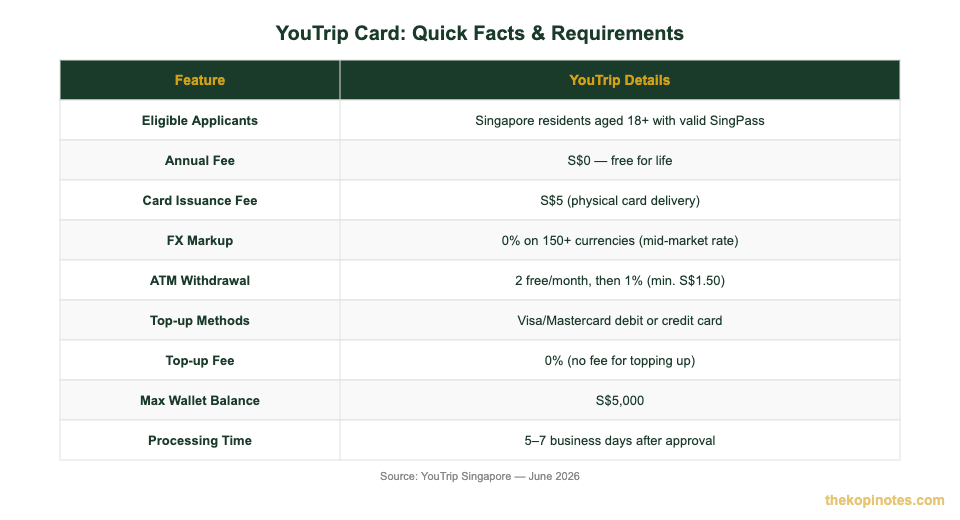
Source: YouTrip Singapore, June 2026
Who Can Apply for a YouTrip Card?
YouTrip is open to most Singapore residents. Here’s what you need to qualify:
| Requirement | Details |
|---|---|
| Age | 18 years old and above |
| Residency | Singapore resident (citizens, PRs, and Employment Pass / S Pass holders) |
| SingPass | Required for MyInfo-based identity verification |
| Phone | iOS or Android smartphone with the YouTrip app |
| Card Fee | S$5 for the physical card (one-time, charged at delivery) |
Source: YouTrip Singapore, June 2026
If you’re on a Short-Term Visit Pass (tourist visa), you are not eligible. You need a long-term Singapore residency status to apply.
Work Permit holders may face additional verification steps. If the MyInfo route doesn’t work, YouTrip’s in-app support can guide you through manual verification.
Step-by-Step: How to Apply for the YouTrip Card
The whole application takes about 10 minutes on your phone. Here’s exactly what to do:
Step 1: Download the YouTrip App
Search “YouTrip” on the Apple App Store or Google Play Store. The app is free. Download and install it.
Step 2: Tap “Sign Up”
Open the app and tap Sign Up on the welcome screen. Enter your Singapore mobile number. You’ll receive a one-time password (OTP) via SMS — enter it to proceed.
Step 3: Verify Your Identity via SingPass MyInfo
YouTrip uses SingPass MyInfo to verify your identity automatically. This pulls your name, NRIC/FIN, and address directly from the government database. You don’t need to upload any documents manually.
Tap Retrieve my details via SingPass, log in to SingPass, and authorise YouTrip to access your data. This usually takes under 30 seconds.
Step 4: Set Up Your Account
After SingPass verification, create a 6-digit passcode for the app. You can also enable Face ID or Touch ID for faster logins. Review and accept YouTrip’s Terms and Conditions.
Step 5: Order Your Physical Card
Tap Order Card in the app. Confirm your delivery address (pulled from MyInfo, but you can edit it). Pay the S$5 card issuance fee via any Visa or Mastercard debit or credit card.
Your YouTrip card arrives by mail in 5–7 business days. While you wait, you can already use your YouTrip wallet for online purchases — just add it to Apple Pay or Google Pay for contactless payments.
Step 6: Activate Your Card
When the card arrives, open the YouTrip app and tap Activate Card. Enter the last 4 digits printed on your card. That’s it — your YouTrip card is ready to use.
After Approval: Setting Up Your YouTrip Wallet
Once your card is active, take 5 minutes to set up your wallet properly. Here’s what to do:
Top Up First
Your YouTrip wallet starts at S$0. You need to top it up before spending. The minimum top-up is S$20. There’s no fee to top up (more on that below).
Lock Exchange Rates in Advance
One of YouTrip’s most powerful features is the ability to lock in exchange rates ahead of time. If you’re travelling to Japan next month and the SGD/JPY rate looks good today, you can convert SGD to JPY now and hold the amount in your wallet.
Your wallet can hold up to 10 currencies simultaneously. This is great for frequent travellers who want to avoid rate fluctuations.
Add to Apple Pay / Google Pay
In the app, tap the card icon and select Add to Wallet. This lets you tap-and-pay anywhere contactless Mastercard is accepted — even before your physical card arrives.
Enable Notifications
Turn on transaction notifications in app settings. You’ll get an instant ping every time your card is charged. Useful for spotting any unauthorised transactions quickly.
For more ways to save money on your travels, check out our guide on the YouTrip referral code and latest promos — you can earn a sign-up bonus just for inviting friends.
How to Top Up Your YouTrip Card
Topping up is straightforward. Here are the methods available in Singapore:
| Top-Up Method | Fee | Notes |
|---|---|---|
| Visa/Mastercard Debit Card | 0% | Recommended — free and instant |
| Visa/Mastercard Credit Card | 0% from YouTrip | Check if your credit card charges a cash advance fee |
Source: YouTrip Singapore, June 2026
YouTrip does not support top-up via PayNow, bank transfer, or PayLah. You must use a Visa or Mastercard.
The maximum wallet balance is S$5,000. If you’re planning a big trip, you can top up in stages. The minimum single top-up amount is S$20.
Pro tip: Use a debit card to top up. Some credit cards classify a YouTrip top-up as a cash advance, which can trigger extra fees from your bank — not from YouTrip, but from your credit card issuer. Check your card’s terms before using a credit card to top up.
YouTrip Card Fees You Should Know
YouTrip keeps its fee structure simple. Here’s a complete breakdown:
| Fee Type | Amount |
|---|---|
| Annual fee | S$0 — free forever |
| Card issuance | S$5 (one-time, charged at delivery) |
| FX markup | 0% on 150+ currencies |
| Top-up fee | 0% |
| ATM withdrawals | First 2 free per month, then 1% (min. S$1.50) |
| Inactivity fee | S$3/month after 12 months of inactivity (if balance > S$0) |
| Card replacement | S$5 |
Source: YouTrip Singapore, June 2026
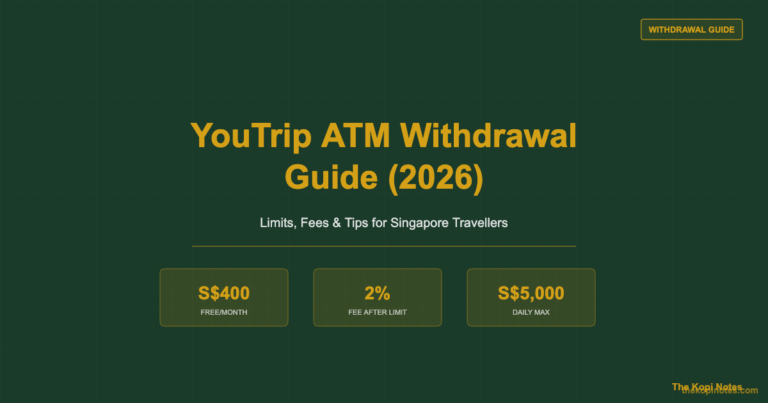
The one fee worth watching is the ATM withdrawal fee. YouTrip gives you 2 free overseas ATM withdrawals per month. After that, it’s 1% of the withdrawal amount, with a minimum charge of S$1.50. If you withdraw cash regularly, factor this in.
For the inactivity fee: if you’ve topped up but not used your card for 12 months, YouTrip charges S$3/month. Avoid this by either spending down your balance before a long break, or withdrawing remaining funds back to your bank (note: fund withdrawals from YouTrip wallet back to your bank are currently not supported — you need to spend the balance).
If you want to explore other passive income and savings options in Singapore, check out our passive income Singapore guide for ideas beyond travel cards.
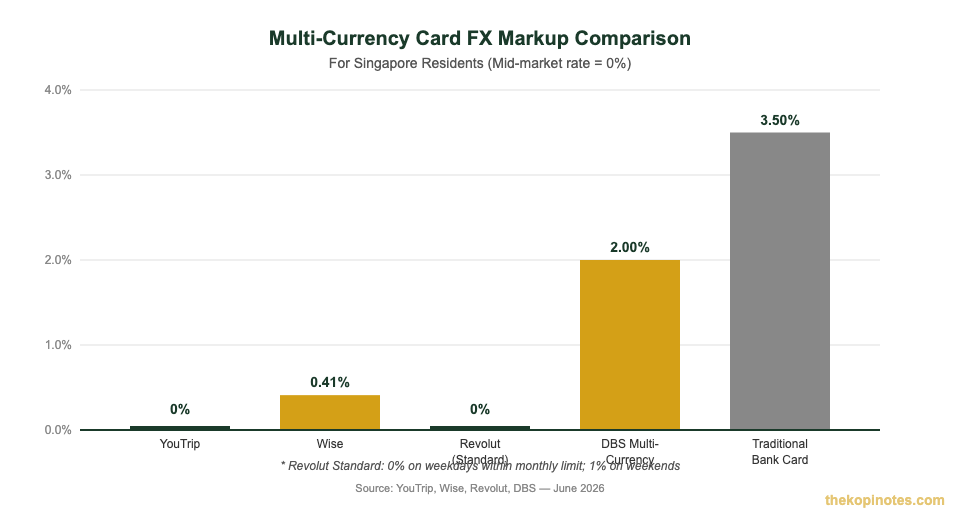
Source: YouTrip, Wise, Revolut, DBS — June 2026
YouTrip vs Other Multi-Currency Cards
YouTrip isn’t the only multi-currency card available in Singapore. Here’s how it stacks up:
| Card | FX Markup | Annual Fee | Best For |
|---|---|---|---|
| YouTrip | 0% | S$0 | Everyday travellers, simple setup |
| Wise | ~0.41% avg | S$0 | International transfers + spending |
| Revolut Standard | 0% (weekday limit) | S$0 | High spenders who want premium perks |
| DBS Visa Debit | 2.0% | S$0 | Those who prefer an existing bank |
| Traditional Credit Card | 2.5–3.5% | S$0–S$200+ | Miles accrual (if you accept the FX cost) |
Source: Individual card issuer websites, June 2026
When to Choose YouTrip
YouTrip is the best fit if you want a simple, no-fuss card that works immediately. The SingPass-based application is easier than Revolut’s or Wise’s process. And with 0% markup on 150+ currencies, it covers virtually every country you’d visit from Singapore.
When to Consider Alternatives
If you also send money internationally, Wise is worth considering — it offers international bank transfers in addition to card spending. If you spend large amounts overseas and want cashback or lounge access, Revolut’s paid plans or a miles credit card may suit you better.
For a detailed side-by-side, read our Revolut vs YouTrip comparison. And if you’re weighing Wise against YouTrip, our Wise vs YouTrip guide breaks down every fee and use case.
YouTrip Referral Code and Current Promos
YouTrip regularly runs sign-up promotions for new users. The fastest way to get a bonus is to use a referral code when signing up.
During sign-up, you’ll be prompted to enter a referral code. Enter the code from our YouTrip referral page to activate the current promotion — typically cashback or bonus credits on your first spend.
YouTrip for Business
If you’re a business owner, YouTrip also offers YouTrip for Business. It works similarly to the personal card but lets you issue cards to employees, set spending limits, and manage expenses from a central dashboard. The business referral code is YOUygWAHwmo.
Looking for other smart ways to manage your finances in Singapore? Our Singapore T-bills 2026 guide and Singapore Savings Bonds guide are good starting points for parking your SGD savings.
Frequently Asked Questions
How long does it take to get a YouTrip card in Singapore?
The application itself takes under 10 minutes. After approval, your physical YouTrip card arrives by mail within 5–7 business days. While waiting, you can already add your YouTrip account to Apple Pay or Google Pay for contactless and online payments.
Can foreigners apply for a YouTrip card in Singapore?
Yes. Singapore residents on Employment Pass (EP), S Pass, and similar long-term passes can apply for YouTrip using SingPass. Tourist visa holders (Short-Term Visit Pass) are not eligible. You must be a Singapore resident with SingPass access.
Is there an income requirement for YouTrip?
No. YouTrip is a prepaid e-wallet — not a credit card. There is no credit check, no income requirement, and no minimum salary. Anyone aged 18 and above who is a Singapore resident with SingPass can apply.
What is the YouTrip card annual fee?
YouTrip has no annual fee. The only upfront cost is the S$5 one-time card issuance fee, charged when you order the physical card. After that, there are no recurring fees unless you trigger the inactivity fee (S$3/month after 12 months of inactivity with a positive balance).
Can I use YouTrip in China?
Yes, but with limitations. YouTrip is a Mastercard and is accepted at merchants that accept Mastercard in China. However, many Chinese merchants use WeChat Pay or Alipay for everyday payments. YouTrip works best for hotel check-ins, international restaurants, and online purchases. For cash, you can use YouTrip at international bank ATMs in China. Check our full guide on using YouTrip in China for more details.
How do I cancel my YouTrip card?
To cancel YouTrip, contact their in-app support or email support@youtrip.com. Before cancelling, spend down or transfer your remaining wallet balance — YouTrip does not directly transfer your balance back to a bank account. Cancellation is free.
Does YouTrip have Google Pay and Apple Pay support?
Yes. You can add your YouTrip card to both Apple Pay and Google Pay. This lets you tap-and-pay at contactless terminals worldwide even before your physical card arrives. In-app, go to the card section and tap “Add to Wallet”.
Disclaimer: This article is for informational purposes only and does not constitute financial advice. All fees and features are based on publicly available data as at June 2026. Always verify current terms directly with YouTrip before applying. TKN may earn referral fees when you use links on this page.
This article was researched with the help of AI. While we strive to keep all information accurate and up to date, there may be errors. If you notice any discrepancies, please contact us.