Trust Bank SWIFT Code Singapore: TRBUSGSGXXX — Complete Guide (2026)
Everything you need to receive international transfers to your Trust Bank account — verified July 2026.
Trust Bank Singapore’s SWIFT code is TRBUSGSGXXX (8-character version: TRBUSGSG). You need this code when someone overseas wants to send money directly into your Trust Bank account via an international wire transfer. Trust Bank is Singapore’s digital bank backed by Standard Chartered and FairPrice Group, and it is fully MAS-regulated under Standard Chartered’s banking licence.
Not financial advice. All figures are for educational reference only. Data verified as at 11 July 2026.
- Trust Bank’s SWIFT/BIC code is TRBUSGSGXXX — use this to receive international wire transfers into your Trust Bank account.
- You’ll also need to provide your full name, account number, and bank address when asking someone overseas to send you money.
- Trust Bank does not currently support outgoing international wire transfers — for sending money abroad, use a service like Wise or open a multi-currency account.
Table of Contents
Contents — Click to expand
What Is Trust Bank’s SWIFT Code?
A SWIFT code — also called a BIC (Bank Identifier Code) — is a standard international format used to identify a specific bank during cross-border transfers. Think of it as your bank’s postal address for the global banking network.
Trust Bank Singapore’s SWIFT code is TRBUSGSGXXX. You may also see the shorter 8-character version listed as TRBUSGSG — both refer to the same bank and head office. When in doubt, use the 11-character version with XXX.
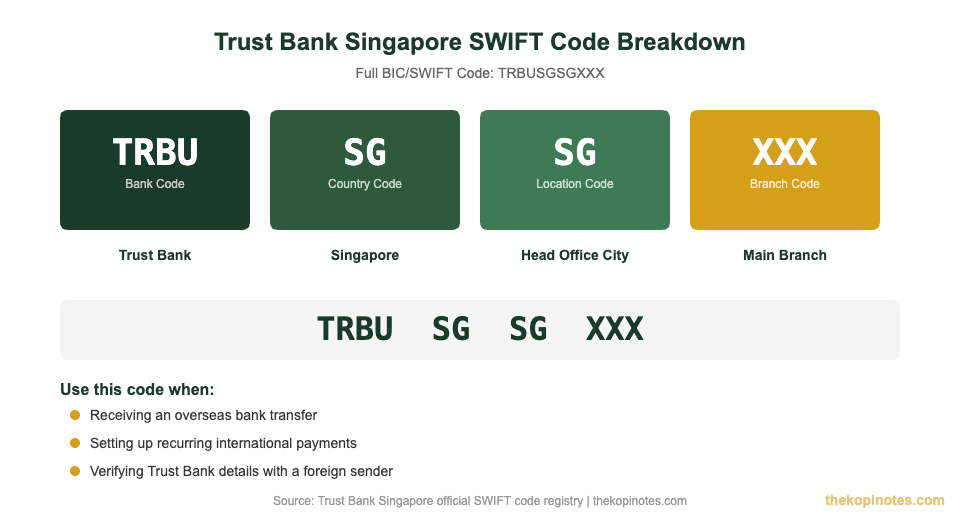
Here is exactly what each part of the code means:
| Code Segment | Value | What It Means |
|---|---|---|
| Bank Code | TRBU | Trust Bank (abbreviated) |
| Country Code | SG | Singapore |
| Location Code | SG | Head office location |
| Branch Code | XXX | Primary/head office branch |
Source: SWIFT global registry, verified July 2026
Trust Bank Singapore Limited has only one registered SWIFT code. There are no branch-specific codes to worry about — TRBUSGSGXXX covers all Trust Bank account holders.
When Do You Need Trust Bank’s SWIFT Code?
You will need to provide the SWIFT code TRBUSGSGXXX in two main situations:
- Receiving money from overseas: If a family member, employer, or client is sending you money from a foreign bank account, they will need Trust Bank’s SWIFT code to route the payment correctly.
- Setting up recurring international salary or payment credits: Some employers based abroad (or payroll platforms like Deel or Remote) require your bank’s SWIFT code to credit your account monthly.
You do not need the SWIFT code for domestic Singapore transfers — those use PayNow (linked to your IC number or mobile number) or FAST transfers instead. The SWIFT code is strictly for cross-border wire transfers involving foreign banks.
Details to Share With an Overseas Sender
Giving someone just the SWIFT code is not enough. When asking someone overseas to wire money into your Trust Bank account, share all of the following:
| Detail Required | What to Provide |
|---|---|
| SWIFT / BIC Code | TRBUSGSGXXX |
| Bank Name | Trust Bank Singapore Limited |
| Bank Address | 1 Fusionopolis Place, #05-10, Galaxis, Singapore 138522 |
| Account Number | Your Trust Bank account number (find it in the Trust App → Account → Account Details) |
| Account Holder Name | Your full legal name (as registered with Trust Bank) |
| Currency | SGD (Singapore Dollar) — Trust Bank accounts are SGD only |
Source: Trust Bank Singapore support documentation | thekopinotes.com
One important note: Trust Bank accounts currently only hold Singapore Dollars (SGD). If someone sends you money in USD, GBP, or another currency, the receiving bank or intermediary will convert it to SGD before it lands in your account. You will not be able to hold foreign currency in your Trust Bank account.
If you regularly receive foreign currency payments and want to hold them in that currency, consider opening a multi-currency account (e.g. Wise or Revolut) alongside your Trust Bank account. You can read our Trust Bank interest rate guide to see how to maximise the SGD savings rate once the funds arrive.
How to Receive an International Transfer to Trust Bank
The process is straightforward once you have your account details ready. Here is a step-by-step breakdown of what happens when someone sends you an international wire transfer:
Step 1 — Share your details with the sender. Provide the full list in the table above: SWIFT code (TRBUSGSGXXX), bank name, bank address, your account number, and your full name. Sending an incomplete set of details is the most common reason transfers are delayed or returned.
Step 2 — Sender initiates the transfer from their bank. The sending bank enters your SWIFT code and account number into their wire transfer system. The payment is then routed through the SWIFT network to Trust Bank Singapore.
Step 3 — Processing time. International transfers typically take 1–5 business days to arrive, depending on the sending country and whether any intermediary banks are involved. Transfers from certain regions (such as Southeast Asia or Australia) are often faster — sometimes arriving the next business day.
Step 4 — Receiving the funds. When the transfer lands, it will appear in your Trust Bank account in SGD. If the original currency was not SGD, the conversion will have been applied by the sending bank or an intermediary bank before crediting your account.
Step 5 — Check for intermediary bank fees. Some international transfers pass through one or more correspondent banks along the way. Each of these banks may deduct a small fee (typically USD 10–25) from the transferred amount. This is separate from any fees the sending bank charges — ask your sender if their bank uses “full amount” (SHA/BEN/OUR) fee options.
If you are expecting a transfer and it has not arrived after 5 business days, contact Trust Bank support through the Trust App with the transfer reference number from the sender. That reference number (sometimes called a SWIFT reference or MT103 number) is essential for tracing delayed payments.
Trust Bank Singapore — Key Facts
Understanding Trust Bank’s full profile helps you know whether it is the right account to receive your international funds in. Trust Bank launched in September 2022 as Singapore’s first home-grown digital bank. It is a joint venture between Standard Chartered Bank and NTUC Enterprise (FairPrice Group).
Trust Bank operates under Standard Chartered’s existing full banking licence — which means it is regulated by the Monetary Authority of Singapore (MAS) at the same level as DBS, OCBC, or UOB. Your deposits are insured by the Singapore Deposit Insurance Corporation (SDIC) up to S$100,000 per depositor.
| Feature | Details |
|---|---|
| SWIFT / BIC Code | TRBUSGSGXXX |
| Founded | September 2022 |
| Backed by | Standard Chartered Bank + NTUC Enterprise |
| MAS Regulated | Yes (under Standard Chartered’s full banking licence) |
| SDIC Insurance | Yes — up to S$100,000 per depositor |
| Savings Rate | Up to 2.40% p.a. (with 3 bonus criteria met) |
| No-Conditions Rate | 0.50% p.a. (Zen Plan) |
| Monthly Fees | None |
| Minimum Balance | None |
| Domestic Transfers | PayNow + FAST (free) |
Source: Trust Bank Singapore official website and app | July 2026
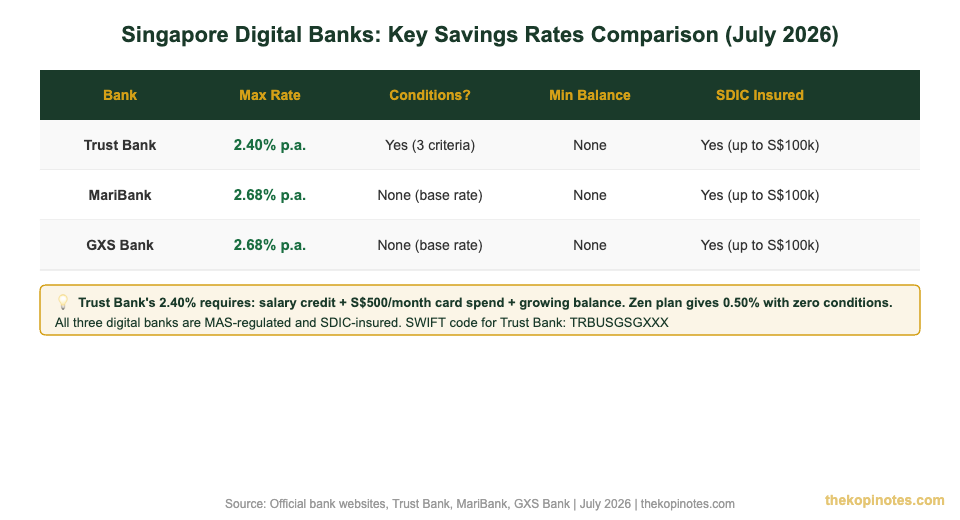
To earn the maximum 2.40% p.a. on your savings, you need to meet three bonus criteria each month: credit your salary into Trust Bank, spend at least S$500 on your Trust credit card, and grow your savings balance. If those conditions feel like too much effort, the Zen Plan gives you a flat 0.50% p.a. with absolutely zero requirements.
Compared to the other digital banks, Trust Bank sits in the middle of the pack. MariBank and GXS Bank both pay up to 2.68% p.a. with no conditions — so if your priority is a hassle-free high interest rate, you may want to compare options. See our MariBank review Singapore for a full side-by-side, and check the Trust Bank referral code and sign-up bonus if you’re opening a new account today (referral code: HTWYQP95 for a welcome bonus).
Can You Send International Transfers FROM Trust Bank?
Here is an important limitation to be aware of: Trust Bank currently does not support outgoing international wire transfers. The Trust App only allows you to send money domestically — via PayNow to another Singapore bank account or FAST transfer to any Singapore-registered bank.
If you need to send money overseas — paying a foreign freelancer, supporting a family member abroad, or paying an overseas merchant — you have two practical options:
- Use Wise (formerly TransferWise): Transfer your SGD from Trust Bank via PayNow to your Wise account, then send it internationally in the recipient’s currency. Wise typically offers near-mid-market exchange rates with transparent fees.
- Use your YouTrip or Revolut multi-currency card: Great for spending abroad, though not ideal for large bank-to-bank transfers.
This is a deliberate design choice by Trust Bank — they focus on the domestic Singapore savings and credit card market. Standard Chartered (their parent bank) handles international banking needs for customers who require them.
Alternatives if You Need Full International Banking
If international banking is a core part of your financial life — you receive regular overseas income, pay foreign vendors, or frequently move money across borders — Trust Bank alone may not be sufficient. Here are the most practical alternatives for Singapore residents:
- OCBC Global Savings Account: A traditional bank with full SWIFT transfer capabilities both in and out, plus multi-currency holding.
- Standard Chartered Bonus$aver: Given Trust Bank’s Standard Chartered backing, existing SC customers can use their SC account for international wires.
- Wise Singapore: For remittances and FX-heavy transfers, Wise generally offers much lower fees than bank-to-bank SWIFT transfers (wise.com/sg).
For most everyday Singaporeans, Trust Bank works perfectly well as a high-yield savings account receiving the occasional international payment — the SWIFT code TRBUSGSGXXX handles incoming transfers without issue. It’s only for outgoing international payments that you’d need to supplement Trust Bank with another service.
If you are building a long-term savings strategy, pair your Trust Bank account with a robo-advisor for growth. Use our Singapore retirement calculator to see how even small monthly contributions compound over time, and explore our Syfe referral code if you want to start an automated investment portfolio alongside your Trust savings.
Not financial advice. All interest rates, fees, and product features are based on publicly available information as at July 2026. Verify current rates directly with Trust Bank before making financial decisions.
Frequently Asked Questions
What is Trust Bank Singapore's SWIFT code?
Trust Bank Singapore’s SWIFT code (also called BIC code) is TRBUSGSGXXX. The shorter 8-character version is TRBUSGSG — both refer to the same bank and are accepted by most international transfer systems. Use the full 11-character version TRBUSGSGXXX when in doubt, as this is the most universally recognised format.
Is Trust Bank Singapore safe for receiving international transfers?
Yes. Trust Bank operates under Standard Chartered’s full banking licence issued by the Monetary Authority of Singapore (MAS). Your deposits are protected by the Singapore Deposit Insurance Corporation (SDIC) up to S$100,000 per depositor. Trust Bank’s SWIFT code TRBUSGSGXXX is registered and recognised in the global SWIFT network, so international wire transfers can reach your account safely.
How long does an international transfer to Trust Bank take?
International wire transfers to Trust Bank typically arrive within 1–5 business days, depending on the sending country and the correspondent banks involved. Transfers from nearby countries like Malaysia, Australia, or Hong Kong often arrive within 1–2 business days. Transfers from further afield (Europe, USA) may take 3–5 business days. If your transfer has not arrived after 5 business days, contact Trust Bank support with the sender’s SWIFT reference number (MT103).
What account details do I need to give for a Trust Bank international transfer?
You need to provide: (1) SWIFT code — TRBUSGSGXXX, (2) bank name — Trust Bank Singapore Limited, (3) bank address — 1 Fusionopolis Place, #05-10, Galaxis, Singapore 138522, (4) your Trust Bank account number (found in the Trust App under Account Details), and (5) your full legal name as registered with Trust Bank. Missing any of these details may cause the transfer to be delayed or returned.
Can I send international transfers from Trust Bank to overseas accounts?
No — as of July 2026, Trust Bank does not support outgoing international wire transfers. The Trust App only allows domestic Singapore transfers via PayNow and FAST. If you need to send money overseas, transfer your SGD out of Trust Bank via PayNow to a service like Wise, which can then route it internationally at competitive exchange rates.
Does Trust Bank support multi-currency accounts?
No. Trust Bank savings accounts only hold Singapore Dollars (SGD). If you receive a transfer in USD, GBP, or another currency, it will be converted to SGD before it is credited to your account — either by the sending bank or an intermediary bank. If you need to hold foreign currency, consider opening a separate multi-currency account with a platform like Wise or YouTrip alongside your Trust Bank savings account.
What savings interest rate does Trust Bank offer in 2026?
Trust Bank offers up to 2.40% p.a. on its savings account under the Flex or Signature plan, provided you meet three monthly bonus criteria: credit your salary, spend at least S$500 on your Trust credit card, and grow your savings balance. If you prefer zero conditions, the Zen Plan gives a flat 0.50% p.a. with no requirements. See our full Trust Bank interest rate guide for the latest breakdown.
Open Your Trust Bank Account Today
Use referral code HTWYQP95 to earn a sign-up welcome bonus when opening your Trust Bank savings account.
This article was researched with the help of AI. While we strive to keep all information accurate and up to date, there may be errors. If you notice any discrepancies, please contact us.