TribeCar + FSMOne + GXS + IBKR + Syfe: Ranking the 5 Apps by Onboarding & Login Friction (2026)
From a 4-minute MyInfo sign-up to a multi-day compliance wait — which app gets you set up fastest, and which one needs patience.
Among TribeCar, FSMOne, GXS, IBKR and Syfe, GXS has the lightest onboarding in Singapore — Singpass MyInfo auto-fill, no selfie or document upload, and instant approval in about five minutes. IBKR sits at the other end: a MyInfo-assisted form that still needs one to three business days of compliance review, plus a security code at every login afterward. Ranking all five by sign-up time, funding step, and daily login friction gives a clear order to open accounts in — fastest first, so momentum doesn’t stall on the slowest one.
Not financial advice. Onboarding steps, approval times and app features change as platforms update their apps — details below were verified in October 2026, so always check the current sign-up flow before you start.
Table of Contents
Contents — Click to expand
- The friction score, side by side
- Step 1: GXS (YONG477) — lightest onboarding
- Step 2: TribeCar (zZDeg) — fast signup, e-wallet step
- Step 3: Syfe (SRPRFFFCD) — biometric, but OTP-gated first login
- Step 4: FSMOne (P0544985) — simple app, slower activation
- Step 5: IBKR (jianxiong368) — worth the wait
- The friction ladder, visualised
- Which order to open accounts in
- FAQ
The Friction Score, Side by Side
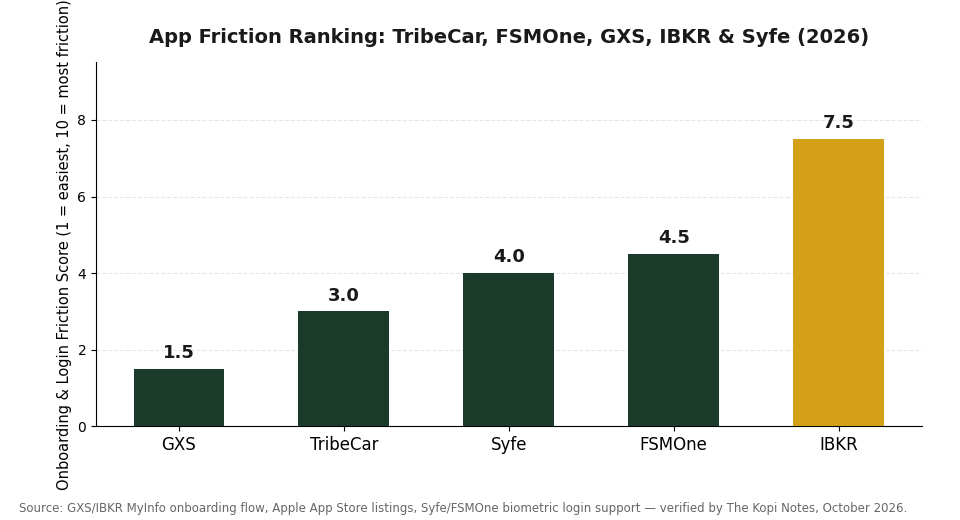
“Friction” here means three things added together: how long sign-up takes, what you need to do before the app is actually usable (fund it, verify it, wait for approval), and how much friction you hit every time you log back in afterward. Lower score means less friction. Here’s the honest breakdown as at October 2026:
| Platform | Account Opening | Approval | Daily Login | Friction Score |
|---|---|---|---|---|
| GXS | ~4–5 min, MyInfo auto-fill | Instant | Biometric unlock | 1.5 / 10 |
| TribeCar | ~2 min signup | Instant (licence check) | Standard login, e-wallet top-up each use | 3.0 / 10 |
| Syfe | ~10 min, no funding required | Instant | Face ID/Touch ID — after first full OTP login | 4.0 / 10 |
| FSMOne | ~10–15 min application | Typically within 1–2 business days | Face ID/fingerprint — after first login | 4.5 / 10 |
| IBKR | <10 min to submit, MyInfo-assisted | 1–3 business days (compliance review) | Security code required every login | 7.5 / 10 |
Source: GXS and IBKR MyInfo onboarding flows, Apple App Store listings for TribeCar/FSMOne/IBKR Mobile, Syfe and FSMOne in-app biometric login behaviour — verified by The Kopi Notes, October 2026.
Step 1: GXS (Code YONG477) — Lightest Onboarding
Open GXS first because nothing else on this list is this frictionless. The app pulls your NRIC details straight from Singpass MyInfo, so there’s no selfie step and no document upload — sign-up runs about four to five minutes end to end, with instant approval. Enter referral code YONG477 during registration to pick up the sign-up bonus. Once you’re in, Face ID or fingerprint unlock is available immediately, so every return visit after the first is a single tap.
Because approval is instant, GXS is also the obvious place to park the cash you’ll be routing into Steps 2-5 below while you work through them — see our full GXS Bank review for how the Boost Pocket and Saving Pocket rates stack up once you’re funded.
Step 2: TribeCar (Code zZDeg) — Fast Signup, E-Wallet Step
TribeCar’s own sign-up is almost as quick as GXS — download the app, register with email and mobile number, add your driving licence, and enter code zZDeg before your first booking to claim S$20 off. The friction here isn’t the signup; it’s the e-wallet model. TribeCar requires a refundable S$100 deposit before you can book a car, and getting that deposit back afterward is the one step users consistently flag as slower and more manual than the rest of the app. Budget for that when you rank this one — it’s fast to start, not fast to fully wind down.
If skipping car ownership is the whole point of being on this list, our TribeCar + FSMOne + GXS + Syfe trade-size guide covers what to do with the money you free up once the deposit friction is behind you.
Step 3: Syfe (Code SRPRFFFCD) — Biometric, But OTP-Gated First Login
Syfe’s initial sign-up takes about ten minutes and needs no funding to open the account — enter SRPRFFFCD during registration to lock in the referral reward. The app does support Face ID/Touch ID on iOS and fingerprint unlock on Android, which is a genuine convenience for daily use, but it only activates after you’ve completed one full email-plus-password-plus-OTP login on that specific device. In practice that means your very first session has an extra step the other “instant biometric” apps on this list don’t — after that, it’s as fast as any of them.
See our step-by-step Syfe login guide if you want the exact screens for that first OTP-gated session.
Step 4: FSMOne (Code P0544985) — Simple App, Slower Activation
FSMOne’s mobile app itself is one of the more straightforward on this list — reviewers consistently describe it as easy to move around, with quick access to watchlist and holdings, and Face ID or fingerprint login kicks in after your first successful sign-in. The friction is upstream of the app: the account application (CDP sub-account linking and KYC checks) typically clears within one to two business days rather than instantly, so there’s a short wait between submitting your details with code P0544985 and being able to place your first trade.
Our FSMOne login walkthrough covers what the app looks like once activation clears, including where the biometric toggle lives in settings.
Step 5: IBKR (Code jianxiong368) — Worth the Wait
Interactive Brokers goes last because every stage of it takes longer than the other four. Singapore applicants can auto-fill most of the form via MyInfo and submit in under ten minutes with referral code jianxiong368, but IBKR’s compliance team then reviews the application — typically one to three business days before the account is tradeable. Daily use adds a bit more friction too: IBKR Mobile requires a two-factor security code at every login (via the app itself or a separate security device), not just the first one, so there’s no “tap and you’re in” shortcut like the other four apps offer. The trade-off is access to global markets none of the other four provide — see our IBKR vs moomoo comparison for how that depth stacks up against a lighter broker app.
None of this makes IBKR the wrong choice — it just means it shouldn’t be the first account you try to open if you’re doing this ladder in one sitting. Submit the application, then spend the one-to-three-day wait working through Steps 1-4 instead of waiting idle.
The Friction Ladder, Visualised
Lined up by friction score, a pattern falls out: the two lightest apps (GXS, TribeCar) are instant-approval and need nothing but a phone and Singpass; the middle one (Syfe) is instant but has one extra first-login step; and the two heaviest (FSMOne, IBKR) both involve a real wait between submitting your details and being able to actually use the account. Open the fast ones first so you’re not sitting idle while the slow ones process.
| Order | Platform | Time to Usable Account | Main Friction Point |
|---|---|---|---|
| 1 | GXS | ~5 min | None — fastest of the five |
| 2 | TribeCar | ~2 min signup + S$100 deposit | Deposit return is slower than deposit-in |
| 3 | Syfe | ~10 min | First login needs full OTP before biometrics unlock |
| 4 | FSMOne | 1–2 business days | CDP/KYC activation wait |
| 5 | IBKR | 1–3 business days | Compliance review + per-login 2FA |
Which Order to Open Accounts In
If you’re setting up all five in one sitting, sequence it to avoid dead time:
Open GXS and TribeCar first — both approve instantly, so you can finish both before you’ve even reached for your second cup of coffee.
Submit IBKR next, immediately after — not because you’ll use it next, but because its one-to-three business day review is the longest wait on the list. Start the clock early so it’s not the thing you’re waiting on at the end.
Do Syfe and FSMOne while IBKR processes — Syfe is instant once you push through the first OTP login; FSMOne’s own one-to-two day activation will likely clear around the same time IBKR does, so the two waits overlap instead of stacking.
Don’t open all five just because you can. If you don’t drive, skip TribeCar. If you already have a global broker you’re happy with, IBKR’s longer wait may not be worth it just for the referral code. Rank these by which accounts you’d actually use, not by which one has the lowest friction score.
Claim the Five Codes
FAQ
Which of the five apps is genuinely the fastest to set up?
Why does IBKR take longer than the other four?
Does Syfe really need an OTP every time I log in?
Can I use all five referral codes at once?
Is FSMOne's 1-2 business day activation unusual for a Singapore broker?
What should I do while IBKR or FSMOne is still processing?
The Bottom Line
Open GXS and TribeCar today — both are instant. Submit IBKR right after, since its compliance review is the longest wait on this list, then use that waiting window to finish Syfe and FSMOne. Sequenced this way, five separate sign-ups turn into about fifteen minutes of your own active time, with the slow parts running quietly in the background instead of blocking everything else.
See our CPF retirement sum guide for where freed-up cash from skipping car ownership can go next, or read our Best Investment App Singapore comparison for how these brokerage and robo apps stack up on fees, not just onboarding speed.
This article was researched with the help of AI. While we strive to keep all information accurate and up to date, there may be errors. If you notice any discrepancies, please contact us.