YouTrip Card in Canada 2026: CAD Exchange Rate, ATM Fees & Tips for Singapore Travellers
Zero FX fees on Canadian dollar spending — how YouTrip works in Toronto, Vancouver and Montreal, plus the ATM fee reality and money-saving strategies.
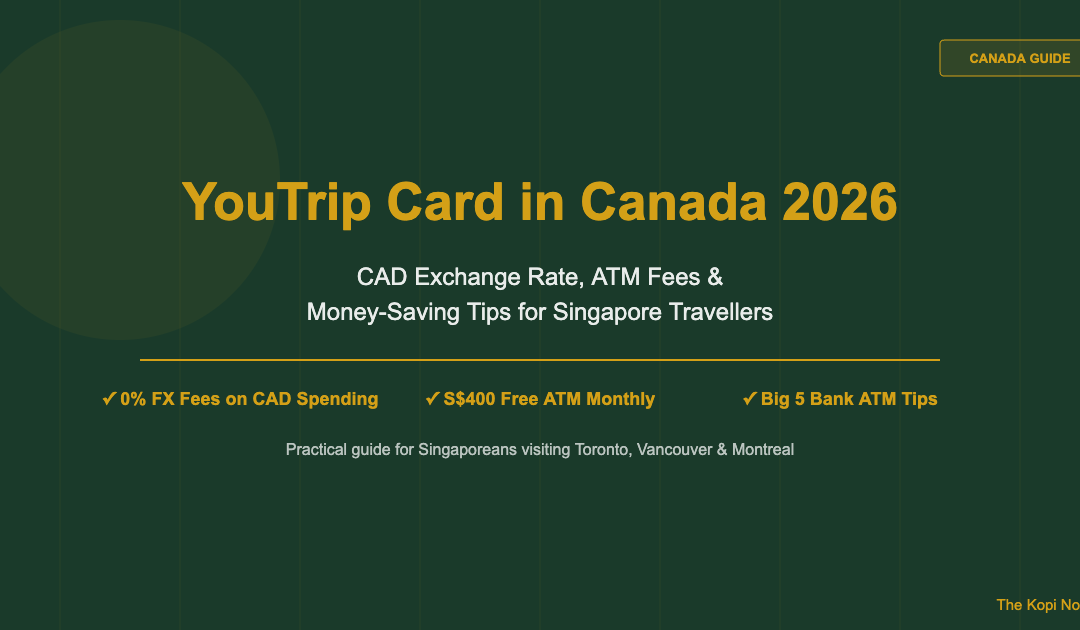
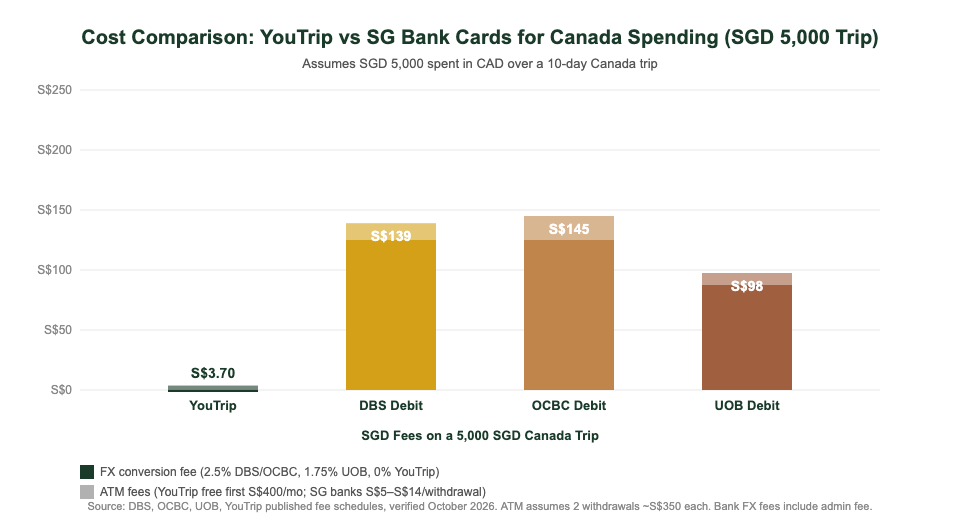
YouTrip works in Canada: Singapore travellers can spend in Canadian dollars (CAD) with 0% foreign exchange fees via the Mastercard wholesale rate, and withdraw cash from any Big 5 bank ATM — free up to S$400 per calendar month, then 2% after that. Canada is one of the world’s most cashless countries, so most city spending goes on the card. ATM cash is mainly needed for tipping, farmers’ markets, and older local eateries. Compared with a standard DBS or OCBC debit card, YouTrip typically saves a couple SGD 130–160 in fees on a SGD 5,000 Canadian trip.
Not financial advice. All figures are for educational reference only. Data verified as at October 2026 unless noted.
- YouTrip charges 0% FX fees on all CAD spending — Mastercard wholesale rate, no markup
- CAD is not one of YouTrip’s 12 pre-exchange wallet currencies, so the rate is applied at time of each purchase
- Free ATM withdrawals up to S$400/month, then 2%; Big 5 bank machines add ~CAD 3–4 per visit
- Canada is very cashless — carry CAD 100–150 for tips and markets, put the rest on YouTrip
Table of Contents
Contents — Click to expand
- Does YouTrip Work in Canada?
- Key Facts at a Glance
- CAD Exchange Rate — What Rate Does YouTrip Give?
- ATM Withdrawals in Canada: Fees & Best Machines
- How to Use YouTrip in Canada (Step-by-Step)
- Card vs Cash: What You Actually Need
- YouTrip vs Wise vs Revolut for Canada
- Money-Saving Tips for Your Canadian Trip
- Frequently Asked Questions
Does YouTrip Work in Canada?
Yes. YouTrip is a Mastercard-based prepaid multi-currency wallet issued in Singapore. It is accepted wherever Mastercard is — which in Canada means essentially every shop, restaurant, hotel, transit terminal, and online retailer you’ll encounter as a tourist. Canada has one of the highest rates of contactless card adoption in the world; tap-to-pay is the default method at most counters, and YouTrip’s contactless Mastercard slots in seamlessly.
The one thing to understand before you travel: Canadian dollars (CAD) are not one of YouTrip’s 12 pre-exchange wallet currencies (those are SGD, USD, EUR, GBP, JPY, AUD, HKD, NZD, CHF, SEK, MYR and THB). This means you cannot lock in a CAD rate inside the app before you fly, the way you can for Japanese yen or US dollars. Instead, YouTrip automatically converts your SGD balance to CAD at Mastercard’s wholesale rate at the moment of each transaction — with 0% markup from YouTrip. In practice the rate you get is still very close to the interbank mid-market rate, and significantly better than any Singapore bank debit card’s published FX rate.
If you’re comparing travel cards more broadly, our guide on the best multi-currency card for Singapore travellers covers how YouTrip stacks up against Wise and Revolut across common travel currencies.
Key Facts at a Glance
| Metric | Detail |
|---|---|
| FX fee on CAD spending | 0% — Mastercard wholesale rate applied at time of purchase |
| CAD wallet (pre-exchange) | Not available — CAD is not one of the 12 wallet currencies |
| Card network | Mastercard — accepted at 30 million+ merchants worldwide |
| Annual fee | None |
| Free ATM withdrawal | Up to S$400 per calendar month (resets on the 1st) |
| ATM fee after free limit | 2% of the withdrawal amount |
| Daily ATM withdrawal limit | S$5,000 equivalent |
| Best ATMs in Canada | Big 5: RBC, TD, Scotiabank, BMO, CIBC — ~CAD 3–4 machine fee |
| App top-up methods | PayNow, linked bank transfer, linked debit card |
Source: YouTrip Support Centre, YouTrip app fee schedule and YouTrip Canada ATM guide, verified October 2026.
CAD Exchange Rate — What Rate Does YouTrip Give?
When you tap or swipe your YouTrip card at a Canadian merchant, YouTrip converts your SGD balance to CAD at Mastercard’s published wholesale exchange rate. This is not the tourist rate you’d get at a money changer, and it’s not your bank’s “retail FX rate” with a 1.5–2.5% markup baked in. It tracks closely to the interbank mid-market rate that you see quoted on Google or XE.
The practical impact: on a S$5,000 Canada trip, the difference between YouTrip’s rate and DBS’s retail FX rate is approximately S$75–S$125 in your favour — before even counting YouTrip’s lower ATM fees. Check the YouTrip exchange rate guide for a deeper breakdown of how the wholesale rate compares to other benchmarks.
Because CAD is not a wallet currency, you cannot lock in the rate in advance the way you can for USD or EUR. Each transaction gets the rate at the moment it settles. In practice, for a trip spanning a week or two, rate fluctuation on a small float of S$3,000–6,000 is typically minor — we’re talking cents per dollar, not a material swing. If you’re travelling during a known period of currency volatility (a Bank of Canada rate decision, for example), it’s worth checking the live rate in the app a few days before departure to gauge whether your budget needs adjusting.
ATM Withdrawals in Canada: Fees & Best Machines
Canada’s ATM landscape is straightforward for foreign cards: every bank machine you’ll see in city centres, shopping malls, airports and transit hubs accepts Mastercard. The Big 5 — RBC, TD Bank, Scotiabank, BMO and CIBC — are the main networks. Most of their ATMs charge international cardholders approximately CAD 3.00 to CAD 4.00 per withdrawal as a machine fee, separate from any fee your card issuer charges. At October 2026 exchange rates, that’s roughly S$2.70–S$3.60 per visit.
Private or white-label ATMs (common in convenience stores, tourist zones, and smaller eateries) charge significantly more — sometimes CAD 4–7 or higher — and may also offer Dynamic Currency Conversion (DCC) where they present a pre-converted SGD amount. Always decline DCC. Always choose to be charged in CAD, not SGD. DCC typically adds a 3–5% surcharge on top of an already-unfavourable rate; even if the screen shows a “guaranteed” SGD figure, it will cost you more than letting YouTrip do the conversion.
How YouTrip’s ATM fee works in practice
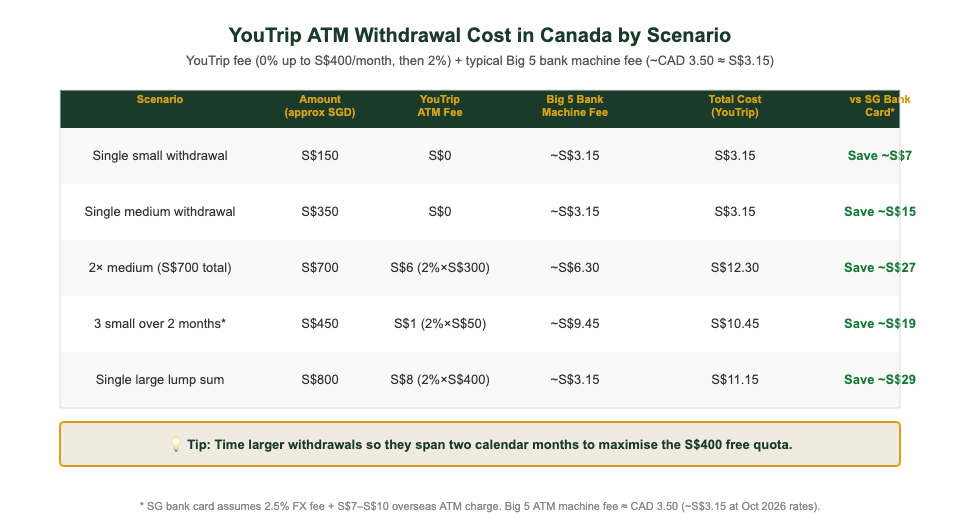
YouTrip gives you S$400 of free ATM withdrawals every calendar month. After you cross that threshold, a 2% fee applies to the amount withdrawn above the free limit. This counter resets on the 1st of each calendar month. So if your Canada trip spans late September and early October, you effectively have two separate S$400 free quotas — a useful timing trick for longer trips.
A worked example: suppose you withdraw the equivalent of S$700 in CAD over a 10-day trip in a single calendar month. The first S$400 is free; the remaining S$300 attracts a 2% YouTrip fee = S$6. Add two Big 5 machine fees at roughly S$3 each = S$6 in machine fees. Your total ATM cost is roughly S$12 for S$700 cash accessed — about 1.7% of the withdrawal, versus the S$14–S$20 you’d pay in overseas ATM charges alone from a typical Singapore bank, plus their FX markup on top.
For the full breakdown of YouTrip’s fee structure, including top-up limits and wallet features, see our guide on using YouTrip card overseas.
How to Use YouTrip in Canada (Step-by-Step)
- Top up SGD before you fly. Open the YouTrip app and transfer SGD from PayNow or your linked bank account. Since CAD isn’t a pre-exchange wallet currency, there’s no in-app conversion step — just make sure you have enough SGD loaded to cover your trip budget.
- Activate your physical card and add it to Apple Pay or Google Pay. Canadian retailers are very contactless-friendly; most checkouts accept tap payments without a PIN for amounts under CAD 250 (the standard no-PIN limit at most terminals). Having the card on your phone as a backup speeds up checkout.
- At ATMs: insert card, select “Debit” or “Chequing” when prompted, and choose CAD. Some ATMs may default to offering you a Savings or Chequing option — either works for foreign Mastercards. Always confirm the amount displayed is in CAD before approving, and decline any offer to convert to SGD.
- Monitor your SGD balance in the app as you spend. YouTrip shows each transaction in CAD alongside the SGD equivalent charged from your wallet. This makes it easy to track spending in both currencies without mental arithmetic at the checkout.
- Top up on the go if needed. As long as you have WiFi or mobile data, you can transfer more SGD into your YouTrip wallet at any time during the trip — no need to find a physical top-up location.
Card vs Cash: What You Actually Need
Canada is one of the most cashless countries in the world. In Vancouver, Toronto, Montreal and Ottawa, you can comfortably run 90–95% of your spending on a card — including street food markets, museum entries, transit fares (Toronto’s TTC and Vancouver’s TransLink both accept contactless Mastercard), most coffee shops, and essentially every restaurant you’ll visit as a tourist.
For a Singapore traveller spending approximately SGD 4,000–6,000 on a 10–14 day Canadian trip, a reasonable working split is around 85% card and 15% cash. Cash is primarily useful for four situations: restaurant and taxi tips (where card tipping sometimes adds surcharges), farmers’ markets and independent food vendors, occasional parking meters in smaller cities, and emergencies if your card is declined or a machine is down.
Our suggestion: withdraw approximately CAD 150–200 upon arrival or before departure (some SG money changers stock CAD) and keep it as your cash float. Top up the YouTrip wallet to cover the rest. If you’re heading into rural areas — the Canadian Rockies, smaller towns in the Maritimes, or camping parks — carry an extra CAD 100–150 since card acceptance becomes patchier outside major centres.
YouTrip vs Wise vs Revolut for Canada Trips
YouTrip isn’t the only option Singapore travellers use for Canada. Wise and Revolut both support CAD, and the choice between them depends on your trip length, spending volume, and whether you also want a multi-currency account for everyday use.
| Feature | YouTrip | Wise | Revolut |
|---|---|---|---|
| CAD spending fee | 0% (Mastercard wholesale rate) | Small conversion fee per transaction (~0.4–0.6%) | 0% within monthly fair-use limit, markup after |
| CAD pre-exchange | No — rate at time of purchase | Yes — hold CAD balance | Yes — hold CAD balance |
| Free ATM withdrawal | S$400/month | Varies by plan; ~S$350 free on standard | Varies by plan tier |
| Annual fee | None | None (basic), paid tiers available | None (standard), paid tiers available |
| Best for | Simple travel spend, no-frills setup | Travellers who want a rate-locked CAD balance | Users already on Revolut’s premium tiers |
Source: YouTrip, Wise and Revolut published fee schedules, verified October 2026. Fees change — confirm current terms with each provider before travel.
The key advantage Wise has over YouTrip for Canada is the ability to hold a CAD balance — you can convert SGD to CAD in advance, locking in the rate if you’re happy with it. YouTrip doesn’t offer this for CAD, so your rate floats with each transaction. For most 1–2 week leisure trips, this difference is minor. For longer stays, working holidays, or if you’re moving significant money across currencies, it’s worth considering. See our full Wise Card vs YouTrip comparison for a detailed breakdown, and the Revolut vs YouTrip comparison if you’re also weighing Revolut’s premium features.
Money-Saving Tips for Your Canadian Trip
- Always choose CAD at terminals and ATMs. Dynamic Currency Conversion (DCC) adds a hidden 3–5% surcharge by converting the amount to SGD at an inflated rate. Whenever a terminal or ATM asks “Would you like to pay in SGD or CAD?”, choose CAD. YouTrip handles the conversion at 0% FX on your behalf.
- Withdraw cash once or twice, not five times. Each Big 5 bank ATM visit adds a ~CAD 3–4 machine fee regardless of amount. One S$400–S$600 withdrawal beats four S$100 ones, and keeps you within or close to the free S$400 monthly quota.
- Time withdrawals to span two calendar months if possible. If your trip runs from late September into October, for example, you get two separate S$400 free ATM quotas — effectively S$800 of fee-free withdrawals.
- Avoid private ATMs in tourist zones. Niagara Falls, Old Montreal and Whistler village are full of white-label ATMs with machine fees of CAD 5–7 or higher. Walk an extra block to find a Big 5 branch ATM instead.
- Use the YouTrip app to monitor your SGD balance as you go. Unlike a regular card where you see the SGD amount only on your bank statement days later, YouTrip shows each CAD transaction and its SGD equivalent in real time — useful for sticking to a daily budget.
- Get the YouTrip referral bonus before you apply. New users get a S$5 credit on their first top-up via the YouTrip referral code. If you travel for work, YouTrip’s business card (YouBiz) offers a S$50 sign-up bonus with promo code YOUygWAHwmo on your first S$5 card purchase.
Disclaimer: exchange rates, fees and promotional terms change. Figures in this article reflect YouTrip’s published terms as verified in October 2026 — always confirm current rates and fees in the YouTrip app before you travel.
Frequently Asked Questions
Can I use YouTrip in Canada?
Yes. YouTrip is a Mastercard-based prepaid card and works at any Mastercard-accepting merchant in Canada — including all major retailers, restaurants, hotels, transit systems and ATMs. Canada has very high Mastercard acceptance rates, especially in cities like Toronto, Vancouver and Montreal.
Does YouTrip charge fees for Canadian dollar (CAD) spending?
No — YouTrip charges 0% foreign exchange fees on CAD spending, using Mastercard’s wholesale rate at the time of each transaction. There is no annual card fee. For ATM cash withdrawals, YouTrip gives S$400 of free withdrawals per calendar month; a 2% fee applies to amounts above that. The Canadian ATM operator (Big 5 bank machines) may also charge their own machine fee of approximately CAD 3–4 per visit.
Can I pre-exchange SGD to CAD in the YouTrip app?
No. Canadian dollars are not one of YouTrip’s 12 in-app wallet currencies (which include USD, EUR, GBP, JPY, AUD and others). This means you cannot lock in a CAD rate before your trip. Instead, each CAD transaction is converted from your SGD balance at that moment’s Mastercard wholesale rate — still 0% markup, but the rate floats rather than being fixed in advance.
Which ATMs should I use in Canada with YouTrip?
Stick to Big 5 bank ATMs — RBC, TD, Scotiabank, BMO and CIBC. These are widely available in city centres, shopping malls, airports and transit hubs. They typically charge foreign cardholders CAD 3–4 per withdrawal (the machine fee, separate from YouTrip’s own fee). Avoid private or white-label ATMs in convenience stores and tourist zones; their machine fees are often CAD 5–7 or higher, and they frequently push Dynamic Currency Conversion (DCC).
Is YouTrip or Wise better for a Canada trip?
For most short leisure trips, YouTrip’s 0% FX fee and simple setup make it the easier default. The main advantage of Wise for Canada is the ability to hold a CAD balance — useful if you want to lock in a rate in advance or keep leftover CAD for a return trip. Wise also applies a small conversion fee (typically 0.4–0.6%) per CAD transaction, so YouTrip is marginally cheaper on pure spending cost.
How much cash should I carry for Canada with YouTrip?
Canada is very cashless — most city spending can go on the YouTrip card. A good rule of thumb is to keep about CAD 150–200 in cash for tipping at restaurants and taxis, farmers’ markets, and smaller vendors. If you’re venturing into rural areas or national parks, carry an extra CAD 100–150 as card acceptance can be patchier outside major urban centres.
Does YouTrip charge a fee for DCC (Dynamic Currency Conversion) avoidance?
No — avoiding DCC is just good practice. DCC is when a Canadian terminal or ATM offers to charge you in SGD instead of CAD. If you accept DCC, the merchant’s bank does the conversion at an unfavourable rate, typically adding 3–5% above the real exchange rate. Always choose CAD. YouTrip’s 0% FX fee then converts the CAD amount from your SGD balance at Mastercard’s wholesale rate.
Ready for Your Canada Trip?
Sign up for YouTrip and get a S$5 welcome bonus on your first top-up.
This article was researched with the help of AI. While we strive to keep all information accurate and up to date, there may be errors. If you notice any discrepancies, please contact us.