YouTrip ATM Withdrawal Guide: Limits, Fees & Tips (2026)
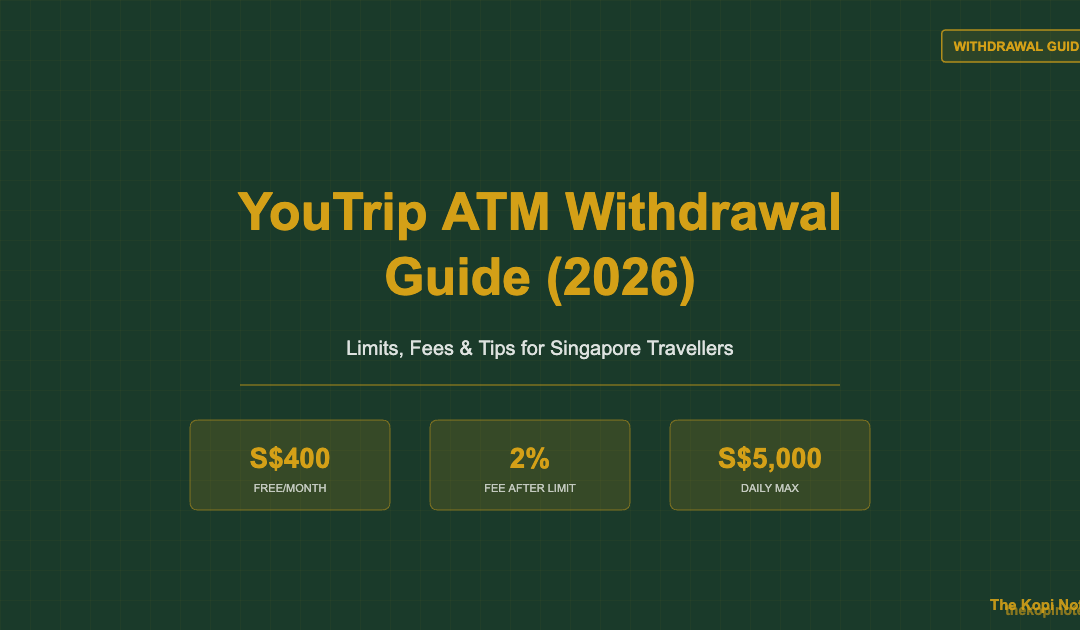
YouTrip lets you withdraw cash at overseas ATMs at wholesale exchange rates — the same mid-market rate banks use with each other. You get S$400 free per calendar month, with a 2% fee on any amount above that. The daily withdrawal limit is S$5,000 globally and S$2,500 for Malaysian ATMs. Note: YouTrip only works at overseas ATMs, not Singapore ones. This guide explains every rule, fee, and trick to get the most from your YouTrip card at ATMs.
Not financial advice. All figures are for educational reference only. Data verified as at 3 September 2026.
- YouTrip gives you S$400 free ATM withdrawals per calendar month; 2% fee after that
- Daily limit: S$5,000 globally (S$2,500 in Malaysia) — free limit resets on the 1st of each month
- Always choose local currency at the ATM — never accept Dynamic Currency Conversion (DCC)
How YouTrip ATM Withdrawal Works
YouTrip runs on the Mastercard network. That means you can withdraw cash at any overseas ATM displaying the Mastercard, Maestro, or Cirrus logo — which covers most ATMs in over 150 countries.
When you make a withdrawal, YouTrip converts your Singapore dollars to local currency at the wholesale (mid-market) exchange rate. This is the most favourable rate available — the same one banks use when trading with each other. There is no YouTrip markup on the exchange itself.
One firm rule: YouTrip does not support withdrawals at Singapore ATMs. The card is designed for overseas use. If you try to withdraw at a local ATM, it will be declined.
YouTrip Withdrawal Limits Explained
Here are all the limits you need to know, pulled directly from YouTrip’s official support page:
| Limit Type | Amount |
|---|---|
| Free monthly withdrawal | S$400 per calendar month |
| Fee after free limit | 2% of amount withdrawn |
| Daily withdrawal limit | S$5,000 |
| Daily limit (Malaysia ATMs) | S$2,500 |
| Monthly free limit reset | Midnight SGT, 1st of each month |
| Countries/currencies supported | 150+ currencies globally |
Source: YouTrip official support centre, September 2026
About the monthly reset: Your S$400 free quota resets at midnight SGT on the 1st of every month. If your trip overlaps the month boundary, you get a fresh S$400 on the 1st — useful if you plan your timing right.
About the 2% fee: Once you’ve used your S$400 free limit, every further withdrawal in that calendar month costs 2% of the amount withdrawn. On top of that, some ATM operators charge their own local fee — this is shown on-screen before you confirm the withdrawal.
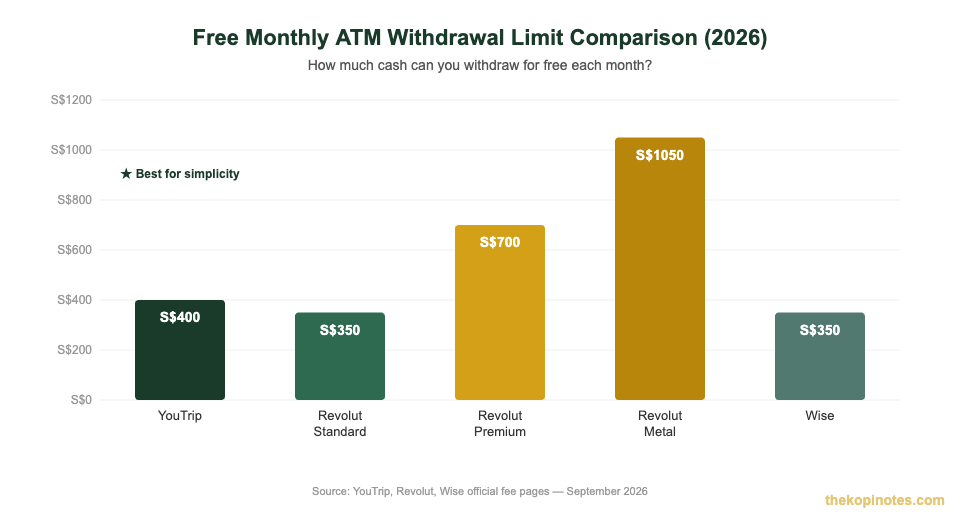
Source: YouTrip, Revolut, Wise official fee pages — September 2026. Revolut Metal requires S$21.99/month subscription.
Step-by-Step: How to Withdraw Cash Using YouTrip
Most overseas ATMs are straightforward. Follow these steps to avoid common mistakes:
- Find an ATM showing the Mastercard, Maestro, or Cirrus logo
- Insert your YouTrip physical card (or tap if the ATM supports contactless)
- Select “withdraw from checking/current account”
- Enter the amount in local currency (e.g. JPY, THB, EUR)
- Decline any Dynamic Currency Conversion (DCC) offer — always pay in local currency
- Confirm the withdrawal and collect your cash
If the ATM asks “Would you like to pay in SGD?” or offers to convert the amount for you — say NO. This is Dynamic Currency Conversion. The ATM’s rate is typically 3–5% worse than YouTrip’s wholesale rate. Choosing local currency lets YouTrip do the conversion at the better rate.
What Happens If You Exceed the Free Limit?
YouTrip charges 2% on any withdrawal amount that exceeds your S$400 monthly free limit. Here’s exactly what that costs at different amounts:
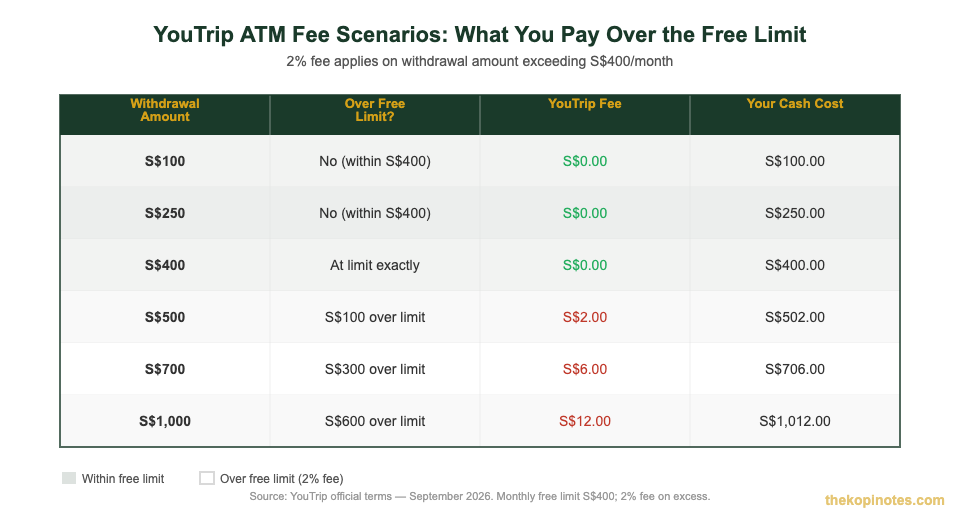
Source: YouTrip official terms, September 2026. Monthly free limit S$400; 2% fee applies on amount over that limit.
For most short-haul trips (Thailand, Malaysia, Japan), you’re unlikely to need more than S$400 in cash per month. For extended travel or cash-heavy destinations like Vietnam, the 2% fee is worth knowing — but it’s still better than the typical bank’s overseas ATM fee of 3–5%.
Tips to Maximise Your Free Monthly Withdrawal
A few habits can save you money on every trip:
1. Withdraw in larger amounts, not small ones. Many ATM operators charge a flat fee per transaction (e.g. 220 THB in Thailand). One withdrawal of S$300 is cheaper than three withdrawals of S$100 when there’s a per-pull fee.
2. Time your withdrawals around the month boundary. If your trip spans late in one month and early in the next, hold off on your big withdrawal until midnight SGT on the 1st. You get S$400 free in each calendar month — effectively S$800 across the boundary.
3. Choose ATMs that don’t charge operator fees. 7-Eleven ATMs in Japan and major bank ATMs across Europe often have no operator fee for foreign Mastercard users. A quick search before your trip can save S$5–15 per visit.
4. Pair YouTrip with a no-FX credit card for spending. Use YouTrip only for ATM cash, and pay for hotels, restaurants, and shopping with a best card for overseas spending that earns cashback or miles. This way you stretch both cards’ free limits further.
5. Check your remaining limit in the app. Open YouTrip > Card > Withdrawal Limit to see how much of your S$400 monthly free allowance remains and when it resets.
YouTrip vs Revolut vs Wise: ATM Withdrawal Comparison (2026)
Choosing between multi-currency cards? ATM policy is one of the key differences. Here’s how they stack up:
| Card | Free Limit/Month | Fee After Limit | Plan Cost |
|---|---|---|---|
| YouTrip | S$400 | 2% of amount | Free |
| Revolut Standard | S$350 or 5 withdrawals | 2% or min S$1.49 | Free |
| Revolut Premium | S$700 | 2% or min S$1.49 | S$10.99/month |
| Revolut Metal | S$1,050 | 2% or min S$1.49 | S$21.99/month |
| Wise | ~S$350 (2 free/month) | 1.75% + S$1.50 fixed | Free |
Sources: YouTrip support; Revolut SG fee page; Wise fees page — September 2026
Bottom line: YouTrip wins for simplicity at zero cost — just one rule (S$400/month, then 2%). Revolut Standard is slightly behind YouTrip on the free limit (S$350 vs S$400) and adds a transaction count cap (5 free per month). Revolut Metal gives the most free cash (S$1,050/month) but costs S$21.99/month — only worth it if you regularly withdraw S$800+ per month. Wise has the most expensive excess fee (1.75% + fixed S$1.50), so it loses on ATM value unless you need its strong bank-transfer features.
For most Singaporean travellers taking 1–4 trips a year, YouTrip’s free ATM policy is the best no-cost option. You can read a full breakdown in our YouTrip vs Revolut comparison.
Country-Specific ATM Tips for YouTrip Users
Every country has its quirks. Here are the ones that matter most for Singapore travellers:
Japan: 7-Eleven ATMs (operated by Seven Bank) are reliable and often charge no operator fee — rare globally. Japan Post Bank and Aeon Bank ATMs also accept Mastercard. Avoid small bank ATMs in rural areas as they may not accept foreign cards.
Vietnam: Vietnamese ATMs often have very low per-transaction caps — as little as 3,000,000 VND (~S$165) per withdrawal. You may need multiple pulls to get enough cash, which burns through your monthly free limit quickly. If you expect to need a lot of cash, consider bringing some SGD to exchange at reputable money changers before departure.
Europe: Major bank ATMs (Deutsche Bank, BNP Paribas, Barclays) typically don’t charge operator fees for foreign Mastercard users. Avoid Euronet Worldwide ATMs — they aggressively push DCC and often quote unfavourable rates. Look for bank-branded ATMs instead.
Thailand: Thai ATMs almost universally charge a 220–250 THB (~S$8.50) operator fee per withdrawal. Your YouTrip free limit helps here, but every pull costs money on the operator side. Withdraw larger amounts less frequently.
Malaysia: Remember the lower daily cap of S$2,500 at Malaysian ATMs. Major bank ATMs (Maybank, CIMB, Public Bank) all accept Mastercard. If you’re doing the Johor Bahru day trip, one S$200–300 withdrawal is typically more than enough.
USA: Airport ATMs often charge US$5+ per withdrawal. Find ATMs inside 7-Eleven, CVS, or Walgreens for lower or zero operator fees. Chase and Bank of America ATMs are widely available but may charge US$3 for non-customers.
For more destination-specific tips, check out our YouTrip USA guide or the YouTrip South Korea guide.
Planning your overall travel money strategy? See how to pick the best travel card for Singapore travellers — a head-to-head across YouTrip, Revolut, Wise, and more.
Not financial advice. Fees and limits are subject to change — always verify on YouTrip’s official website before your trip.
Frequently Asked Questions
Can I withdraw cash from Singapore ATMs using YouTrip?
What is the YouTrip ATM withdrawal fee?
What is the daily ATM withdrawal limit for YouTrip?
When does my YouTrip free withdrawal limit reset?
Does YouTrip charge a fee for ATM withdrawals in Malaysia?
What should I do if an ATM offers to convert in SGD?
Can I use a YouTrip virtual card to withdraw cash at ATMs?
This article was researched with the help of AI. While we strive to keep all information accurate and up to date, there may be errors. If you notice any discrepancies, please contact us.