TribeCar, FSMOne, IBKR, MariBank & Syfe: Which Login Security Actually Protects You in 2026?
We ranked all five platforms by what their 2FA actually requires at login — not what their marketing pages claim.
Interactive Brokers (IBKR) has the strongest login security of the five platforms we checked, thanks to its FIDO2 passkey and physical security card options, while FSMOne and Syfe use solid but more conventional OTP-plus-biometric setups. MariBank’s everyday login 2FA is not clearly documented, and TribeCar publishes no security policy at all — a real gap for a platform holding your refundable deposit.
Not financial advice. All figures and claims are for educational reference only. Data as at October 2026 unless noted, sourced from each platform’s own help centre where available.
Table of Contents
Why login security matters for a 5-platform money stack
The security ladder: IBKR to TribeCar, ranked
What each platform actually checks at login
TribeCar's security gap, explained
How to harden each account today
FAQ
Why Login Security Matters for a 5-Platform Money Stack
If you’re running a TribeCar deposit, an FSMOne SRS portfolio, an IBKR brokerage account, a MariBank savings account and a Syfe Cash+ balance side by side — which is a very common Singapore retail stack — your overall security is only as strong as the weakest login in that chain. A Singapore investor holding S$50,000 split across these five accounts isn’t protected by the strongest platform; they’re exposed by the weakest one, because a compromised email or SIM can be the entry point into whichever account has the thinnest 2FA.
This matters more in 2026 because the Monetary Authority of Singapore (MAS) has pushed major retail banks to phase out SMS one-time passwords (OTPs) for account login in favour of app-based digital tokens, specifically to blunt SIM-swap and phishing attacks. Brokerages and digital banks sit slightly outside that specific directive, which means the five platforms in this stack have each made their own call on how far to go — and the gap between them is wider than most users assume.
The Security Ladder: IBKR to TribeCar, Ranked
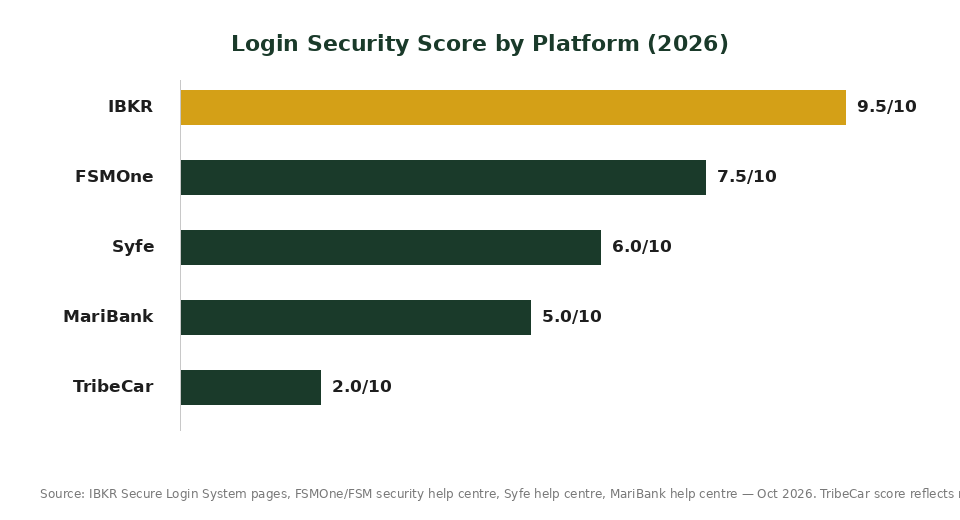
We scored each platform out of 10 based on the strongest 2FA method it publicly offers, whether biometrics are required (not just optional), and whether a “trusted device” is allowed to skip a factor entirely.
| Rank | Platform | Score | Why |
|---|---|---|---|
| 1 | IBKR | 9.5/10 | Offers a FIDO2/WebAuthn passkey and an optional physical Digital Security Card+ on top of app-based authentication — the only platform here with a phishing-resistant option. |
| 2 | FSMOne | 7.5/10 | Digital Token push notification plus a mandatory biometric scan every single login if enabled — no “remember this device” shortcut. |
| 3 | Syfe | 6.0/10 | Password + OTP on a new device, but a known device can skip straight to Face ID/Touch ID — convenient, but a stolen unlocked phone bypasses the OTP step entirely. |
| 4 | MariBank | 5.0/10 | Face ID/Touch ID can be toggled on, and high-risk actions get SingPass Face Verification — but MariBank’s help centre doesn’t clearly state what, if anything, gates everyday login beyond the biometric toggle. |
| 5 | TribeCar | 2.0/10 | No official security or 2FA documentation was found. The score reflects that absence, not a confirmed vulnerability — treat this as a genuine data gap, not an accusation. |
Source: IBKR Secure Login System pages, FSMOne/FSM security help centre, Syfe help centre, MariBank help centre — checked October 2026.
What Each Platform Actually Checks at Login
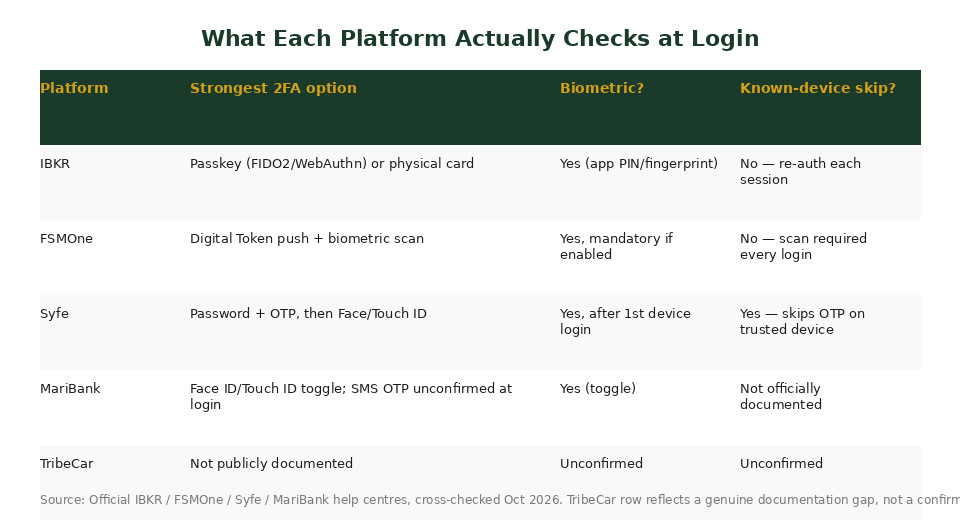
The marketing language on most “secure login” pages sounds similar — “bank-grade encryption,” “industry-standard protection” — but what the app actually asks you to prove at the login screen differs a lot. Here’s the side-by-side.
IBKR: the only phishing-resistant option
IBKR’s Secure Login System (SLS) pairs your password with a second factor from either the IBKR Mobile app (PIN or fingerprint), an optional physical security device, or — the standout feature — a passkey built on the WebAuthn/FIDO2 standard. A passkey can’t be phished the way an OTP can, because it’s cryptographically bound to the real IBKR domain. Accounts start on SMS codes by default, and that fallback is removed once you activate a digital or physical device, according to IBKR’s own Secure Login System page. The physical Digital Security Card+ is gated to accounts above USD 1,000,000, so most retail users will rely on the app or the passkey instead.
FSMOne: no shortcut, every time
FSMOne’s Digital Token sends a push notification to your registered device for you to approve; if it doesn’t arrive, you can generate a 6-digit code manually from the app menu. The detail that matters most: according to FSM’s own security guidance, anyone who has enabled the biometric feature must complete a fresh biometric scan on every single app login session — there is no “trusted device, skip the check” setting. That’s a meaningfully stricter default than Syfe’s.
Syfe: fast, but the OTP only happens once per device
Syfe asks for a password and a one-time code the first time you log in on a given phone. After that, according to Syfe’s help centre, you can turn on Face ID or Touch ID under Screen Lock, and the app checks whatever biometric data is already stored on that device for every login after the first. This is convenient, but it also means the real second factor, for day-to-day use, is “does this physical phone unlock” — not a code sent to you specifically. If someone gets your unlocked phone, the OTP step has already been satisfied once and isn’t being asked again.
MariBank: biometric toggle confirmed, login 2FA not clearly stated
MariBank’s help centre confirms you can switch on Face ID or Touch ID under Account Security, and that higher-risk actions (like the Money Lock feature) require SingPass Face Verification plus a 12-hour cooling-off period before funds unlock. What we could not find in MariBank’s own published material is a clear statement of what gates an everyday login beyond that biometric toggle — whether a password, an OTP, or just the phone’s own lock screen is the baseline. We’re flagging this as an open question rather than a confirmed weakness, since MariBank’s general claim is that it uses “industry standard encryption, identity verification and fraud monitoring.”
TribeCar’s Security Gap, Explained
TribeCar holds a refundable deposit (S$100 for citizens/PRs, up to S$500–1,000 for EP holders and some foreign-licence holders) plus a non-refundable e-wallet top-up balance. Despite that, we found no official TribeCar help page describing its login process, 2FA options, or account-recovery steps — the same documentation gap we’ve flagged in prior TribeCar research on this site. This doesn’t mean TribeCar’s app is insecure; it means TribeCar hasn’t published anything that lets a user verify how it’s secured, which is itself worth knowing before you park a deposit there. Practically, this means the burden falls entirely on you: use a unique password, enable your phone’s own biometric lock, and don’t reuse the password from any of your other four accounts.
How to Harden Each Account Today
- IBKR: set up a passkey instead of relying on the SMS fallback — it takes under five minutes in IBKR Mobile and removes the SMS/SIM-swap risk entirely.
- FSMOne: turn on the Digital Token and the biometric scan option; since there’s no device-skip, this is close to the strongest setup FSMOne allows.
- Syfe: if you ever hand your phone to someone else even briefly, turn off Face ID/Touch ID login temporarily, since that’s the only factor standing between an unlocked phone and your Syfe balance on a known device.
- MariBank: enable the Face ID/Touch ID toggle and keep your registered mobile number current, since SMS-based recovery still appears to matter here.
- TribeCar: use a password you use nowhere else, and treat the app like it has no safety net beyond your phone’s own lock screen — because as far as public documentation shows, it doesn’t.
For the broader cash and investing side of this stack, see our deep dive on whether Syfe is safe under MAS regulation, which covers SDIC coverage and custody structure beyond just login security.
Frequently Asked Questions
Which platform has the strongest login security in 2026?
IBKR, because it’s the only one of the five offering a FIDO2/WebAuthn passkey, which is resistant to phishing in a way OTP codes are not. Its optional physical Digital Security Card+ adds a further layer, though that’s limited to accounts above USD 1,000,000.
Does Syfe require an OTP every time I log in?
Only on a new device. According to Syfe’s help centre, once you’ve logged in once with a password and OTP, you can enable Face ID or Touch ID, and the app will check your device’s stored biometric data on future logins instead of asking for a fresh OTP.
Is MariBank's login security weaker than the others?
We can’t say for certain. MariBank’s help centre confirms a Face ID/Touch ID toggle and describes extra verification (SingPass Face Verification plus a 12-hour cooling-off period) for high-risk actions like Money Lock, but it doesn’t clearly document what gates an everyday login. That’s an open question, not a confirmed weakness.
Why does TribeCar score so low?
Not because of any confirmed flaw, but because we could not find any official TribeCar page describing its login process or 2FA options. The low score reflects a documentation gap, which is itself a useful thing to know before relying on the app to hold your deposit.
What is a passkey, and why does it matter more than an OTP?
A passkey, built on the WebAuthn/FIDO2 standard, is a cryptographic credential tied to the real website or app domain, verified using your device’s biometrics or PIN. Unlike an OTP, which can be phished if you’re tricked into entering it on a fake site, a passkey simply won’t work on a lookalike domain, which is why security teams consider it phishing-resistant.
Is Singapore phasing out SMS OTPs for logins?
MAS has pushed major retail banks to move users off SMS OTPs for account login toward app-based digital tokens, specifically to reduce SIM-swap and phishing risk. That directive is aimed at retail banks; brokerages and digital banks in this comparison have each made their own separate decisions on how far to go.
[/et_pb_text][/et_pb_column][/et_pb_row][/et_pb_section]
Ready to open these accounts the safer way?
Sign up through our referral links below — same security features, plus a welcome bonus where available.
This article was researched with the help of AI. While we strive to keep all information accurate and up to date, there may be errors. If you notice any discrepancies, please contact us.